
Yes, you can automate review requests safely and effectively. The fastest DIY path: pick a trigger (job complete, order delivered, appointment ended), connect it to an SMS or email tool, and drop in a direct Google review link. If you'd rather hand it off, Rooted Up handles the full setup — audit, templates, integrations, and pilot — typically within two weeks. Either way, the rules are clear: Google's user-contributed content policy prohibits incentivized or gated reviews, the FTC's consumer review rules ban suppressing negative feedback, and best-practice benchmarks show SMS open rates are very high while email open rates are moderately lower.
Table of Contents
- How to set up review request automation step by step
- Which integrations and trigger sources do you need?
- What are the compliance rules you must follow?
- What does a safe pilot rollout look like?
- How Rooted Up sets up review automation and when to hire an agency
- Key Takeaways
- The mistake most businesses repeat
- Rooted Up manages your review automation from day one
- Useful sources and policy links
How to set up review request automation step by step
The sequence below works for most service businesses, from a solo plumber to a multi-chair salon. Follow it in order.
- Build the initial ask message. Keep it short. One sentence of context, one direct link, one sentence of thanks. The direct review link matters more than anything else in the message. Missing a direct link is the single most common reason completion rates drop.
The highest-performing programs treat review requests as a system: integrated triggers, direct links, one reminder, and sentiment routed internally — not used to gate public requests. The businesses that see 3–5x review volume gains are not doing anything exotic. They are just asking every customer, every time, with a link that works.
Pro Tip: Before your pilot goes live, click every link yourself from a mobile device. A broken or redirected review link is invisible in your dashboard but kills completion rates instantly.
Which integrations and trigger sources do you need?
The trigger source determines how complex your integration needs to be. Most small businesses fall into one of five categories.
Common trigger sources:
- Google Maps user-contributed content policy
- Review generation (Shopify blog)
- How to ask for reviews (BrightLocal)
- Review Automation for Small Businesses: 2026 Guide | Plaudit
- Statista: Local business recommendation methods
- How to automate review requests for small businesses (UENI blog)
- Why review gating is bad for your business in 2026 | Kaisah Blog
Integration checklist before you go live:
Light-touch vs. deep integrations:
Zapier and Make (formerly Integromat) cover most SMB setups without custom code. You connect your trigger app to your messaging tool in a workflow, map the fields, and you're done in an afternoon. Deep integrations, where the review request system sits natively inside your CRM or POS, take longer to configure but handle edge cases better: duplicate suppression, multi-location routing, and automatic opt-out syncing across systems.
When evaluating an integrator or agency, ask four specific questions: How long are customer records retained? What happens when a message fails to deliver? Does the system retry, and how many times? How are opt-outs synced back to the source system?
What are the compliance rules you must follow?
This is where most businesses get into trouble, usually by accident. The rules are not complicated, but the consequences of ignoring them have grown sharper.
What Google prohibits:
Google's user-contributed content policy bans fake reviews, incentivized reviews, and rating manipulation. Gating, which means showing unhappy customers a private form while directing happy customers to Google, is a direct violation. Google removes reviews that violate this policy and can take action against the business profile.
What the FTC requires:
The FTC's final rule on consumer reviews (effective 2024) prohibits suppressing negative reviews, buying fake reviews, and creating any system that selectively routes customers based on anticipated sentiment. Enforcement risk is real and has grown since the rule took effect.
The compliant pattern:
Every customer gets the same public review link. No exceptions based on what you think their rating will be. In parallel, offer an optional private feedback channel for service recovery. That channel is additive, not a filter.
Do's:
- Send the same review link to every customer, regardless of how you think the interaction went.
- Respond publicly to both positive and negative reviews. Public responses to negative reviews demonstrate accountability and build trust with prospective customers.
- Keep an audit log of all sends, opt-outs, and responses. If a platform ever questions your practices, logs are your defense.
- Honor opt-outs immediately and sync them across all systems.
Don'ts:
- Never offer a discount, gift, or reward in exchange for a review.
- Never ask customers to rate you before deciding whether to show them the public review link.
- Never delete or hide negative feedback from your internal system to avoid addressing it.
- Never use language like "if you had a great experience, please leave us a review" — that phrasing implies you only want positive reviews and edges toward gating.
Review gating carries both platform and legal risk. The safest approach is also the simplest: ask everyone, link directly, respond to everything.
What does a safe pilot rollout look like?
A pilot with 30–100 recent customers is the lowest-risk way to validate everything before you commit to full automation.
Minimum pilot checklist:
- Export 30–100 completed transactions from the past 60 days. Include name, contact, service type, and date.
- Generate your direct Google review link from your Google Business Profile dashboard.
- Write your SMS and email templates. Keep both under 160 characters for SMS; keep email under 150 words.
- Configure your trigger in your automation tool (Zapier, your CRM, or your booking platform).
- Send a test message to yourself and two colleagues. Click every link from a mobile device.
- Confirm opt-out works: text "STOP" and verify the contact is removed from the sequence.
- Launch to your 30–100 pilot records and monitor for 7 days.
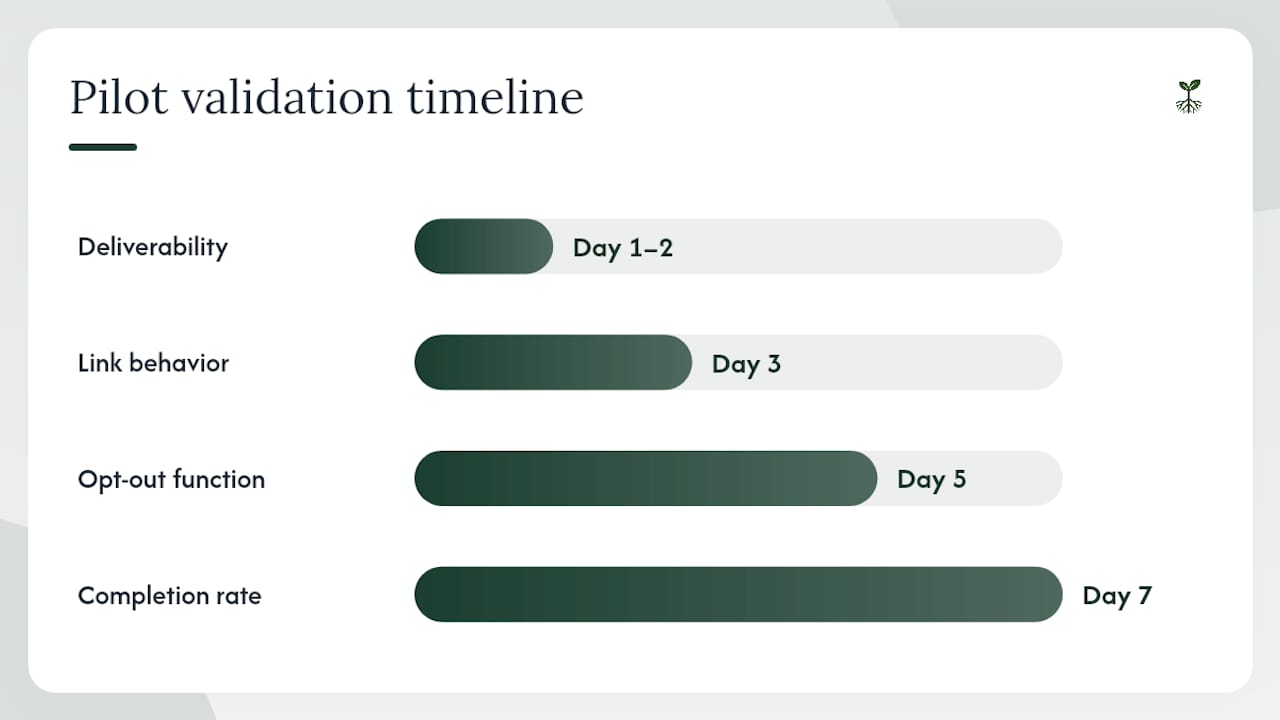
What to validate each day of the pilot:
- Day 1–2: Deliverability. Are messages arriving? Check bounce rates and failed sends.
- Day 3: Link behavior. Are customers clicking through to the review form, or dropping off?
- Day 5: Opt-out function. Any opt-out requests handled correctly?
- Day 7: Completion rate. How many reviews came in? Calculate requests sent vs. reviews received.
Common pitfalls that delay results:
- Broken or redirected review links. The most common issue. Always generate the link fresh from your Google Business Profile.
- Wrong review destination. Multi-location businesses sometimes send all customers to the same profile. Map location data to the correct profile link.
- Missing opt-out language. Required for SMS under TCPA rules. "Reply STOP to opt out" must appear in every message.
- Gating-like flows. Any sequence that asks customers to rate their experience before showing them the review link is a compliance risk.
- Poor timing. Sending at 11 PM or within minutes of a transaction before the customer has processed the experience.
Rollback plan: If a compliance issue surfaces during the pilot, pause the campaign immediately, pull the audit log of all sends, and contact the platform's support team to report the issue proactively. Document everything. A proactive report is treated differently than a discovered violation.
How Rooted Up sets up review automation and when to hire an agency
Most small businesses can set up a basic automated review sequence themselves in a day or two. The case for hiring an agency comes down to three factors: complexity, compliance risk, and staff bandwidth.
When DIY makes sense: Single location, one trigger source, a CRM or booking tool that connects to Zapier, and someone on your team who can spend a few hours on setup and monthly monitoring.
When to hire: Multiple locations with different Google Business Profiles, a POS or CRM that requires custom API work, a history of compliance issues, or simply no internal bandwidth to monitor and optimize the system monthly.
Rooted Up's onboarding process for review automation:
- Audit: Review the client's current review profile, existing trigger sources, and any past compliance issues.
- Trigger mapping: Identify the cleanest trigger event and confirm data field availability.
- Template creation: Write SMS and email templates tailored to the client's voice and service type.
- Integration setup: Connect the trigger source to the messaging platform via native integration or Zapier.
- Pilot: Run a 30–100 record test, validate deliverability and link behavior, and confirm opt-out handling.
- Scale: Full rollout with monthly reporting on volume, completion rate, and star distribution.
Questions to ask any agency you evaluate:
- What is your SLA for alerting me to a 1–2 star review?
- How often do you report on completion rates and volume?
- How do you handle opt-out syncing across systems?
- What is your process if a platform flags our account?
- Do you provide audit logs of all sends?
Pricing for agency-managed review automation varies. Rooted Up structures this inside its monthly subscription plans, so there is no separate per-campaign fee. For readers evaluating reputation management software agencies more broadly, the key differentiator is whether the agency monitors and optimizes monthly or just sets it up and walks away.
Key Takeaways
Automated review requests work when every customer gets the same direct link, one reminder, and the system is monitored monthly for compliance and completion rate.
| Point | Details |
|---|---|
| Start with a pilot | Export 30–100 recent customers and validate links, opt-outs, and timing before full rollout. |
| SMS outperforms on speed | SMS open rates run near 95%; use it for local services and send within 1–2 hours of completion. |
| Compliance is non-negotiable | Never gate the public review link by sentiment; every customer gets the same ask, per Google and FTC rules. |
| Track five core metrics | Monitor requests sent, completion rate, star distribution, CTA click-through, and low-star response time. |
| Rooted Up handles the full setup | Audit, templates, integrations, pilot, and monthly reporting are included in Rooted Up's subscription plans. |
The mistake most businesses repeat
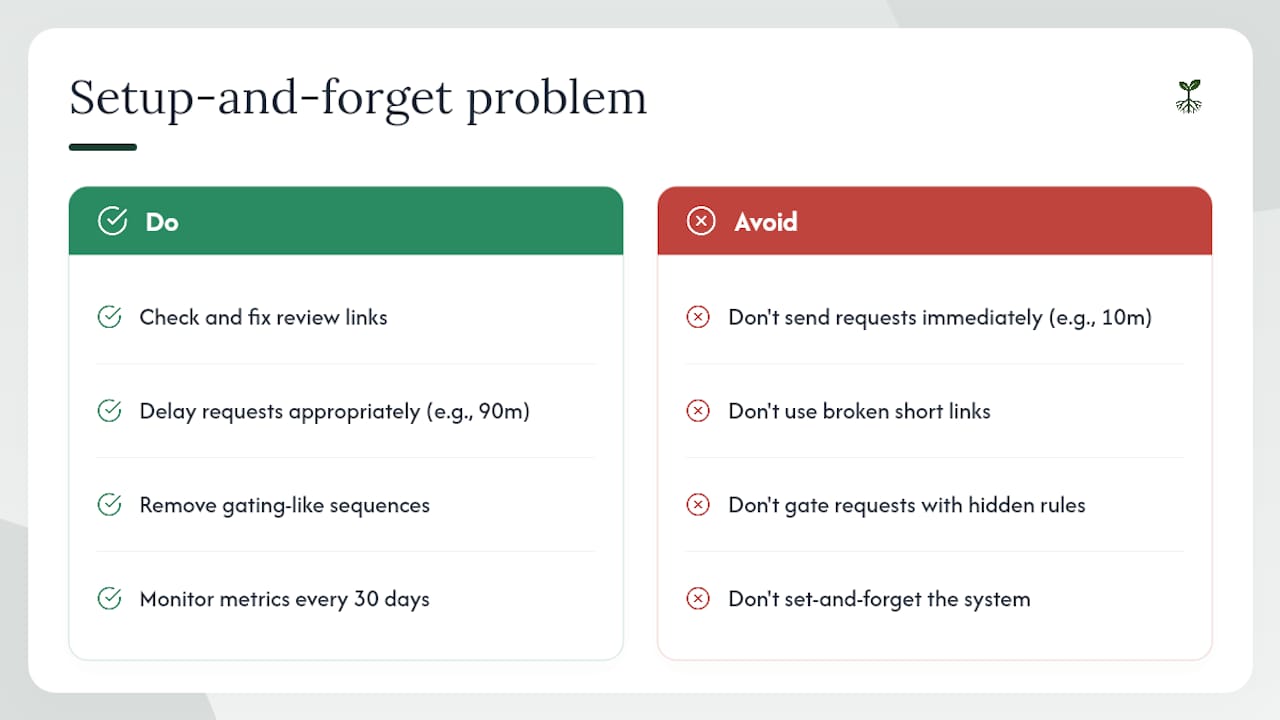
The most common failure in review automation is not a technology problem. It is a setup-and-forget problem.
Three issues show up repeatedly: the review link is wrong or broken from day one, the timing fires too early or too late for the service type, and the sequence has a gating-like structure that the business owner did not realize was a compliance risk. Each of these is fixable in under an hour once identified, but they often sit undetected for months because no one is checking the dashboard.
A quick example: a home services client had a Zapier workflow sending review requests 10 minutes after a job was marked complete in their CRM. The crew was still packing up. Customers were getting the message before they had even walked back inside. Moving the delay to 90 minutes after job completion, combined with replacing a broken short link with a direct Google review URL, produced a measurable lift in completions within the first week. No new tools, no new spend.
The operational discipline that matters most is monthly monitoring: check completion rates, click-through rates, and opt-out counts every 30 days. A system that worked in January can drift by March if a platform updates its review link format or a CRM field mapping breaks. Catching that drift early is the difference between a system that compounds results and one that quietly stops working.
Rooted Up manages your review automation from day one
Rooted Up gives solo professionals and small business owners a done-for-you alternative to piecing together review automation themselves. The concrete difference: you get a fully configured system, compliant templates, and monthly performance reporting without hiring a developer or spending your own time on Zapier workflows.

The standard engagement covers everything in the setup checklist above: trigger audit, direct review link generation, SMS and email template creation, integration with your existing CRM or booking tool, a 30-record pilot, and a full rollout with monthly reporting. Onboarding typically completes within two weeks. There is no long-term contract required to start.
For businesses managing online reputation alongside review volume, Rooted Up's monthly plans fold review automation into a broader package that includes Google Business Profile management, local SEO, and AI workflow support. One subscription, one point of contact, no separate agency fees per service.
To see what's included and get a quote, visit Rooted Up's Services & Packages or book a discovery call directly from the site.
Useful sources and policy links
These are the primary sources referenced in this article. When in doubt about platform policy, always check the official source directly, as policies update without notice.
- Google Maps user-contributed content policy — Google's official rules on reviews, including prohibited behaviors like gating, incentivizing, and fake reviews.
- Review generation (Shopify blog) — Explains how automated review tools work post-delivery, including trigger types and platform integrations.
- How to ask for reviews (BrightLocal) — Channel recommendations, timing guidance, and template structure for email and SMS review requests.
- Review Automation for Small Businesses: 2026 Guide (Plaudit) — Benchmark data on volume increases, channel open rates, and automation flow best practices.
- Statista: Local business recommendation methods — Consumer data on review request channels and willingness to respond.
- How to automate review requests for small businesses (UENI blog) — Practical setup steps, direct link guidance, and pilot testing recommendations.
- Why review gating is bad for your business (Kaisah Blog) — Compliance context on gating risks, FTC rule implications, and compliant alternatives.
Consult each platform's current policy page before launching any automated campaign. Rules change, and your audit log is your best protection if questions arise.