
A local landing page is a single web page built to rank and convert for one specific service and one specific place. If you serve five cities, you build five pages, not one page with a city dropdown. Here's the mandatory checklist before you build or audit one:
- Unique H1 combining service + city (not a generic "Welcome" headline)
- Full NAP block (name, address, phone) with a local phone number
- An embedded Google map
- At least one testimonial from a customer in that specific location
- LocalBusiness JSON-LD structured data using Schema vocabulary
- A localized title tag and meta description
- A click-to-call or primary CTA visible above the fold
- Google Search Console and GA4 tracking wired to conversion events
Nearly half of all Google searches carry local intent, and pages built around a specific service and geography convert at higher rates than generic service pages ever will. Google Business Profile (GBP) data and your website need to agree on every detail, down to the suite number.
Pro Tip: Don't try to build the perfect page on day one. Create the skeleton first: H1, NAP, and map. Everything else layers on top once the structure is live.
Your next move: build the page frame with NAP and map embedded, then move to the content and schema work below.
Key Takeaways
A local landing page built around one service and one place, backed by consistent NAP, GBP alignment, and validated LocalBusiness schema, consistently outranks and outconverts generic service pages.
| Point | Details |
|---|---|
| One page, one location | Build a dedicated page per city or neighborhood; never swap only the city name across identical templates. |
| Above-the-fold basics | Include H1, NAP, click-to-call, and CTA visible without scrolling on mobile. |
| Validate structured data | Run LocalBusiness JSON-LD through validator.schema.org before every page launch. |
| Track real conversions | Set GA4 events for calls, form fills, and direction clicks, not just pageviews. |
| Scale with a managed plan | Rooted Up bundles GBP management, page builds, schema, and GA4 tracking into one monthly service for multi-location owners. |
Authoritative Resources for Building and Validating Local Pages
- Google's LocalBusiness structured data docs for required and recommended schema fields
- Schema for the full property vocabulary
- Validator to catch JSON-LD errors before launch
- Arc4's local SEO landing page guide for architecture and duplicate-content guidance
- Ezpages for conversion benchmarks
- Think with Google's consumer journey research on local signals and foot traffic
- Southerncalifornia for a real-world example of regional local listings
Table of Contents
- What Elements Belong on a Local Landing Page?
- How Should You Structure URLs and Content for Multiple Locations?
- How Does Google Business Profile Connect to Your Landing Pages?
- How Do You Set Up LocalBusiness Schema Correctly?
- Which Local Keywords Should You Target First?
- What Belongs on Your Pre-Launch and Tracking Checklist?
- What Does a Ready-to-Use Local Page Template Look Like?
- Why Does Page Speed Matter More for Local Searches?
- Should You Build These Pages Yourself or Hire It Out?
- When Should You Hire a Managed Local Landing Page Service?
- Sources
What Elements Belong on a Local Landing Page?
Every high-converting local page shares a common skeleton. Miss one piece and you either lose rankings, lose trust, or lose the click entirely.
Start with the H1: service plus city, written like a human would say it out loud ("Emergency Roof Repair in Nashville," not "Roofing Services Location Page"). Directly below it, a one-sentence summary answers who you serve, what you do, and where, followed immediately by your primary CTA. This above-the-fold block is what most visitors will read and nothing else.
Your NAP block (name, address, phone) needs to appear in the hero section and again in the footer. Consistency here isn't cosmetic. Mismatched NAP data across your site and directories confuses citation algorithms and can quietly tank your local rankings. Pair it with your hours of operation and a click-to-call phone number formatted as a tap target, not just text, since most local searches happen on a phone.
The map embed matters even if you don't have a storefront. Service-area businesses can show a coverage radius instead of a pin, which still signals locality to both users and search engines.
Local proof beats generic proof every time. Pull testimonials that specifically mention the city and the service, not vague five-star ratings. A review saying "Fixed our AC in one afternoon here in Franklin" does more work than a generic "great service!" quote. Add local photos: storefront, team, or finished projects from that exact location, not stock imagery.

Round out the page with trust badges or certifications, a location-specific service summary (what you handle in this particular market, including any local regulations or specialties), a short FAQ block, and a final CTA that repeats your phone number or booking link.
Pro Tip: Put your hero image and one local proof photo side by side. The hero sells the brand; the proof photo sells the location. Both jobs matter, and neither should be skipped for the sake of a "cleaner" design.
How Should You Structure URLs and Content for Multiple Locations?
The moment you have more than one location page, structure becomes the difference between ranking and getting buried under duplicate-content penalties.
Use a clear, service-first URL pattern: /plumbing/denver-co/ or /hvac-repair/austin-tx/. If you're running a location hub for a multi-city brand, /locations/denver/ works too, as long as each page links back to its specific services. Keep the pattern consistent across every city you serve.
Your title tag should include the service and city within roughly 60 characters ("Emergency Plumber in Denver, CO | [Brand]"). Your meta description runs 140 to 160 characters, mentions the location, and includes a soft CTA ("Call now for same-day service in Denver"). Use exactly one H1 per page, structured the same way as the title, then break the rest of the content into H2s for services, reviews, and FAQs.
Here's where most businesses shoot themselves in the foot:
- They build a template, swap only the city name, and publish 40 near-identical pages.
- Google notices, treats them as thin or duplicate content, and rankings for all of them suffer.
- Arc4's local SEO guidance is blunt about this: each page should represent one primary location, often one primary service, with genuinely unique content.
To avoid that trap, build a content template with fields, not fixed sentences: local landmarks, neighborhood names, region-specific service notes, unique testimonials, and different photos per page. That gives you scale without sameness.
Checklist for avoiding duplicate-content flags:
- Unique local content block on every page (not just a swapped city name)
- Different testimonials per location
- Different images per location
- Local trust signals (permits, associations, regional certifications) where applicable
- Internal links from your homepage and core service pages to every local page, using descriptive anchor text
- Every local page listed in your XML sitemap, with internal links from your homepage and service pages
- No accidental noindex tags (check this after every CMS update)
- Canonical tags only where two pages are genuinely duplicate, never as a workaround for thin content
How Does Google Business Profile Connect to Your Landing Pages?
Your GBP listing and your local landing pages aren't separate projects. They're two ends of the same signal, and Google treats consistency between them as a trust marker.
- Link the exact local landing page URL from your GBP listing, not your homepage.
- Match phone number, address, and hours exactly between GBP and the website.
- Upload location-specific photos to both your GBP listing and the landing page itself.
- Audit major directories (Yelp, Apple Maps, Bing Places) for NAP mismatches and correct them.
- Surface your most recent, location-specific reviews directly on the page, with a link to your full GBP review stream.
Getting this right doesn't just help rankings. Think with Google's consumer journey research shows that aligning your online local signals, including landing pages and GBP, with accurate in-store information is what actually drives foot traffic, not just clicks.
If you run paid search, use location extensions in Google Ads and point each ad group to the matching local landing page. Sending a Denver-targeted ad to a generic homepage wastes the click and drags down your Quality Score.
How Do You Set Up LocalBusiness Schema Correctly?
Structured data tells search engines exactly what your business is, where it operates, and when it's open, in a format machines can parse instantly instead of guessing from page text. Google's structured data documentation confirms this can unlock richer results in Search and Maps, including knowledge panels and review stars.
A basic annotated example:
{
  "@context": "https://schema.org",
  "@type": "Plumber",
  "name": "Blue Ridge Plumbing",
  "address": {
    "@type": "PostalAddress",
    "streetAddress": "123 Main St",
    "addressLocality": "Denver",
    "addressRegion": "CO",
    "postalCode": "80202"
  },
  "telephone": "+1-303-555-0199",
  "url": "https://example.com/plumbing/denver-co/",
  "geo": {
    "@type": "GeoCoordinates",
    "latitude": 39.74001,
    "longitude": -104.99253
  },
  "openingHoursSpecification": [{
    "@type": "OpeningHoursSpecification",
    "dayOfWeek": ["Monday","Tuesday","Wednesday","Thursday","Friday"],
    "opens": "08:00:00",
    "closes": "18:00:00"
  }]
}
Use the most specific type available (Plumber, Restaurant, MedicalClinic) rather than the generic LocalBusiness, per schema.org's own guidance. Priority properties: name, full address, telephone with country code, url, geo coordinates carried to at least five decimal places, opening hours, and priceRange when it applies to your industry.
Before publishing, run the code through Validator and check the URL in Search Console's Rich Results and URL Inspection tools.
Pro Tip: Five decimal places on latitude and longitude isn't overkill. It's the difference between pinning your exact building and pinning the wrong end of the block.
Which Local Keywords Should You Target First?
Start with Google Search Console to see which queries are already driving impressions to your existing pages. That data reflects real searcher language, not guesses. Layer in Ahrefs for city-level search volume and keyword difficulty, then check Google Autocomplete and "people also ask" boxes for phrasing you haven't considered.
Common local intent patterns worth targeting:
- "[service] in [city]"
- "[service] near me"
- "[service] [neighborhood name]"
- "[service] open now"
- "24/7 [service]" or "same-day [service]"
Prioritize by revenue potential first, then check you can actually deliver in that area, then weigh how strong the buying intent is (transactional modifiers like "emergency" or "same-day" convert better than informational ones). Finally, ask if you can sustain genuinely unique content for that location long term.
For an emergency plumber: primary keyword "emergency plumber Denver," secondary "24/7 plumber near me," long-tail "same-day water heater repair Denver." Work those naturally into your title tag, H1, and opening paragraph.
What Belongs on Your Pre-Launch and Tracking Checklist?
Before any local page goes live, run through this sequence:
- Confirm there's no accidental noindex tag or canonical pointing elsewhere.
- Add the page to your XML sitemap and confirm it's not blocked in robots.txt.
- Run Google's mobile-friendly test and a page speed audit.
- Validate your JSON-LD through validator.schema.org.
Once live, GA4 and Search Console need to track the actions that actually matter: phone clicks, form submissions, direction requests, and booking completions. Set these up as conversion events, not just pageviews. Tag every paid campaign pointing to a local page with a consistent UTM template so you can compare performance across cities later without guessing which campaign sent the traffic.
Maintenance checklist:
- Weekly: check GBP for new reviews and Q&A activity
- Monthly: audit content freshness and confirm NAP consistency across directories
- Quarterly: refresh photos and re-validate schema markup
A/B testing worth running: hero CTA wording (Call Now vs. Get a Free Quote), an above-the-fold form versus a prominent click-to-call button, and different review placements. Measure lift in actual phone calls and form fills, not just click-through rate. Tools like AI-driven conversion testing can help small teams run these experiments without a dedicated CRO analyst.
What Does a Ready-to-Use Local Page Template Look Like?
Here's the skeleton, block by block:
- Hero: H1 (service + city) + one-sentence summary + primary CTA (20 to 40 words total)
- NAP block and map embed
- Services offered, bulleted (150 to 300 words)
- Local testimonials and proof (50 to 120 words combined)
- FAQ block addressing common local objections
- Trust badges or certifications
- Footer with repeated NAP and secondary CTA
Sample micro-copy to adapt:
- Hero headline: "Same-Day AC Repair in Franklin, TN"
- Location intro: "We've served Franklin homeowners near Cool Springs and downtown for over a decade."
- Testimonial excerpt: "Had our unit fixed within three hours, right here in Franklin."
Keep each page genuinely distinct: swap photos every time, reference actual neighborhoods or landmarks, and pull at least one testimonial sourced from that specific city, not a company-wide review pool.
Why Does Page Speed Matter More for Local Searches?
Local searches happen overwhelmingly on phones, often from someone standing outside a business or driving toward one. A slow-loading page in that moment doesn't just hurt rankings; it loses the customer to whichever competitor loads first.
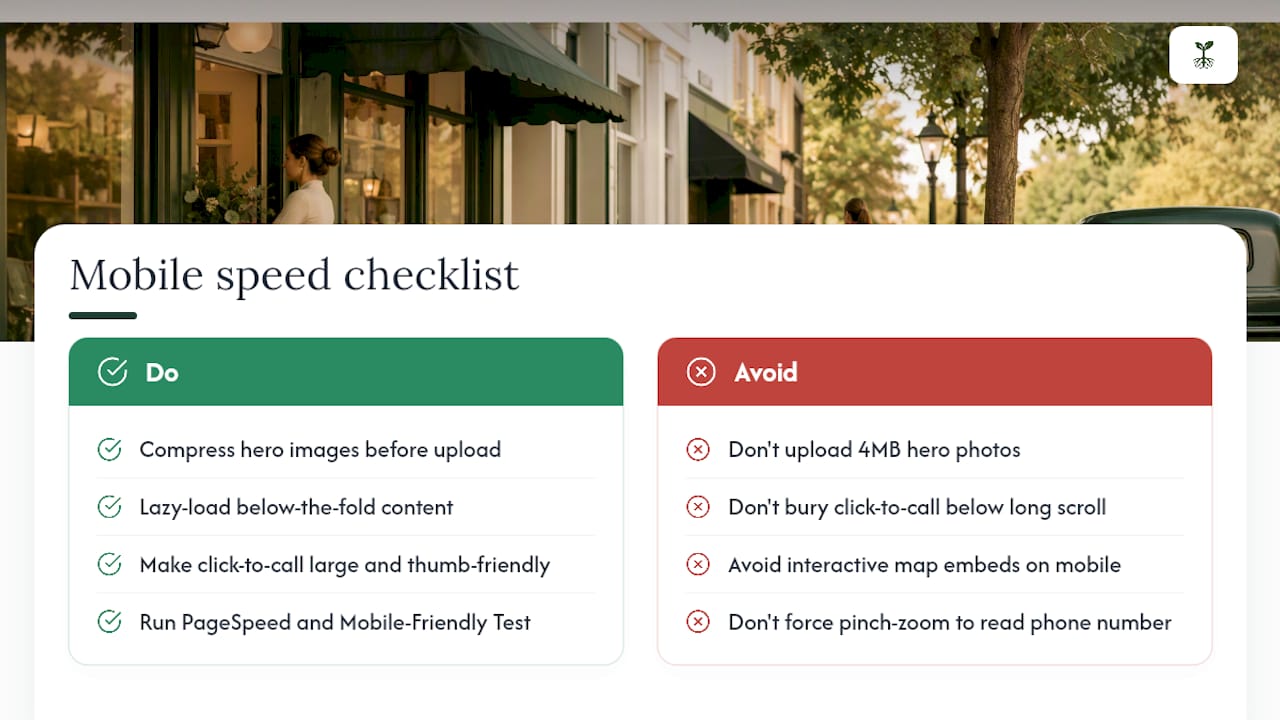
Compress hero images before upload rather than relying on the browser to scale them down. A 4MB hero photo defeats the purpose of a fast page no matter how good your hosting is. Lazy-load anything below the fold, especially review widgets and secondary images, so the initial render stays lean.
Your click-to-call button needs to be large enough to tap accurately with a thumb, positioned within reach of one hand, and never buried below a long scroll of text. If someone has to pinch-zoom to read your phone number, you've already lost them.
Test every local page with Google's PageSpeed tools and the mobile-friendly test before launch, not after you notice a ranking drop. Map embeds are notorious for slowing pages down; consider a static map image that links out to Google Maps instead of loading the full interactive widget, especially on mobile.
Core Web Vitals scores factor into rankings, but for local pages specifically, speed is also a direct conversion lever. Someone searching "plumber near me" while standing in a flooding kitchen isn't going to wait eight seconds for your page to render. Fast, simple, and thumb-friendly wins over polished but heavy every time.
Should You Build These Pages Yourself or Hire It Out?
DIY works for one or two locations if you follow a structured template
Beyond that, the maintenance load (schema updates, review syncing, NAP audits across a dozen directories) eats time most owners don't have. If you're juggling five-plus locations or running a practice solo, prioritize NAP and GBP sync first, then build your hero and CTA. That's the highest-leverage sequence, and it's exactly where Rooted Up starts with new clients.
When Should You Hire a Managed Local Landing Page Service?
There are other paths here: hiring a freelance SEO consultant, using a DIY page builder, or tasking an in-house marketer with the checklist above. Each works, provided someone has the hours to keep NAP consistent, schema validated, and reviews refreshed month after month.

Rooted Up is the alternative to a traditional agency retainer for solo professionals and small teams juggling local visibility on top of everything else. Instead of piecing together a freelancer for schema, another for GBP management, and a third for content, Rooted Up bundles Google Business Profile management, local landing page builds, schema and review automation, and GA4 tracking and reporting into one monthly plan.
Hiring a managed service makes sense once you're running six or more locations, don't have in-house SEO time, or keep finding NAP mismatches across directories you didn't know existed. Expect deliverables tied to a monthly subscription with an optional one-time setup for the initial buildout, not a surprise invoice every time something needs fixing.
If reading through the schema checklist above made your stomach sink a little, that's your sign. Check out Rooted Up's services and packages to see what a managed rollout looks like for your specific number of locations.
Sources
- Local Business (LocalBusiness) Structured Data | Google Search Central | Documentation | Google for Developers
- Schema
- Local SEO Landing Pages: Complete Guide for 2026 - Arc4
- The Best Local Landing Page Strategies for Improved SEO Performance
- Validator