
Local business schema is JSON-LD structured data that tells search engines exactly what your physical location is, and the fastest way to improve eligibility for local rich results is to add a JSON-LD block using the most specific LocalBusiness subtype and the required fields. Google and Schema.org both point to the same short list of essentials:
- Name — your exact legal or trading name
- Address — full postal address, formatted with
streetAddress,addressLocality,addressRegion,postalCode,addressCountry - Telephone — including the country code
- URL — the canonical page for that location
- Geo — latitude and longitude with real decimal precision
- openingHoursSpecification — structured hours, not a plain text string
Get those six right, in the right subtype, and you've cleared the bar most local businesses never do.
Key Takeaways
Accurate LocalBusiness schema, built with the most specific subtype and kept synced with your Google Business Profile, is the single biggest lever for local rich result eligibility.
| Point | Details |
|---|---|
| Use the specific subtype | Choose Dentist, Restaurant, or your closest match instead of generic LocalBusiness. |
| Nail the required fields | Name, address, telephone, url, geo, and openingHoursSpecification come first. |
| Format matters | Use 24-hour time, include country codes on phone numbers, and use five-decimal geo precision. |
| Validate before and after publishing | Run validator.schema.org and the Rich Results Test, then monitor Search Console. |
| Keep GBP and schema in sync | Rooted Up's managed setup and monthly plans handle schema hygiene alongside Google Business Profile upkeep. |
Table of Contents
- What Is Local Business Schema and Why Subtype Choice Matters
- What Fields Actually Affect Rich Results?
- Copy-Ready JSON-LD Examples for Local Businesses
- How to Add and Validate Your Schema
- Structuring Schema for Multiple Locations
- Fixing Common Schema Errors and Warnings
- What We See Working Across Client Implementations
- Keeping Your Schema Accurate as Your Business Changes
- Connecting Local Business Schema With Reviews and Events
- Choosing the Right Images and Logos for Your Markup
- Handling Schema for Multi-Language and Multi-Region Sites
- The One Priority That Beats Every Other Schema Decision
- Letting Rooted Up Handle Setup and Monitoring So You Don't Have To
- Frequently Asked Questions
- Sources
What Is Local Business Schema and Why Subtype Choice Matters
Local business schema is a structured data format, almost always written in JSON-LD, that sits in a page's <head> or <body> and describes a physical location in a language search engines parse directly instead of guessing at. Search engines have always tried to infer this information from your visible page content: your footer address, the phone number in your header, the hours buried in an FAQ. Structured data skips the guesswork. It hands Google a labeled, machine-readable object.
Here's the detail most guides skip: Google doesn't want you to use the generic LocalBusiness type if a more specific one exists. Google's own structured data documentation recommends defining each location with the most specific subtype available, whether that's Dentist, Restaurant, AutoRepair, or one of the dozens of others Schema. A generic LocalBusiness tag tells Google "this is a place." A Dentist tag tells Google "this is a place, it's a dental practice, and here's what that unlocks."
That specificity has real consequences for what shows up in search:
- Knowledge panel clarity improves because Google can classify the entity correctly instead of inferring category from crawled text.
- Eligibility for specialized rich results (review stars, price indicators, hours snippets) generally requires the subtype-level markup, not just the generic parent type.
- AI answer engines, which increasingly pull from structured data rather than rendered HTML, parse a labeled
RestaurantorPlumberentity far more reliably than a vagueLocalBusinessobject sitting next to unstructured page copy.
Pro Tip: If you can't find an exact match for your business type in Schema.org's subtype list, pick the closest reasonable parent (like ProfessionalService or Store) rather than falling back to generic LocalBusiness. Closer beats generic almost every time.
The subtype list is long enough that most businesses have an exact or near-exact match. A yoga studio can use ExerciseGym or SportsActivityLocation. A tax preparer fits under AccountingService. A HVAC company lives under HVACBusiness. Spend the five minutes to find yours before you write a single line of code.
What Fields Actually Affect Rich Results?
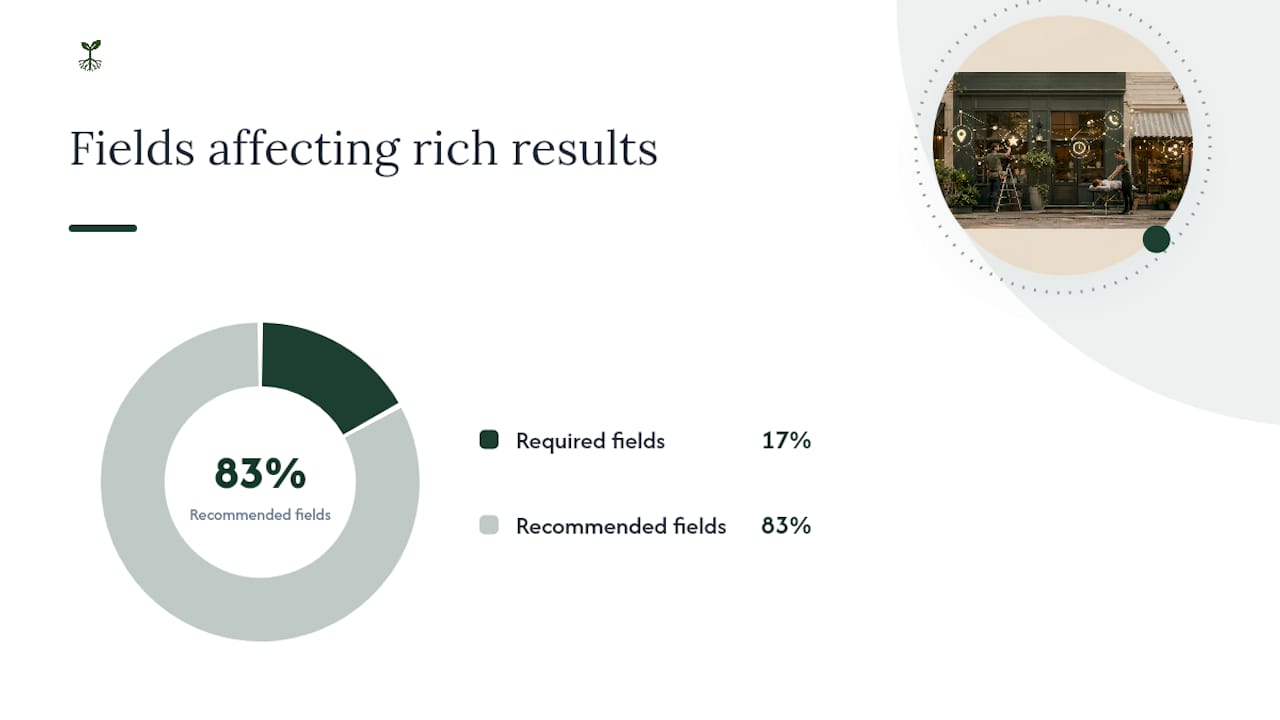
Google splits LocalBusiness properties into two tiers: required and recommended. That split matters more than it sounds. Google's documentation treats recommended fields as functionally necessary, since rich results frequently fail to appear without them even though the page still validates cleanly.
Required fields:
| Field | What It Holds |
|---|---|
name |
Your business's exact name, matching Google Business Profile |
address |
Full postal address as a PostalAddress object |
Recommended fields (practically necessary for most rich results):
| Field | What It Holds |
|---|---|
image |
At least one representative photo, ideally several |
telephone |
Phone number with country code |
url |
Canonical URL for the location |
priceRange |
A symbol range like $$ or a numeric range |
openingHoursSpecification |
Structured hours by day, with open/close times |
geo |
Latitude/longitude as a GeoCoordinates object |
paymentAccepted |
Accepted payment methods |
currenciesAccepted |
ISO 4217 currency codes, like USD |
aggregateRating |
Only if you have real review data behind it |
sameAs |
Links to verified social profiles and directory listings |
Formatting is where most implementations quietly break. Four rules cover almost every mistake developers make:
Time format. openingHoursSpecification needs 24-hour time in hh:mm or hh:mm:ss format. "9:00 AM to 5:00 PM" as a string does nothing. opens: "09:00" and closes: "17:00" is what the OpeningHoursSpecification standard expects, and it also supports validFrom and validThrough for holiday hours or seasonal closures, which almost nobody uses but should.
Phone format. Always include the country code. A U.S. business writes +1-615-555-0142, not (615) 555-0142. Google's validator won't necessarily flag the local-format version as an error, but you lose the international clarity that helps disambiguate businesses with similar names in different regions.
Currency codes. Use ISO 4217 three-letter codes for currenciesAccepted, like USD, not currency symbols or country names.
Geo precision. Latitude and longitude need to be numeric values, and at least five decimal places, which gets you accuracy within about a meter. Rounding to two or three decimals can place your pin blocks away from your actual address, which undermines the exact reason you added geo coordinates in the first place.
On placement: your homepage should carry the core LocalBusiness markup if you're a single-location business. If you run multiple locations, each location page gets its own complete block, not a shared or inherited one. Your contact page can duplicate the same markup safely; duplication across pages describing the same entity isn't a penalty risk the way duplicate visible content can be.
Copy-Ready JSON-LD Examples for Local Businesses
Here's a complete, adaptable example for a single-location business using a specific subtype, in this case a dental practice:
{
  "@context": "https://schema.org",
  "@type": "Dentist",
  "name": "Riverside Family Dental",
  "image": "https://www.example.com/images/riverside-dental-storefront.jpg",
  "url": "https://www.example.com/",
  "telephone": "+1-615-555-0142",
  "priceRange": "$$",
  "address": {
    "@type": "PostalAddress",
    "streetAddress": "412 Riverside Ave",
    "addressLocality": "Nashville",
    "addressRegion": "TN",
    "postalCode": "37203",
    "addressCountry": "US"
  },
  "geo": {
    "@type": "GeoCoordinates",
    "latitude": 36.16234,
    "longitude": -86.78161
  },
  "openingHoursSpecification": [
    {
      "@type": "OpeningHoursSpecification",
      "dayOfWeek": ["Monday", "Tuesday", "Wednesday", "Thursday"],
      "opens": "08:00",
      "closes": "17:00"
    }
  ],
  "sameAs": [
    "https://www.facebook.com/riversidefamilydental",
    "https://www.instagram.com/riversidefamilydental"
  ]
}
Walk through why each piece is there: @type uses Dentist instead of generic LocalBusiness. image should be a real photo of the storefront or team, not a stock image or logo alone. priceRange uses the dollar-sign convention, though a numeric range works too. The dayOfWeek array groups identical hours to avoid repeating the same object four times.
For businesses that serve a radius rather than a storefront (mobile detailers, plumbers, home cleaners), swap the fixed address approach for areaServed:
{
  "@context": "https://schema.org",
  "@type": "Plumber",
  "name": "Music City Plumbing Co.",
  "telephone": "+1-615-555-0198",
  "areaServed": {
    "@type": "GeoShape",
    "name": "Nashville Metro Area"
  },
  "priceRange": "$$"
}
You can also list areaServed as an array of city names or ZIP codes if a GeoShape polygon feels like overkill for your setup. Two adaptation notes worth flagging:
- Pull your coordinates from Google Maps directly (right-click the pin, copy the decimal values) rather than estimating, since a five-decimal typo can misplace your business by miles.
- Only include a
sameAslink if the profile is verified and active. A dead or abandoned social link in your schema does nothing helpful and occasionally confuses entity matching.
How to Add and Validate Your Schema
Getting the JSON-LD written is half the job. Getting it live, correct, and monitored is the other half, and it's the half most businesses skip.
- Choose your insertion method. If you're on WordPress, a plugin like Yoast SEO or Rank Math can generate basic LocalBusiness markup, though it often needs manual editing to reach the specific subtype and full field list this guide covers. Manual insertion, pasting a
<script type="application/ld+json">block directly into your page template, gives you full control and is often faster than fighting a plugin's limited UI. Google Tag Manager is a third option, but it renders schema client-side, which occasionally causes indexing delays since some crawlers process JavaScript-injected content on a second pass. - Decide where each page needs its own block. Homepage gets one for single-location businesses. Each location page gets its own for multi-location setups. Contact pages can carry duplicate markup safely.
- Test in staging first. Never publish untested JSON-LD to a live page. Paste your code into a staging environment or even a local HTML file before it touches production.
- Run it through validator.schema.org. This catches syntax errors and type-level mismatches, like a missing required property or a malformed nested object, before Google ever sees it.
- Run it through Google's Rich Results Test. This tells you specifically whether your markup is eligible for the rich result types Google currently supports for your business category.
- Publish, then confirm with URL Inspection in Search Console. Submit the live URL and check that Google's own rendering matches what you intended.
- Monitor the Enhancements report periodically. New errors can appear after site migrations, template updates, or CMS changes you didn't expect to touch your schema at all.
Pro Tip: Bookmark validator.schema.org and the Rich Results Test together. Run new markup through both before publishing, since one catches syntax problems the other misses, and one catches rich-result eligibility the other doesn't check at all.
Keeping your Google Business Profile data aligned with your on-site schema matters just as much as the code itself. A mismatch between your GBP hours and your openingHoursSpecification doesn't just look sloppy. It creates the kind of inconsistency search engines interpret as unreliable data.
Structuring Schema for Multiple Locations
Multi-location businesses run into a specific trap: copying one JSON-LD block across every location page and only changing the address. Google needs each location treated as its own distinct entity, not a template with a search-and-replace address field.
Every location page needs its own unique JSON-LD block, with its own name, address, geo, telephone, and openingHoursSpecification, tailored to that specific site. If your locations operate under one parent brand, use branchOf or parentOrganization to establish the relationship explicitly rather than leaving Google to infer it from matching business names.
- Naming convention matters. Google recommends combining store name and department or branch identifier, like "Riverside Family Dental — Green Hills" rather than just "Riverside Family Dental" repeated across five location pages with nothing distinguishing them in the name field itself.
- Departments within a single physical address (a pharmacy inside a grocery store, a café inside a bookstore) should use a nested
departmentproperty rather than being listed as an entirely separate business with its own address block. - Service-area businesses without fixed storefronts should lean on
areaServedwith either a list of served regions or aGeoShape, and skip a fabricated street address entirely if you genuinely operate from a home base you don't want indexed.
Get the naming and nesting right once, then it's a template you can genuinely reuse; get it wrong, and you'll be untangling duplicate-entity confusion in Search Console for months.
Fixing Common Schema Errors and Warnings
Most validator errors trace back to a small set of repeat offenders. Malformed time strings top the list. A value like "9am" or "9:00 AM" in opens or closes fails silently in some parsers and throws an outright error in others. Stick to hh:mm in 24-hour format every time.
Phone number formatting causes similar trouble. Local formats without a country code, or formats mixing parentheses and dashes inconsistently, can pass validation but reduce match confidence. Standardize on +1-XXX-XXX-XXXX for U.S. numbers.
A less obvious but common issue: your schema says one set of hours or one address, and your Google Business Profile listing says another. Google cross-references these signals, and a mismatch can suppress rich results even when your JSON-LD validates cleanly on its own.
- Confirm
imageURLs are publicly accessible, not blocked by robots.txt or sitting behind a login wall. - Confirm
urlvalues point to live, canonical pages, not redirects or staging URLs left in by accident. - Re-run validator.schema.org after any template or CMS update, since a plugin update can silently break markup that worked fine last month.
Pro Tip: Set a recurring calendar reminder, quarterly is plenty, to re-run your live pages through validator.schema.org. Schema doesn't announce when it breaks; it just quietly stops working.
What We See Working Across Client Implementations
Across the local business clients Rooted Up manages, the pattern holds consistently: businesses that pair clean schema with an accurate, actively managed Google Business Profile see more consistent map pack visibility and more inbound calls tied directly to search than businesses that treat either one as a set-it-and-forget-it task.
Two lessons show up in nearly every engagement. First, data hygiene beats code elegance. A perfectly formatted JSON-LD block with a stale phone number or an old address does more harm than a simpler block that's accurate. Second, testing cadence matters more than testing depth. Businesses that check their markup after every site change catch problems in days. Businesses that check once a year find out from a client who couldn't get through on the phone.
Keeping Your Schema Accurate as Your Business Changes
Schema markup isn't a one-time install. It's a living record of your business, and it goes stale the same way an old menu or an outdated phone number does.
The trigger points are predictable. A change in hours, a seasonal closure, a new location, a rebrand, a website migration to a new CMS, all of these should prompt a schema review, not just a content update. The most overlooked trigger is a Google Business Profile edit. If you update your hours or phone number in GBP but forget your site's JSON-LD, you've created exactly the kind of mismatch that erodes trust signals between your two most important local data sources.
Build a light maintenance habit rather than relying on memory. A quarterly check, tied to whatever calendar reminder system you already use for other recurring business tasks, is enough for most single-location businesses. Multi-location businesses should tie schema updates directly into whatever process already handles new-location launches or closures, so updating the JSON-LD becomes a checklist item rather than an afterthought someone remembers three months late.
Seasonal hours deserve specific attention here. Rather than manually editing your regular hours block every holiday and reverting it after, use validFrom and validThrough within openingHoursSpecification to schedule temporary hours that expire automatically. It's a small technical detail that saves you from the embarrassing and common mistake of forgetting to revert holiday hours in February.
Connecting Local Business Schema With Reviews and Events
LocalBusiness schema rarely lives in isolation on a well-built local site. Two related schema types extend what it can do: Review and Event.
aggregateRating, nested inside your LocalBusiness object, summarizes review data as a ratingValue and reviewCount. The rule here is strict and important: only include this if you have real, verifiable review data behind it, ideally pulled from a legitimate review platform. Fabricated or inflated ratings in structured data are exactly the kind of manipulation Google's guidelines target directly, and getting caught risks a manual action against your entire site, not just a warning. If you're actively collecting and managing reviews across platforms, that review data becomes the legitimate backbone this field needs.
Event schema connects to LocalBusiness when your location hosts things like a wine tasting, a seasonal sale, a workshop, or a grand opening. Nest the event under location, pointing back to your LocalBusiness entity, so search engines understand the event happens at your specific, already-defined place rather than treating it as a standalone, placeless listing.
The connective thread across both: never duplicate the same business information across multiple schema blocks on one page. Reference your LocalBusiness entity by @id from the Review or Event block instead of retyping the name and address a second time. It keeps your markup lean and avoids the kind of internal inconsistency that happens when someone updates one copy of your address and misses the other.
Choosing the Right Images and Logos for Your Markup
The image property carries more weight than most businesses assume, and it's one of the easiest fields to get technically right while still getting practically wrong.
Use a real photo of your storefront, your team, or your product, not a stock photo and not just your logo standing alone. Google's guidance treats image as evidence of a real, physical business, and a generic stock photo undercuts exactly the authenticity signal this field is meant to provide. logo, when used, belongs in your Organization markup if you have a separate one, or can sit alongside image in your LocalBusiness block, but it shouldn't replace a genuine photo entirely.

Technical basics still apply: host images at a stable, publicly accessible URL, avoid anything behind a login wall or blocked by robots.txt, and use a reasonably high resolution since Google occasionally pulls these images directly into rich result displays. Multiple images, submitted as an array rather than a single string, give Google more to choose from and tend to perform better for businesses with a visually distinct location, like a restaurant with a distinctive interior or a boutique with an eye-catching storefront.
One detail that trips up multi-location businesses: don't reuse the exact same generic photo across every location page. It technically validates fine, but it undercuts the entire point of proving each location is a genuinely distinct, real place.
Handling Schema for Multi-Language and Multi-Region Sites
If your business operates across language versions or multiple regions, each version of a page needs its own complete, language-appropriate LocalBusiness block, not a single English block reused silently across French, Spanish, or other translated pages.
Match the inLanguage property to the actual page content, and make sure address and telephone fields reflect the region that specific page actually serves, not a single headquarters address applied universally regardless of which country version a visitor lands on. A business with an English-language U.S. site and a separate Spanish-language page targeting a different regional audience should treat these as distinct entities with their own accurate contact and location details, connected through sameAs or shared organizational markup where the relationship is real.
Currency and pricing fields need the same regional accuracy. priceRange and currenciesAccepted should reflect the actual currency and price level of the region that page serves, using ISO 4217 codes consistently rather than mixing symbols and codes across different regional versions of your site.
The core principle holds across every regional variant: never let a technically valid but factually generic block stand in for markup describing an actual place with real, verifiable, regionally accurate details.
The One Priority That Beats Every Other Schema Decision
If you take one thing from this guide, prioritize data accuracy over optional fields every time. A Dentist schema with a wrong phone number does more damage than a generic LocalBusiness block with correct information. Start with NAP, name, address, phone, matched exactly to your Google Business Profile, then layer in hours, geo, and images. After that, let Search Console tell you what to fix next instead of guessing.
Letting Rooted Up Handle Setup and Monitoring So You Don't Have To
If you'd rather spend your week with clients than debugging JSON-LD syntax errors, that's exactly the gap Rooted Up closes for solo professionals and small local businesses. Schema hygiene is one piece of the monthly marketing and AI operations work Rooted Up runs for clients, alongside Google Business Profile management, review automation, and the recurring SEO upkeep that keeps this kind of markup from quietly going stale.

Rather than a one-time setup and disappear, Rooted Up treats structured data the way this guide recommends treating it: as something that needs quarterly checks, not a single install. Setup packages exist for businesses that just need the initial JSON-LD written and validated correctly, and monthly plans exist for businesses that want someone watching Search Console for the mismatches and errors that show up months after launch. If your schema hasn't been touched since your site launched, or you're not sure it was ever done right, visit Rooted Up to talk through what a managed setup looks like for your business.
Frequently Asked Questions
Do I need JSON-LD, or can I use microdata instead?
JSON-LD is the recommended format for LocalBusiness markup, since it's easier to maintain, easier to validate, and keeps your structured data separate from your visible HTML instead of tangled into it. Microdata still works technically, but nearly every current implementation guide and Google's own examples default to JSON-LD.
What happens if I use generic LocalBusiness instead of a specific subtype?
Your markup will still validate without errors, but you reduce your chances of qualifying for category-specific rich results. Google's guidance explicitly favors the most specific subtype available, so a generic tag leaves potential visibility on the table for no real benefit.
Can I use local business schema if I don't have a physical storefront?
Yes. Service-area businesses should use the areaServed property with a list of regions or a GeoShape object instead of a fixed street address, which fits mobile services like plumbers, cleaners, or contractors who serve a radius rather than a single location.
How often should I re-validate my schema?
Check quarterly at minimum, and immediately after any site migration, CMS update, or plugin change. Schema errors don't announce themselves. They just quietly stop generating rich results until someone notices the traffic drop.
Does adding schema guarantee rich results in search?
No markup guarantees a specific search appearance. Correct, complete schema makes your business eligible for rich results; Google's own algorithms still decide when and whether to display them based on relevance and other ranking factors.