
For most U.S. healthcare practices, three options cover the majority of real-world needs: Paubox for patient-facing messaging where simplicity matters, Microsoft 365 or Google Workspace (with a signed Business Associate Agreement and proper configuration) for organizations already running those platforms, and LuxSci for high-volume or archiving-heavy environments. Each of these can satisfy HIPAA's core requirements when set up correctly. The keyword phrase here is "when set up correctly" — the platform alone does not make you compliant.
Here is the short version by reader type:
- Solo clinician or small practice: Hushmail or Paubox. Both offer BAAs, straightforward setup, and pricing that does not require an IT department to justify.
- Mid-size practice on Google or Microsoft tools: Sign the BAA with your existing vendor, enforce TLS, configure DLP rules, and enable audit logging. Do not assume the default settings are compliant — they are not.
- Enterprise health system: LuxSci, Mimecast, or Egress for archiving depth and security layering. Virtru if you want to keep Gmail or Outlook and add end-to-end encryption on top.
- Practices that want managed setup and ongoing monitoring: Rooted Up's services cover compliance-aware communications workflows, policy templates, and operational support so you are not configuring this alone.
Table of Contents
- Which HIPAA-capable email providers fit your practice?
- What does HIPAA actually require for email?
- How to choose the right HIPAA email provider
- Provider profiles: what each option actually delivers
- How to make your chosen email provider actually compliant
- Key Takeaways
- The gap between "HIPAA-capable" and actually compliant
- Rooted Up helps healthcare practices build compliant communications workflows
- Useful sources and further reading
Which HIPAA-capable email providers fit your practice?
The table below covers the leading options across the dimensions that matter for compliance and operational fit. Treat it as a first filter. Validate audit log retention periods, BAA scope, data residency, and subcontractor flow-down in the actual vendor contract before you commit.
| Provider | Best for | BAA available | Encryption type | Audit logs & archiving | EHR/EMR integrations | Typical cost shape |
|---|---|---|---|---|---|---|
| Rooted Up | Practices wanting managed setup, policy templates, and monitoring | Compliance-aware managed service | Depends on chosen email vendor; Rooted Up configures and documents | Operational monitoring and documentation support | Workflow integration support | Monthly subscription |
| Paubox | Patient-facing messaging, simplicity-first | Yes | Automatic end-to-end (HIPAA Email) | Yes, with archiving add-on | Limited native; API available | Starts small plans |
| Google Workspace (Gmail with BAA) | Orgs standardized on Google tools | Yes (Business/Enterprise tiers) | TLS in transit; S/MIME optional | Admin audit logs; Vault for archiving | Via Google Workspace Marketplace | From ~$6/user/mo |
| Microsoft 365 (Outlook with BAA) | Enterprises on Microsoft stack | Yes (business/enterprise plans) | TLS + S/MIME; OME available | Compliance Center audit logs; archiving | Native EHR connectors via partners | From ~$6/user/mo |
| LuxSci | High-volume comms, deep archiving | Yes | TLS, S/MIME, PGP, end-to-end options | Enterprise archiving and audit trails | API and custom integrations | Mid-range; contact for pricing |
| Hushmail | Solo practitioners, small practices | Yes | TLS + web form encryption | Basic audit logs | Limited | From small plans |
| MailHippo | Teams needing dedicated secure patient messaging | Yes | End-to-end encryption | Yes | Limited | Contact for pricing |
| Aspida Mail | Healthcare-focused hosting alternatives | Yes | TLS and encryption at rest | Yes | Healthcare-oriented | Contact for pricing |
| Virtru | Gmail/Outlook users adding encryption layer | Yes | End-to-end, client-side encryption | Yes, with DLP controls | Works inside Gmail and Outlook | Contact for pricing |
| NeoCertified | Gateway-based secure delivery | Yes | Gateway encryption | Yes | Limited | Contact for pricing |
| Mimecast | Large orgs needing security + archiving | Yes (with proper contract) | TLS, S/MIME, secure messaging | Enterprise-grade archiving | Broad integrations | Enterprise pricing |
| Protected Trust | Secure portal delivery for providers | Yes | End-to-end, portal fallback | Yes | Healthcare focus | Contact for pricing |
| Egress | Enterprise DLP and secure file transfer | Yes | TLS, end-to-end, DLP | Yes | Enterprise integrations | Enterprise pricing |
| Identillect | End-to-end encryption, key management | Yes | End-to-end, key management | Yes | Limited | Contact for pricing |
| EnGuard | Gateway-based secure mail routing | Yes | Gateway encryption | Yes | Limited | Contact for pricing |
| HIPAA Vault | Specialized compliance hosting | Yes | TLS, encryption at rest | Yes | Healthcare-focused | Contact for pricing |
| MaxMD | Patient messaging, appointment comms | Yes | Secure messaging protocols | Yes | Patient-oriented | Contact for pricing |
| Proton Mail | End-to-end encryption priority | BAA availability: verify directly | End-to-end (PGP-based) | Limited audit features | Minimal | From small plans |
A few pricing notes worth flagging:
- Google Workspace and Microsoft 365 require Business or Enterprise tiers to access BAA eligibility. The free or personal tiers do not qualify, and consumer email services generally do not sign BAAs at all.
- Paubox's pricing is publicly listed for small plans; larger deployments are quoted.
- Proton Mail's BAA availability is not clearly documented for all plan tiers — confirm directly with their sales team before using it for ePHI.
- Several vendors (LuxSci, Mimecast, Egress, Identillect, EnGuard, MaxMD, Protected Trust, Aspida Mail, MailHippo) do not publish standard pricing. Budget a vendor call.
Pro Tip: Before signing any BAA, ask the vendor specifically whether their subcontractors (infrastructure providers, CDN, backup services) are also bound by BAA obligations. A gap in subcontractor flow-down is one of the most common contract vulnerabilities.
What does HIPAA actually require for email?
HIPAA does not ban email. HHS is explicit that covered entities and business associates may transmit electronic protected health information (ePHI) via email provided they implement reasonable administrative, physical, and technical safeguards under the Security Rule. The compliance burden falls on how you configure and govern the tool, not on whether you use email at all.
The "addressable" encryption question
Encryption under the Security Rule is classified as an addressable specification, not a required one. That distinction matters in practice. It does not mean encryption is optional — it means you must conduct a risk analysis and either implement encryption or document a specific reason it is not reasonable and adopt an equivalent safeguard instead. In most healthcare settings, the risk analysis will conclude that encryption is necessary. NIST SP 800-45 provides the technical framework for secure email deployment that many organizations use to inform that analysis.
Patient communication and the Privacy Rule
HHS Privacy Rule guidance allows providers to communicate with patients via email when reasonable safeguards are applied. Patients can request alternative communication methods under 45 CFR §164.522, and providers must honor those requests. If a patient explicitly asks to receive unencrypted email after being warned of the risks, you may accommodate that request — but document the informed choice. HIPAA Journal notes that several U.S. states go further with affirmative opt-in requirements for certain digital communications, so a jurisdiction check belongs in your patient-consent workflow.
How to choose the right HIPAA email provider
Marketing copy from vendors is not a compliance checklist. Here is what to actually verify.
Questions to ask vendors directly
- Do you sign a BAA, and does it cover all subcontractors and infrastructure providers?
- Is TLS enforced on all outbound messages, or is it opportunistic?
- What happens when a recipient server does not support TLS — does the message fail, queue, or route to a portal?
- Where are encryption keys stored, and who holds them?
- What audit log events do you capture, and what is the default retention period?
- Do you offer DLP rules that detect and encrypt ePHI automatically?
- What is your breach notification SLA under the BAA?
- How do you handle data return or deletion at contract termination?
- Are you SOC 2 Type II certified, and can you share the report?
- What EHR or practice management integrations do you support natively?
Pro Tip: Check the default settings before go-live. Many platforms ship with automatic forwarding enabled, encryption set to opportunistic rather than enforced, and archive retention shorter than HIPAA's six-year requirement. Audit the defaults on day one, not after an incident. HIPAA Journal specifically flags default-setting gaps as a leading cause of compliance failures.
Provider profiles: what each option actually delivers
Paubox
Paubox is purpose-built for healthcare email. Its core product automatically encrypts outbound messages end-to-end without requiring the recipient to log into a portal — the message arrives in the patient's regular inbox, encrypted in transit. That patient-friendly model is genuinely rare. BAA is available. Archiving is an add-on. EHR integrations are limited natively but available via API. Best for small to mid-size practices that want compliant patient messaging without training patients to use a portal.
Google Workspace (Gmail with BAA)
Google signs BAAs on Business Starter, Business Standard, Business Plus, and Enterprise tiers. TLS is enforced by default for outbound messages to servers that support it; S/MIME is available on higher tiers for end-to-end encryption. Google Vault handles archiving and eDiscovery. Admin audit logs are detailed. The gap: default settings need hardening (forwarding rules, external sharing, third-party app access), and S/MIME requires certificate management. Best for organizations already running Google Workspace who want to avoid a platform switch.
Microsoft 365 (Outlook with BAA)
Microsoft signs BAAs on business and enterprise plans. The platform supports TLS, S/MIME, and Office 365 Message Encryption (OME), which allows portal-based delivery to external recipients who cannot receive encrypted messages natively. The Microsoft Purview Compliance Center provides audit logging, DLP policies, and archiving. Active Directory integration makes access control and MFA enforcement straightforward for IT teams. Best for enterprises or practices already on the Microsoft stack with IT resources to manage the configuration.
LuxSci
LuxSci focuses on regulated industries and offers enterprise-grade archiving, TLS, S/MIME, PGP, and end-to-end encryption options. Audit trails are detailed. It is not the simplest interface, but for high-volume healthcare communications or organizations with strict archiving requirements, the depth of compliance features is hard to match among mid-market vendors. BAA is available.
Hushmail
Hushmail has served small healthcare practices for years. Setup is straightforward, BAA is available, and pricing is accessible for solo practitioners. Encryption uses TLS in transit and web-form encryption for patient intake. Audit logging is basic compared to enterprise options. Not the right fit for a large organization, but for a solo therapist or small clinic that needs a compliant, low-friction solution, it works.
Virtru
Virtru layers client-side end-to-end encryption directly inside Gmail and Outlook. The sender controls who can access the message, can revoke access after sending, and can set expiration dates. DLP features detect sensitive content. BAA is available. The appeal is that you keep your existing email client and add encryption on top, which reduces retraining. Best for organizations that want to stay on Google or Microsoft while adding stronger encryption controls than the native platform provides.
NeoCertified
NeoCertified uses a gateway model: outbound messages route through their secure gateway, which encrypts delivery and provides a portal fallback for recipients. BAA is available. Audit logs and compliance reporting are included. A solid option for organizations that want gateway-based delivery without migrating their entire email platform.
Mimecast
Mimecast is an enterprise email security and archiving platform. It handles threat protection, archiving, continuity, and secure messaging. BAA availability depends on contract terms — confirm with their enterprise sales team. Best for large health systems that need a unified security and archiving layer across a large user base.
Hushmail, MailHippo, Aspida Mail, Protected Trust, EnGuard, Identillect, HIPAA Vault, MaxMD
These providers share a common profile: each signs BAAs, each targets healthcare communications, and each offers encryption and audit capabilities. The meaningful differences are in depth of archiving, EHR integration breadth, and pricing model.
- MailHippo positions specifically for patient messaging with multi-device sync.
- Aspida Mail focuses on healthcare-oriented hosting with encryption at rest and in transit.
- Protected Trust uses a portal delivery model with end-to-end encryption.
- EnGuard and Identillect emphasize gateway routing and key management, respectively.
- HIPAA Vault specializes in compliance hosting with a narrow, healthcare-specific focus.
- MaxMD targets patient-provider messaging and appointment communications.
For any of these, request a SOC 2 Type II report and a sample BAA before committing. The marketing language is similar across all of them; the contract terms and audit capabilities are where they diverge.
Proton Mail
Proton Mail offers strong end-to-end encryption using a PGP-based model. Privacy is the core value proposition. BAA availability is not clearly documented across all plan tiers — verify directly before using it for ePHI. Audit features are more limited than purpose-built healthcare vendors. Best for organizations where encryption strength is the primary concern and operational simplicity is secondary.
Egress
Egress layers onto existing mail systems to add DLP, secure file transfer, and encrypted delivery. It is enterprise-oriented and best suited to large organizations that need to enforce outbound data protection policies across a complex email environment.
"A BAA is a contract, not a compliance certificate. Signing one shifts some liability to the vendor, but your configuration, your staff behavior, and your documented policies still determine whether you are actually compliant." — AccountableHQ
How to make your chosen email provider actually compliant
Selecting a vendor is step one. The HIPAA Journal's compliance guidance and Yale's institutional email policy both make the same point: the tool is only one layer. Here is the operational sequence.
- Negotiate and sign the BAA — before provisioning any accounts for ePHI use. Confirm subcontractor flow-down, data residency, breach notification timelines (the HIPAA Breach Notification Rule requires notification within 60 days of discovery), and data return/deletion terms at contract end.
For NIST SP 800-45 guidance on transport-layer protections, the key practical takeaways are: prefer TLS 1.2 or higher, disable older protocol versions, and use certificate validation to prevent man-in-the-middle exposure.
A note on what makes an email service genuinely HIPAA compliant: audit log capabilities and retention periods are the most commonly overlooked element. Many practices verify encryption and BAA availability, then discover during a breach investigation that their logs only go back 30 days. Confirm the retention window in writing before signing.
Key Takeaways
A signed BAA, enforced encryption, and documented audit logs are the three non-negotiable foundations of any HIPAA-compliant email setup — everything else builds on those three.
| Point | Details |
|---|---|
| BAA is the baseline | No vendor can be used for ePHI without a signed Business Associate Agreement covering subcontractors. |
| Encryption is addressable, not optional | Risk analysis almost always concludes encryption is necessary; document your decision either way. |
| Default settings are not compliant | Audit forwarding rules, encryption enforcement, and archive retention before go-live, not after an incident. |
| Audit logs need a six-year retention window | Confirm log retention in writing; 30-day defaults are common and insufficient for HIPAA purposes. |
| Rooted Up for managed setup | Rooted Up provides compliance-aware communications workflows, policy templates, and ongoing operational support for practices that prefer a managed approach. |
The gap between "HIPAA-capable" and actually compliant
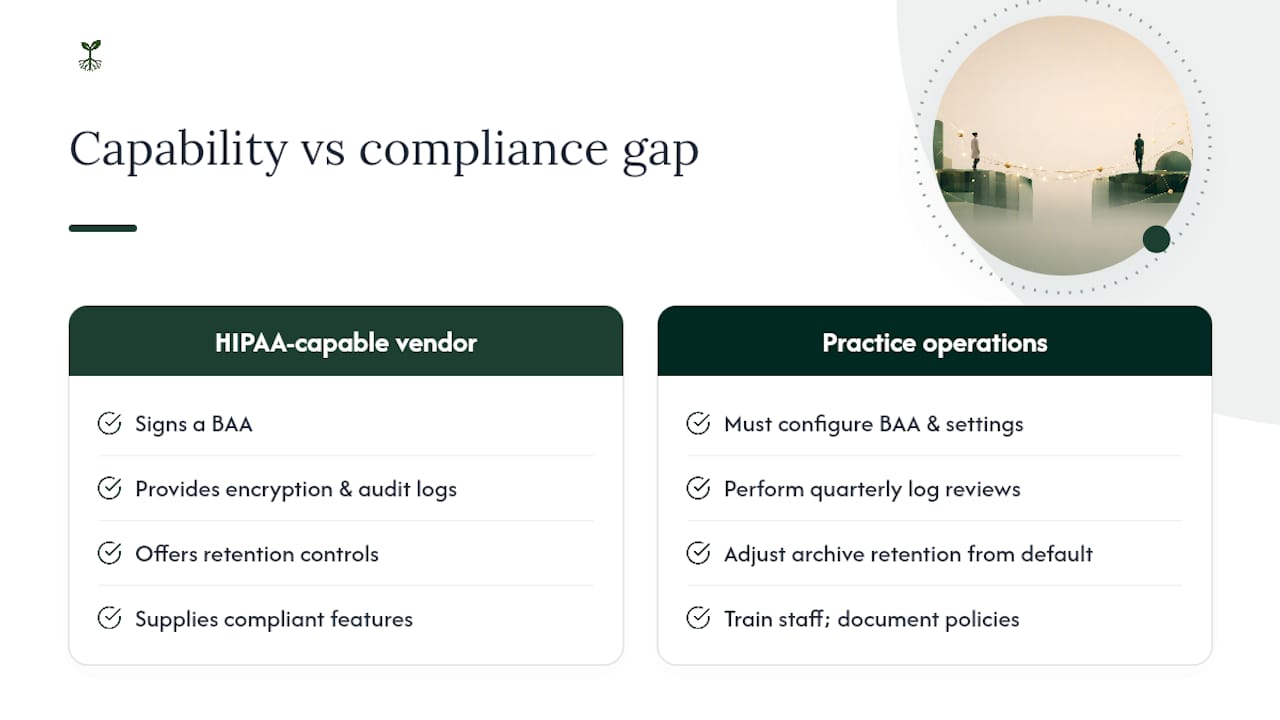
Most vendors on this list are HIPAA-capable. Very few practices that use them are actually compliant on day one. That gap is where breaches happen, and it is almost never the vendor's fault.
The pattern repeats: a practice signs up for Paubox or Google Workspace with a BAA, assumes the work is done, and then a staff member enables automatic forwarding to a personal Gmail account, or sends a message with a full patient record when only the appointment time was needed, or the archive retention is left at the default 30 days. The vendor did everything right. The practice did not.
What the compliance conversation in healthcare consistently underweights is the operational layer: the staff training, the documented policies, the quarterly log reviews, the patient consent workflows. These are not glamorous, and they do not show up in a vendor comparison table. But they are where the actual risk lives.
The other thing worth saying plainly: tools like ChatGPT and other AI assistants are not HIPAA-compliant by default. If you are asking whether ChatGPT is HIPAA compliant, the short answer is that OpenAI does offer a BAA for certain enterprise arrangements, but the standard consumer product is not configured for ePHI. The same applies to AI-powered transcription tools, HIPAA-compliant form builders, and other adjacent tools — each requires its own BAA evaluation and configuration review before touching patient data.
Choose the vendor that fits your size and workflow. Then do the operational work. That second part is where compliance actually lives.
Rooted Up helps healthcare practices build compliant communications workflows
There are solid vendor options on this list, and the right one depends on your size, your existing tech stack, and how much internal IT capacity you have. What most practices underestimate is the setup and ongoing operations work that sits between "we signed the BAA" and "we are actually compliant."

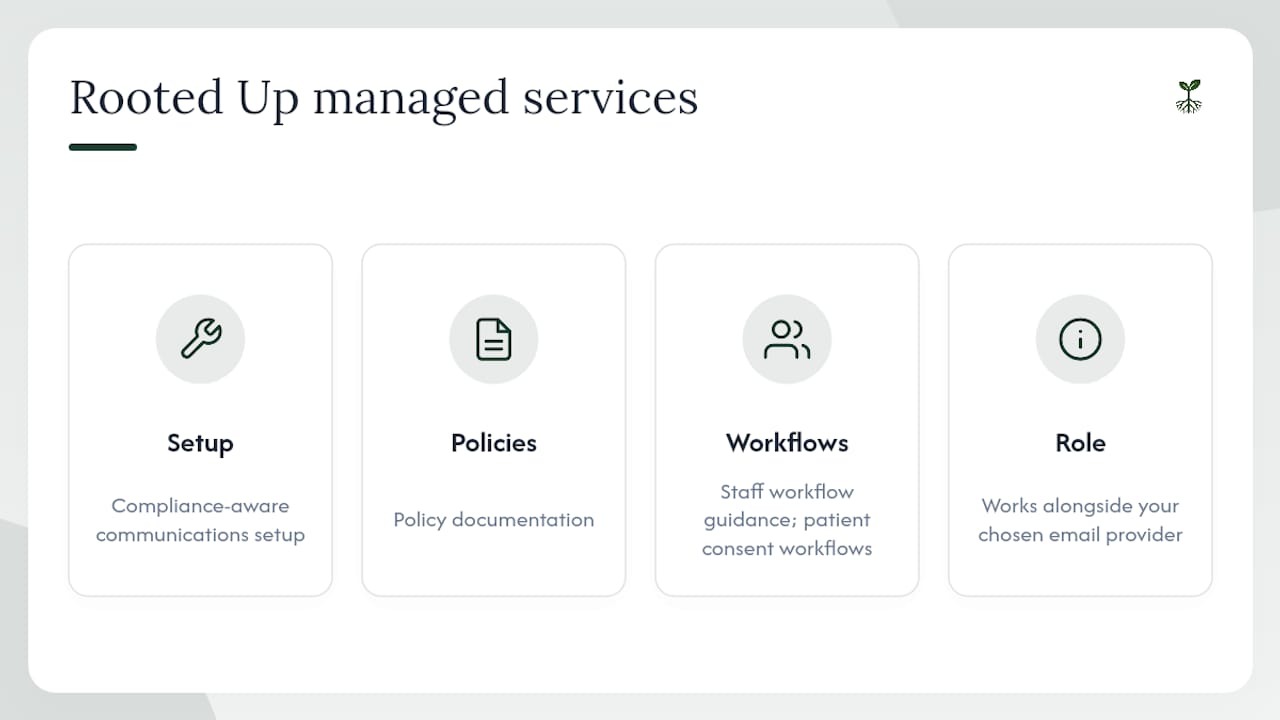
Rooted Up provides managed marketing and operational services for solo professionals and small practices, including compliance-aware communications setup, policy documentation, staff workflow guidance, and ongoing monitoring. The services cover the operational layer that vendor selection alone does not: configuring the right settings, building patient consent workflows, and keeping the documentation current as your practice grows.
Rooted Up is not an email hosting vendor. The service works alongside your chosen email provider to handle the setup, policy, and monitoring work that most practices do not have bandwidth for internally. For practices that want a managed approach to secure communications without hiring a full-time compliance officer, that is the concrete value.
Request a compliance-focused setup assessment at rootedup.net to see which services fit your current situation.
Useful sources and further reading
The sources below are the primary references used to build this article. Official regulatory text (HHS, CFR, NIST) takes precedence over practitioner guides when there is any conflict.
Official regulatory and government sources:
- Does the Security Rule allow for sending electronic PHI in an email or over the Internet? | HHS.gov
- Does the HIPAA Privacy Rule permit health care providers to use e-mail to discuss health issues and treatment with their patients? | HHS.gov
- HIPAA compliance for email (Updated for 2026) | HIPAA Journal
Practitioner and institutional guidance:
Partner resources for broader context:
- Clinical Messaging Framework Explained for Healthcare Teams — Practical framework for clinical communications policy design and message routing.
This article provides general information about HIPAA email compliance and is not legal or regulatory advice. Confirm current requirements and your specific obligations with a qualified HIPAA compliance professional or legal counsel.