
Start by automating a HIPAA-safe review request to every patient within 24 to 48 hours of their visit, and put Google Business Profile monitoring at the top of your daily task list. That single move drives most of the review volume a practice needs. Keep your average rating at 4.0 or higher, respond within a few days using compliant, non-clinical language, and let consistency, not damage control, become the operating model.
TL;DR:
- Sending automated review requests within 24 to 48 hours after patient visits significantly increases review volume and helps maintain a consistent, active reputation.
- Monitoring reviews daily on Google and weekly on other platforms, combined with standardized responses and clear ownership, improves response quality and compliance.
- Responding to reviews within 72 hours using compliant, non-clinical language enhances patient trust and avoids HIPAA and FTC violations.
- Multi-location practices need individual profiles, per-location benchmarks, and centralized dashboards to manage review quality and response consistency effectively.
- Connecting review requests to the EHR and PRM systems increases automation accuracy, reduces manual effort, and helps prevent asking patients with open complaints or billing disputes.
Table of Contents
- What Is Healthcare Review Management, and Why Do Reviews Matter?
- Building the Operational Playbook: Collecting, Monitoring, and Responding
- What Are the HIPAA and FTC Rules for Responding to Reviews?
- How Do You Manage Reviews Across Multiple Locations?
- When and How Should You Ask Patients for Reviews?
- What Should You Look for in Healthcare Review Management Software?
- How Do You Roll Out a Review Management Program?
- Should You Connect Review Tools to Your EHR and PRM Systems?
- How Do You Train Staff to Handle Patient Reviews?
- How Do You Measure ROI From a Review Management Program?
- How Should You Handle Negative Reviews and Legal Risk?
- Rooted Up's Perspective on Managed Review Programs
- How Rooted Up Handles Review Management for You
- Sources
- FAQ
What Is Healthcare Review Management, and Why Do Reviews Matter?
Reviews now function as a clinical quality signal in the eyes of patients, whether or not that framing feels fair. Peer-reviewed research in the Journal of Medical Internet Research found that online reviews shape perceptions of a provider's interpersonal skill and directly influence treatment decisions, even when the reviews say nothing about actual clinical outcomes. That's the core of what healthcare review management means: the ongoing, structured practice of monitoring, requesting, and responding to patient reviews across every platform where your practice appears.
Three factors drive whether that signal works for you or against you: volume, recency, and coverage. A practice with 200 reviews from three years ago reads as stagnant. A practice adding new reviews every week, distributed naturally across visits, reads as active and trustworthy. Coverage matters just as much: a strong Google Business Profile paired with an empty Healthgrades listing tells a fragmented story, and increasingly, that fragmentation gets picked up by AI tools that summarize provider reputation from whatever data they can scrape.
Patient Trust Signal: According to the Rater8 2026 Patient Choice Report, 66% of patients say a provider's response to reviews influences how much they trust that provider, and 68% say they would leave a review if simply asked.
That second figure is the one administrators tend to overlook. Most patients aren't reluctant reviewers. They're unprompted ones.
Building the Operational Playbook: Collecting, Monitoring, and Responding
Review management works best as a repeatable operational process, not an occasional fire drill. Here's the sequence that holds up across most practice sizes:
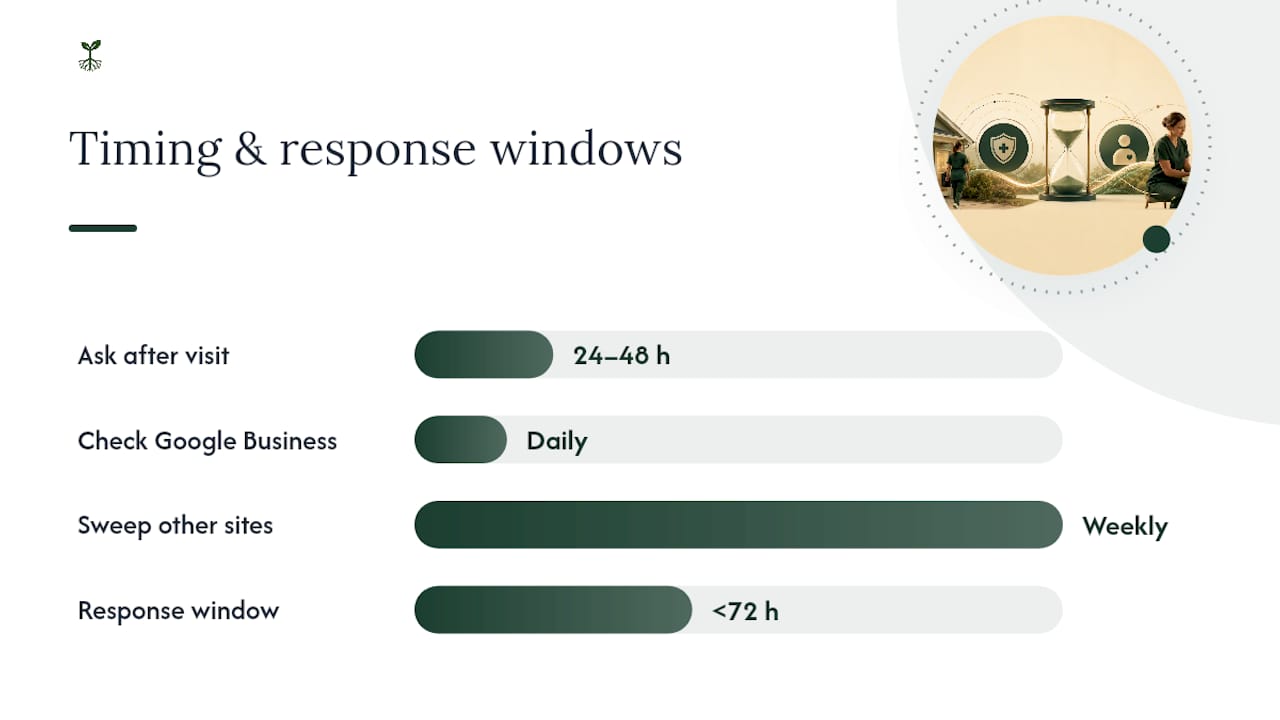
- Automate the ask. Trigger a review request by SMS or short email 24 to 48 hours after each visit, linking directly to your Google Business Profile or a QR code at checkout. Automated post-visit requests sent within this window generate meaningfully more reviews than manual, sporadic asks, and SMS tends to outperform email for completion rate.
- Send the same ask to everyone. Never filter requests to only your happiest patients and never offer a discount, gift card, or perk for leaving one. The FTC's rules on consumer reviews treat that kind of gating as a deceptive practice.
- Monitor daily, report weekly. Check Google Business Profile daily since it drives the most traffic, and sweep Healthgrades, Yelp, and Vitals at least weekly using a centralized dashboard rather than logging into four separate sites.
- Respond within a defined window. Thank the reviewer, acknowledge their experience in general terms, and invite them to call or email the office to discuss specifics. Never confirm they were a patient.
- Assign clear ownership. One staff member owns monitoring, one (often the practice manager or a designated marketing lead) owns responses, and negative reviews above a defined severity threshold escalate to a physician or compliance officer.
Pro Tip: Build a simple response tracker with three columns: date received, date responded, and reviewer sentiment. A response lag over 72 hours is the most common reason practices lose the trust benefit of replying at all.
Track three numbers monthly: new reviews per month, rolling average rating, and average response time as explained in our step-by-step guide for SMBs. Those three, tracked in a 30/60/90 assignment structure, tell you more about reputation health than any single review ever will.
What Are the HIPAA and FTC Rules for Responding to Reviews?
Two federal frameworks govern almost everything you say publicly about a review, and violating either one carries real risk.
HIPAA doesn't stop at the clinic door. The HHS Office for Civil Rights has warned that publicly confirming or denying someone is a patient can itself constitute a HIPAA violation, separate from anything else said in the reply. That means a response like "We're sorry your visit with Dr. Smith didn't go as planned" is a compliance risk even if it sounds harmless. The safer path routes every substantive conversation offline.
The FTC's rule on reviews and testimonials prohibits three things specifically:
- Gating, or only inviting satisfied patients to leave reviews
- Paying for or incentivizing reviews in any form, including discounts
- Failing to disclose material connections between the practice and any reviewer
A compliant reply generally looks like this: "Thank you for sharing your feedback. We take all patient concerns seriously and would like to learn more. Please call our office at [number] or email [address] so we can address this directly." No names, no visit details, no clinical language, no apology that implies a specific encounter occurred.
If a review contains false information, fabricated claims, or violates a platform's own content policy, most platforms including Google offer a formal flagging process rather than a public rebuttal. Reserve that route for genuine policy violations, not just reviews you dislike.
How Do You Manage Reviews Across Multiple Locations?
Multi-location groups run into a different set of problems than solo practices: misrouted reviews, inconsistent response tone, and ratings that vary wildly by site because no one owns the process at the location level. Each location needs its own Google Business Profile with its own review link, since a shared or miscategorized profile sends patients to the wrong address, phone number, or provider list, and that alone tanks conversion on the request side.
A centralized dashboard solves most of the rest:
- Per-location routing, so front-desk staff at Location A never see or respond to Location B's reviews by mistake
- Standardized response templates that stay compliant regardless of which staff member is logged in
- Escalation rules that flag anything below a two-star rating to a regional manager within a set number of hours
- Rolled-up reporting so leadership can compare locations side by side instead of pulling four separate reports
Set per-location benchmarks, not one blended company-wide number. Locations that fall short on velocity almost always trace back to a broken or unenforced request automation step, not a lack of happy patients.
When and How Should You Ask Patients for Reviews?
Timing beats wording almost every time. The strongest window sits at 24 to 48 hours post-visit, while the experience is still fresh but the patient isn't mid-recovery or dealing with an unresolved issue. Ask too early, during checkout for example, and you catch people before they've had the actual outcome of the visit. Wait more than a week and the request feels disconnected from anything they remember clearly.
Channel matters almost as much as timing. SMS consistently pulls higher completion rates than email because it's opened faster and the link to your Google Business Profile is one tap away. Email still works as a secondary channel, particularly for patients who've opted out of texts, but treat it as backup rather than primary.
Consent has to be built into the system from day one. Patients should have the option to opt out of automated messaging entirely, and that opt-out needs to be honored immediately across every future touchpoint, not just review requests. Bundling review requests into a broader communication consent form at intake, rather than treating them as a separate ask, tends to reduce friction and keeps you aligned with general telecommunications consent rules.
The mechanics matter too. A request automation system should send one request per visit, not one per appointment type, and should suppress duplicate asks if a patient already left a review in the last 90 days. Nothing erodes trust in the system faster than a patient getting three review requests in one week because they saw three different providers at the same practice.
What Should You Look for in Healthcare Review Management Software?
Not every reputation platform on the market is built with healthcare's regulatory reality in mind, and that gap shows up fast once you start evaluating vendors.
Start with compliance architecture rather than features. Ask directly whether the platform stores any patient identifiers alongside review data, how it handles data retention, and whether it will sign a business associate agreement if any patient information touches its systems. A platform that can't answer those questions clearly isn't ready for a healthcare client, regardless of how polished its dashboard looks.
From there, evaluate on four practical categories:
- Multi-platform monitoring: Does it pull in Google Business Profile, Healthgrades, Yelp, and Vitals in one view, or just Google?
- Request automation controls: Can you set the 24 to 48 hour delay, suppress duplicate sends, and honor opt-outs automatically?
- Template management: Does it support pre-approved, compliance-reviewed response templates that staff can customize slightly without drifting into risky language?
- Reporting granularity: Can leadership see per-location and per-provider breakdowns, not just an aggregate score?
Security certifications worth asking about include SOC 2 Type II and confirmation of encryption standards for data in transit and at rest. Beyond that, ask for references from other healthcare clients specifically, since a vendor's small-business case studies won't tell you how it handles a HIPAA-sensitive complaint buried in a one-star review.
How Do You Roll Out a Review Management Program?
A phased rollout beats a full-scale launch almost every time, mostly because it gives staff room to adjust before the volume gets real.
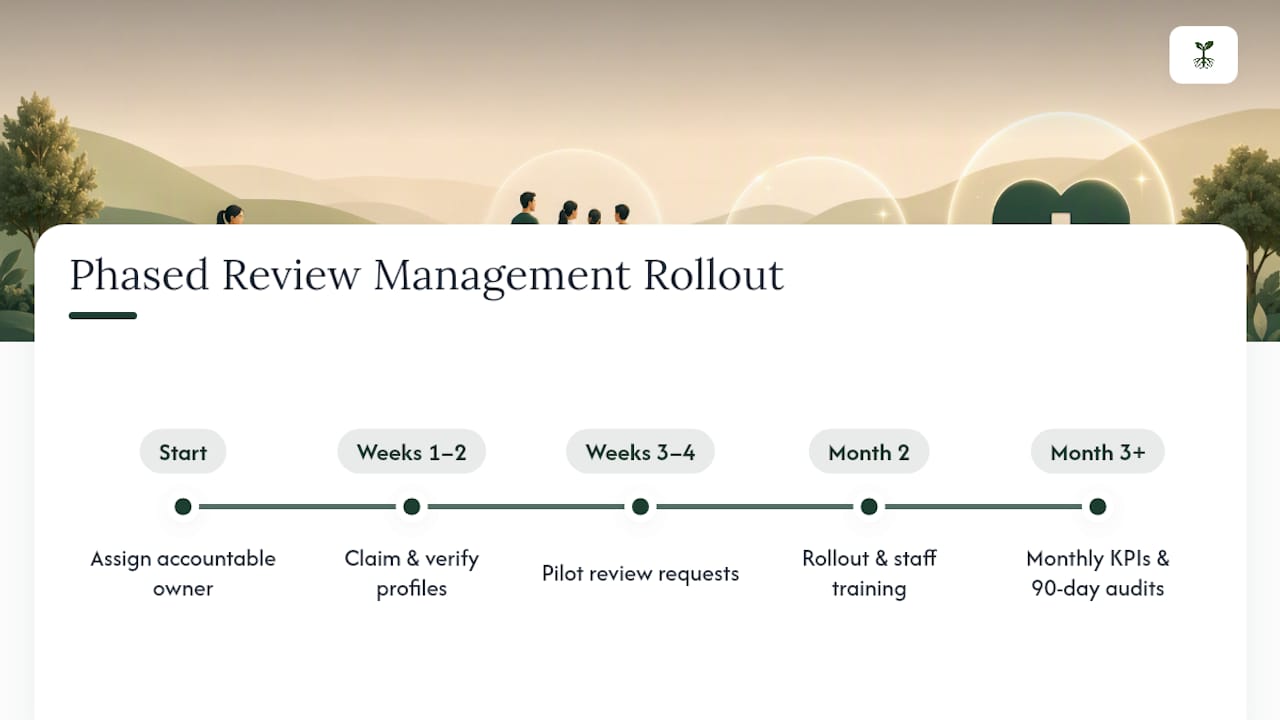
Weeks one and two: Claim and fully complete every platform profile, Google Business Profile first, then Healthgrades, Yelp, and Vitals. Verify hours, addresses, and provider names match exactly across all four, since mismatches confuse both patients and local search algorithms.
Weeks three and four: Turn on automated review requests for a single location or provider group as a pilot. Watch response volume, opt-out rates, and any early compliance flags before expanding further.
Month two: Roll the automation out practice-wide, train staff on the response framework, and set up the monitoring dashboard with defined ownership per the earlier playbook.
Month three and beyond: Move from setup mode to a monthly cadence: review KPIs, adjust request timing if volume is lagging, and audit a sample of responses for compliance drift every 90 days.
The most common rollout failure isn't technical. It's ownership. A program with no single accountable person for monitoring and response tends to decay within two or three months as other priorities crowd it out.
Should You Connect Review Tools to Your EHR and PRM Systems?
Connecting review management to your Electronic Health Record and Patient Relationship Management systems removes the biggest manual bottleneck: figuring out who to send a request to and when.
A well-built integration pulls appointment completion status from the EHR and triggers the review request automatically, rather than relying on staff to manually export a patient list at the end of each day. That single automation is often the difference between a program that sends requests to 40% of patients and one that reaches close to 100%.
PRM integration adds a second layer: segmenting requests by provider, location, or visit type, so a follow-up surgical consult doesn't get the same generic review ask as a routine annual physical. It also lets you suppress requests for patients flagged as having an open complaint or pending billing dispute, which avoids the awkward situation of asking someone for a five-star review while they're disputing a charge.
The integration itself needs to respect HIPAA boundaries just as strictly as your public responses do. Any data passed between the EHR, the PRM, and the review platform should be limited to what's operationally necessary, meaning appointment status and contact preference, not diagnosis codes or visit notes. Vendors should be able to explain in plain language exactly what data crosses each connection point, and if they can't, that's a signal to keep looking.
How Do You Train Staff to Handle Patient Reviews?
Staff training determines whether a compliant response framework actually stays compliant once the practice manager isn't looking over every reply.
Start with a short, mandatory session covering exactly what HIPAA prohibits in a public response: confirming patient status, referencing visit details, or using language specific enough that a third party could identify the patient. Pair that with real examples, both compliant and non-compliant, pulled from the response templates already in use.
Change management matters more than most administrators expect. Staff who've spent years fielding complaints by phone often default to over-explaining or over-apologizing in writing, both of which raise compliance risk. Role-playing a handful of negative-review scenarios in training, then comparing the instinctive response to the compliant template, tends to close that gap faster than a written policy alone.
Set a clear escalation rule everyone understands: any review mentioning a specific clinical outcome, a billing dispute over a certain dollar threshold, or language suggesting potential legal action gets routed to a manager or compliance officer immediately, not answered by front-line staff. Revisit training every six months, since staff turnover and platform changes both erode consistency faster than most practices expect.
How Do You Measure ROI From a Review Management Program?
The clearest ROI signal is new patient inquiries tied back to a review platform, tracked through call source or a "how did you hear about us" field at intake. Most practices see this move within 60 to 90 days of turning on consistent request automation, since review velocity and inquiry volume tend to rise together once the average rating stabilizes above 4.0.
A second, quieter metric worth tracking is patient retention among reviewers versus non-reviewers. Patients who leave a positive review and get a thoughtful response from the practice show measurably higher rates of returning for follow-up care, largely because the exchange reinforces that someone at the practice is paying attention.
Cost avoidance counts too, even though it's harder to put a number on. A practice that responds quickly and compliantly to a negative review often prevents that single complaint from escalating into a formal grievance or a state board inquiry, both of which cost far more in staff time than a five-minute reply would have.
Track three numbers against a baseline set before launch: monthly review volume, average rating trend, and inquiry-to-conversion rate for patients who mention finding the practice online. Reassess quarterly rather than monthly, since review data is noisy enough that a single bad month rarely reflects the actual trend.
How Should You Handle Negative Reviews and Legal Risk?
A negative review is not automatically a legal problem, but a few specific patterns turn one into one fast.
If a review discloses another patient's protected health information, either by naming them or describing identifiable details, the practice's response still cannot confirm or deny anything, even in the reviewer's own defense. Route it to compliance immediately and consider a formal request to the platform for removal on privacy grounds, since most platforms have a process specifically for this.
Defamation is the other common legal question administrators raise, and the honest answer is that it's a high bar. A negative but honest opinion about wait times or bedside manner almost never qualifies. A review containing a specific, false factual claim, like alleging a provider is unlicensed when they aren't, sits in different territory and may warrant a conversation with legal counsel about a formal takedown request rather than a public response.
Never argue clinical specifics in a public reply, even when the review is factually wrong about what happened during a visit. State plainly that the practice takes all feedback seriously and invite the reviewer to discuss it directly, then let that offline conversation, documented internally, be where the actual correction happens. Reviews that repeatedly involve the same staff member or the same complaint type deserve an internal process review, not just a series of individually handled replies.
Rooted Up's Perspective on Managed Review Programs
Most solo practitioners and small group practices don't lack the will to manage reviews well. They lack the hours. Some managed services build automated, HIPAA-aware review request flows directly into their monthly plans, paired with Google Business Profile hygiene and consistent monitoring across the platforms that actually move patient decisions.
The honest case for a managed subscription isn't that it does something a practice couldn't do in-house. It's that it does the unglamorous parts reliably, every week, without needing a staff member to remember it between patient visits.
This approach fits best for solo professionals and small groups without a dedicated marketing hire. Larger systems with in-house digital teams may only need pieces of it. Everyone else usually needs the whole system running quietly in the background.
— Jason
How Rooted Up Handles Review Management for You
Managed solutions can replace the patchwork most solo practices end up with, one staff member handling requests manually, another checking Google when they remember, no one really owning Yelp or Healthgrades, with a single monthly plan that runs all of it on a schedule. Review request automation, Google Business Profile management, ongoing monitoring across platforms, and HIPAA-aware response templates may come bundled together rather than sold as separate tools you have to stitch together yourself.

Onboarding starts with claiming and auditing your existing profiles, then turning on the automated post-visit request flow within the first couple of weeks. From there, the plan runs largely in the background: monitoring happens daily, response drafts get flagged for your review or handled per your approved templates, and you get a straightforward monthly report instead of four different dashboards to check.
Rooted Up's plans start at the Foundation tier, and practices that want a faster initial buildout, full profile cleanup, review system setup, and content foundation in one push, can start with the Foundations Sprint instead. If you're ready to see which plan fits your practice size and current review standing, view the current plans and book a consultation.
Sources
- Journal of Medical Internet Research (2018) — Reviews as a signal of provider quality
- HHS — HIPAA and online interactions guidance
- FTC guidance on consumer reviews and testimonials
- Rater8 — 2026 Patient Choice Report
FAQ
What Is the QA Process in Healthcare Review Management?
Quality assurance for reviews means a defined cycle of monitoring for new reviews, checking every response against HIPAA and FTC guidelines before it posts, and auditing a sample of past responses quarterly for compliance drift.
What Is the Best Doctor Review Site to Prioritize?
Google Business Profile drives the most patient traffic and local search visibility, making it the top priority, with Healthgrades a close second for specialists and Yelp and Vitals rounding out full coverage.
What Software Do Most Healthcare Practices Use for Reviews?
There's no single dominant platform across the industry; most practices use a mix of a dedicated review management tool for automation and monitoring alongside their EHR or PRM system, integrated so requests trigger automatically after appointments.
What Is the Best Care Management Software for Small Practices?
The right choice depends on whether you need full care coordination or just review and reputation management. For solo and small-group practices specifically focused on reputation, a managed subscription like Rooted Up's plans bundles review automation with Google Business Profile management, avoiding a separate software purchase entirely.
How Often Should a Practice Ask Patients for Reviews?
Every patient should get one automated request per completed visit, sent 24 to 48 hours afterward, with duplicate requests suppressed if that patient already reviewed the practice within the past 90 days.