
You verify your Google Business Profile by completing whichever option Google displays on your dashboard, usually postcard, phone, SMS, email, or video, then waiting for its review. Most reviews finish within 5 business days, though some methods confirm instantly. Google itself decides which options you see; you can't pick your favorite from a menu.
For the exact steps for your situation, check Google Business Profile Help or the technical breakdown at Google Developers. If you'd rather skip the guesswork entirely, Rooted Up handles verification setup for clients as part of its profile management service.
- Sign into the Google account tied to your business
- Click "Get verified" on your Business Profile dashboard
- Complete whatever method Google offers
- Submit and wait for confirmation
Key Takeaways
Google Business Profile verification succeeds fastest when you prepare accurate business details and the right proof before submitting, not after a rejection.
| Point | Details |
|---|---|
| Google picks the method | You can't choose postcard, phone, SMS, email, or video; Google's system assigns it automatically. |
| Expect up to 5 business days | Reviews after submission typically resolve within that window, though some methods finish faster. |
| Video needs proof of management | Show staff, branded tools, and locked areas being opened, not just a storefront shot. |
| Verification is always free | Any request for payment to verify or expedite your listing is a scam; report it. |
| Rooted Up handles setup and upkeep | Rooted Up manages verification and monthly profile maintenance so owners avoid repeated rejections. |
Table of Contents
- 5-Step Checklist Before You Start Google Business Profile Verification
- How Do the Different Google Business Verification Methods Work?
- What Does Google Expect From Video Verification?
- What to Do When Google Business Verification Fails
- What Should You Do Right After Verification Completes?
- How Do You Spot a Google Verification Scam?
- Frequently Asked Questions
- Sources
5-Step Checklist Before You Start Google Business Profile Verification
Rushing into verification without prepping first is how people end up stuck for weeks. Run through this before you click anything.
- Confirm your Google account. Make sure you're signed into the exact account that should manage this profile long term, not a personal backup account you'll forget the password to.
- Lock in your business details. Double check your name, address, phone number, and hours now. Editing your address after Google mails a postcard can restart the entire process.
- Test your contact methods. If Google offers phone or email verification, make sure that number or inbox is actually monitored by a real person, not a forwarding service.
- Prep for video if it's offered. Have a staff member available, your storefront accessible, and branded equipment visible.
- Track your codes carefully. Postcard PINs expire after 30 days, and requesting a new one before the old one arrives can create duplicate mailings.
Pro Tip: Screenshot your verification confirmation screen the moment you submit. Support reps often ask for a timestamp when you contact them about delays, and you won't have to dig through old emails to find one.
How Do the Different Google Business Verification Methods Work?
Google's system automatically assigns which verification option you see. You don't get a dropdown menu of choices. The available methods, according to Google's own developer documentation, fall into six categories: ADDRESS (postcard), PHONE_CALL, SMS, EMAIL, AUTO, and VETTED_PARTNER, plus live or recorded video where it's offered.
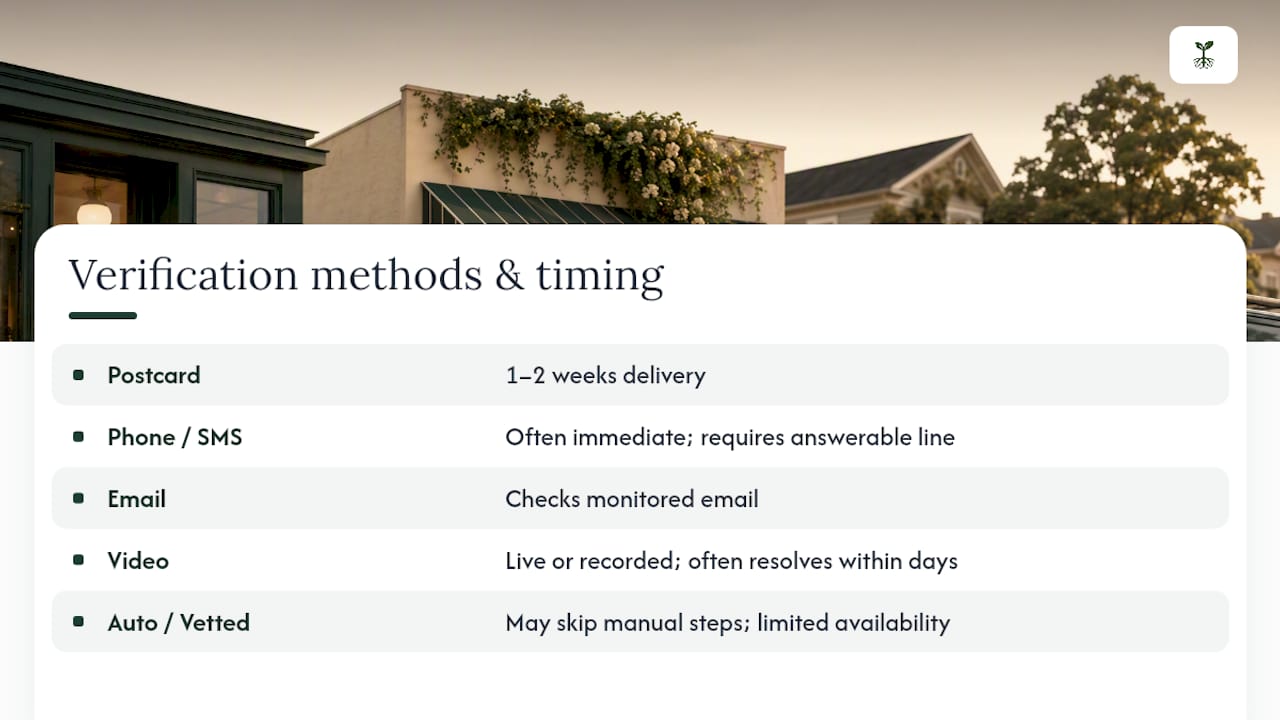
Postcard verification remains the most common path for brick-and-mortar businesses. Google mails a physical card to your listed address with a 5-digit PIN inside. You enter that PIN into your dashboard once it arrives. The catch: don't touch your address field while the postcard is in transit, and don't request a replacement code too early. Codes expire after 30 days, so timing matters.
Phone call or SMS verification works faster when it's available. Google either calls the listed business number or texts a PIN to it. This only works with a real, answerable line. Businesses using automated phone trees or IVR systems for their main number often find this method fails silently.
Email verification checks that the email tied to your profile is monitored and accessible. If your listed address is an old inbox nobody checks, fix that before starting.
Video verification, when Google offers it, involves either a live call with a Google representative or a recorded submission showing your business in operation. This method has become more common for service-area businesses and newer listings without an established address history.

AUTO and VETTED_PARTNER methods occasionally skip manual steps entirely, according to Google's verification management documentation, but availability is limited and not something you can request.
Timeline-wise: postcard verification typically runs one to two weeks for delivery, plus review time after you submit the PIN. Video and instant methods often resolve within days. Either way, Google's stated review window is up to 5 business days once you've submitted your proof, though many cases move faster.
What Does Google Expect From Video Verification?
Video verification isn't a beauty contest. Google isn't grading your camera work; it wants proof that you actually run the business, not that you filmed a nice building. The official guidance recommends this method when it's available, and successful submissions tend to share the same DNA.
Show your storefront or service location, then walk further in. Film staff performing actual work. Point the camera at branded tools, uniforms, or vehicles. If you have a locked storage room or back office, unlock it on camera. Google's video guidance specifically flags proof-of-management, like opening secured areas or using business-branded equipment, as stronger evidence than a static storefront shot.
- Steady the camera; shaky footage reads as rushed and incomplete
- Narrate in real time as you unlock doors or power on equipment
- Show signage that matches your listed business name exactly
Pro Tip: Rejections usually come from insufficient proof, not bad video quality. If Google denies your first attempt, re-record with more emphasis on staff-only access and branded assets rather than reshooting the same storefront angle.
What to Do When Google Business Verification Fails
A missing postcard or a rejected video isn't the end of the process. It just means you need a more targeted next step.
- Postcard never arrived? Confirm your address matches exactly what's on file, check with your building's mailroom, and wait the full expected window before requesting a new code.
- Video got rejected? Read the rejection notes carefully, then re-record with sharper focus on the specific gap Google flagged.
- Phone or SMS failed silently? Check whether your business line uses an automated system; if so, switch to a different available method.
- Still stuck after multiple attempts? Contact Business Profile support directly and have your business license, exterior photos, and any branded vehicle or signage images ready.
Keep a simple log of every submission date and method you've tried. When you escalate to Google Support, that trail saves you from repeating explanations to three different reps in one week.
What Should You Do Right After Verification Completes?
Once you're verified, treat it as the start of the work, not the finish line. Confirm your ownership settings and add co-managers if someone else helps run the profile. Fill in every category, service, and hour field completely. Turn on notifications for messages and reviews, and respond to your first few reviews quickly. Then start checking your profile insights and building a simple content rhythm of new photos and posts.

How Do You Spot a Google Verification Scam?
Verification is free, full stop. Any call, text, or email demanding payment to "unlock" or "speed up" your verification is a scam, and the Google Business Profile community has documented this pattern repeatedly.
Google does not charge for business verification. If someone contacts you claiming otherwise, offering "guaranteed instant verification" for a fee, treat it as fraud and report it rather than respond.
- Only ever verify through your official Business Profile dashboard, never a link in an unsolicited message
- Ignore third-party sellers promising to fast-track your listing
- If you suspect your account was compromised, change your password and enable two-factor authentication immediately
Why a Prepared Checklist Beats Winging It
Most delays come from missing the same small details twice, not from Google being difficult. Rooted Up's team has cleared client verifications faster simply by gathering the right proof before the first submission, not after a rejection.
Skip the Back-and-Forth: Let Rooted Up Handle Verification
Chasing postcards, re-recording rejected videos, and guessing which method Google will offer next eats hours you don't have. Rooted Up manages Google Business Profile verification and ongoing upkeep as part of its monthly plans for solo professionals and small business owners, so you're not the one troubleshooting a failed PIN at 9 PM.

That means fewer rejected submissions, a profile that stays accurate month to month, and someone else tracking insights, reviews, and photo updates while you run your actual business. If your listing is stuck, unverified, or just neglected, check Rooted Up's services and packages for a quick audit or setup package to get it moving.
Frequently Asked Questions
How long does Google Business Profile verification take? Postcard verification usually takes one to two weeks for delivery, then up to 5 business days for review. Video and instant methods often resolve faster.
Can I verify my Google Business without a postcard? Yes, if Google offers phone, SMS, email, or video verification instead. You can't request a specific method; Google's system determines what's available for your listing.
Why does my Google Business Profile keep asking me to reverify? Repeated reverification requests often follow a profile edit, ownership change, or a flagged inconsistency between your listed and actual address.
Does Google charge for business verification? No. Verification is completely free, and any demand for payment is a scam attempt you should report.
What happens if my video verification gets rejected? Review Google's rejection notes, then resubmit with clearer proof of staff activity, branded equipment, or access to secured areas.
Sources
- Verify your business on Google
- VerificationMethod | Google Business Profile APIs | Google for Developers