
Reply to every unanswered review today, flag anything that violates Google's policies, and start sending review requests to recent customers with a direct link. Those three moves, done this week, will do more for your local visibility than almost anything else you can touch without a developer or an ad budget.
Here is the short checklist to run through right now:
- Verify your Business Profile and confirm who has manager or owner access. You cannot reply to reviews without a verified profile, and unmonitored access is a liability.
- Reply to every unanswered negative review within 24–48 hours. Use the calm template in Section 4 below. A public response signals to every future reader that you take complaints seriously.
- Flag policy-violating reviews through the Reviews Management Tool. If Google denies the report, you get one appeal. Use it.
- Generate a short review link (available in your Business Profile dashboard under "Ask for reviews") and share it with the last 10–20 satisfied customers via text or email today.
- Set a weekly calendar task to log four numbers: new review count, current average rating, response rate, and the date of your most recent review.
That is your 30-minute starting point. The rest of this guide explains the why, the how, and the workflows to keep it running.
Key Takeaways
Consistent, managed review activity — responding fast, requesting regularly, and monitoring weekly — is the most accessible local SEO lever available to small businesses without a paid ad budget.
| Point | Details |
|---|---|
| Verify access first | Confirm who has Business Profile access before doing anything else — you cannot reply without a verified profile. |
| Reply within 48 hours | Negative reviews answered within 24–48 hours signal professionalism to every future reader, not just the reviewer. |
| Flag violations with evidence | Use the Reviews Management Tool with transaction records and timestamps; save your one appeal for clear-cut cases. |
| Request reviews after every job | Send a direct link within 48 hours of service completion and ask for a photo and a specific detail. |
| Track six KPIs weekly | Monitor new review count, average rating, response rate, recency, photo count, and sentiment trend every week. |
| Rooted Up manages the system | Rooted Up's monthly plans handle GBP monitoring, response templates, and reporting for solo professionals who need it done without doing it themselves. |
Table of Contents
- Why Google Business Profile reviews affect your local visibility
- Where Google reviews actually show up
- How to reply to reviews: steps, tone, and copy-paste templates
- How to report inappropriate or fake reviews
- How to get more Google reviews without breaking the rules
- What to monitor and the KPIs that signal review health
- Tools and APIs for managing reviews at scale
- Operational targets and what realistic results look like
- Why a managed process beats ad-hoc review handling
- What Rooted Up does for your GBP review management
- Sources
Why Google Business Profile reviews affect your local visibility
Reviews are not just social proof. They feed directly into how Google decides which businesses to show in the Local Pack, Maps, and increasingly in AI-generated overviews. Four review signals drive measurable ranking impact: total review count, average star rating, recency (with the trailing 90 days weighted most heavily), and keyword content inside review text. A business with 200 reviews from three years ago will often rank below a competitor with 40 reviews from the last two months.
The recency weighting is the part most owners underestimate. Google's algorithm treats a stale review profile the same way a stale website looks to a human: like something that may no longer be active. Consistent new reviews signal that your business is open, serving customers, and worth surfacing.
Responding publicly to reviews builds trust and indirectly improves click-through rates. Practitioners recommend maintaining an 80%+ response rate as a minimum activity signal — not because replies are a direct ranking factor, but because profiles with high response rates consistently outperform inactive ones in conversion from impression to click.
Photo-rich, specific reviews carry outsized weight for two reasons. First, they drive higher engagement on your profile. Second, Google's AI overview features extract specific attributes from review text — things like "fast turnaround," "great with kids," or "easy parking" — and use them to answer detailed queries. A review that says "great service" helps your rating. A review that says "Dr. Kim was thorough, the wait was under 15 minutes, and parking is free in the lot out back" feeds AI answers to queries your competitors cannot touch.
The ROI case is straightforward. Adding 20 or more recent, legitimate reviews within a 90-day window can produce visible Local Pack ranking gains, according to evidence-based SEO analysis. The typical curve: minimal movement in weeks 1–4, first visible gains in weeks 5–8, and fuller recency-weighted impact by weeks 9–12. That is a realistic timeline to set with any client or team member managing this work.
Where Google reviews actually show up
Knowing where reviews appear tells you exactly what is at stake when you ignore them — and what you gain when you manage them well.
- Local Pack (the three-business map block): Star rating and review count display directly in search results. A low count or a sub-4.0 average can push you out of this block entirely in competitive categories.
- Google Maps listings: Full review feed, star distribution, and photo reviews are visible to anyone who taps your pin. This is where a string of unanswered negatives does the most damage.
- Knowledge Panel / Business Profile on desktop and mobile: The right-side panel in Google Search shows your rating, review count, and recent review snippets. First-time visitors often make a decision here before they ever visit your website.
- AI-generated overviews: Google's generative search features extract specific attributes from review text to answer queries like "which plumber in Nashville is best for emergency calls." Keyword-rich, specific reviews increase the chance your business gets cited in these answers.
- Third-party review extracts: Google sometimes surfaces review content from other platforms on your Business Profile. You cannot control this directly, but maintaining a strong GBP review base keeps your own content dominant.
When you audit your discoverability, check all five surfaces. Search your business name on mobile, tap the Maps pin, and run a category query ("best [your service] near me") to see where you appear and what your profile looks like to a stranger.
How to reply to reviews: steps, tone, and copy-paste templates
Replying to reviews is the single highest-leverage action most small business owners are not doing consistently. The process is simple once the profile is verified.
Where to reply: Open Google Maps or your Business Profile dashboard, navigate to "Reviews," and click "Reply" under any review. Replies go through Google's review process and post publicly once approved.
Tone guide
Lead with acknowledgment, not defense. For a positive review, thank the customer by name if they used one, reference something specific they mentioned, and invite them back. For a negative review, acknowledge the experience, apologize without admitting fault if the facts are unclear, and offer a direct path to resolution (a phone number or email, not a public argument).

Templates you can use today:
For a 5-star review: "Thank you, [Name]! We're glad [specific detail they mentioned] stood out — that's exactly what we aim for. We look forward to seeing you again."
For a 3-star or neutral review: "Thank you for the feedback, [Name]. We're glad [positive element] worked well, and we hear you on [issue mentioned]. Please reach out to us at [contact] so we can make it right."
For a 1- or 2-star review: "We're sorry to hear about your experience, [Name]. This isn't the standard we hold ourselves to. Please contact us directly at [contact] so we can address this personally."
Operational targets:
- Reply within 24–48 hours for negative reviews.
- Maintain an 80%+ overall response rate across all reviews.
- Never ask a customer to remove or change a review in exchange for a refund, discount, or any other incentive. Google's content policy explicitly prohibits this, and it can trigger review removal or profile penalties.
Dos and don'ts:
- Do personalize each reply with at least one specific detail from the review.
- Do keep replies under 100 words for positive reviews.
- Do not use accusatory language or publicly dispute a customer's account.
- Do not copy-paste the same reply to multiple reviews — Google flags templated responses, and customers notice.
Pro Tip: If a negative review contains specific factual errors, correct them once, calmly, in your reply — then stop. A single professional correction is more persuasive to future readers than a back-and-forth argument.
How to report inappropriate or fake reviews
Google will not remove a review just because you disagree with it. Removal requires a clear policy violation. Knowing the difference saves time and frustration.
When Google will remove a review
Google's content policy covers these violation categories:
- Spam or fake content (reviews from people who never visited or used your service)
- Profanity, hate speech, or explicit content
- Conflict of interest (a competitor or current employee posting a review)
- Off-topic content unrelated to an actual customer experience
- Personal information or doxxing
Step-by-step: how to report a review
- Open your Business Profile dashboard or Google Maps and locate the review.
- Click the three-dot menu next to the review and select "Report review."
- Choose the violation category that best matches the content.
- Submit the report and note the date.
- Check report status in the Reviews Management Tool. Google typically processes reports within a few days, though complex cases take longer.
- If the report is denied and you believe the review clearly violates policy, submit the one-time appeal through the same tool. This is your only escalation path — use it with documentation.
What to collect before escalating
- Transaction records showing the reviewer was never a customer
- Communication logs (emails, texts, booking confirmations)
- Screenshots with timestamps
- Any identifying details that confirm a conflict of interest
Automated spam detection catches many fake reviews before you even report them. For reviews that slip through, the manual report plus appeal process is the only official route. Google does not offer phone support for individual review disputes.
How to get more Google reviews without breaking the rules
Volume matters, but only if the reviews are legitimate. Google's spam filters are aggressive, and a sudden spike of reviews from accounts with no history will likely be removed automatically.
What Google allows
- Direct requests from verified customers after a completed service or transaction.
- Review links and QR codes shared via email, text, receipts, or in-person signage.
- Follow-up messages sent after a clear service milestone (job completion, appointment, delivery).
- Asking for specifics and photos — this is not only allowed, it produces better reviews.
What Google prohibits
- Paying for reviews or offering discounts, gifts, or upgrades in exchange for a review.
- Review gating — filtering customers to only send review requests to those you expect will rate you positively.
- Asking employees, friends, or family to post reviews of experiences they did not have.
- Bulk solicitation campaigns targeting people with no real interaction with your business.
A repeatable review request workflow
- Identify the service milestone (appointment complete, project delivered, invoice paid).
- Wait 24–48 hours — enough time for the customer to reflect, not so long they forget.
- Send a short, direct message with your review link.
- Ask for a photo and a specific detail about the service.
- Thank them regardless of outcome.
Sample scripts
SMS: "Hi [Name], thanks for choosing us for [service]. If you have a moment, we'd love a Google review — even a sentence or two about your experience helps. Here's the link: [link]. A photo is always appreciated too!"
Email subject: "Quick favor — would you share your experience?" "Hi [Name], we hope [service] went smoothly. If you're happy with how things went, a Google review means a lot to a small business like ours. Here's a direct link: [link]. Feel free to mention what stood out and add a photo if you have one."
In-person: "If you have a second, we'd really appreciate a Google review. I can text you the link right now — it takes about two minutes."
Staff training note: Whoever has the most direct customer contact should own the review ask. Train them to make it personal, not scripted. A genuine "this really helps us" lands better than a rehearsed pitch. Personalized messaging consistently outperforms generic outreach in response rate for service businesses.
For home-service and local businesses, marketing automation can trigger these requests automatically after a job is marked complete in your CRM, removing the human-memory dependency entirely.
What to monitor and the KPIs that signal review health
Tracking the right numbers weekly takes about five minutes and tells you whether your review efforts are actually moving the needle.
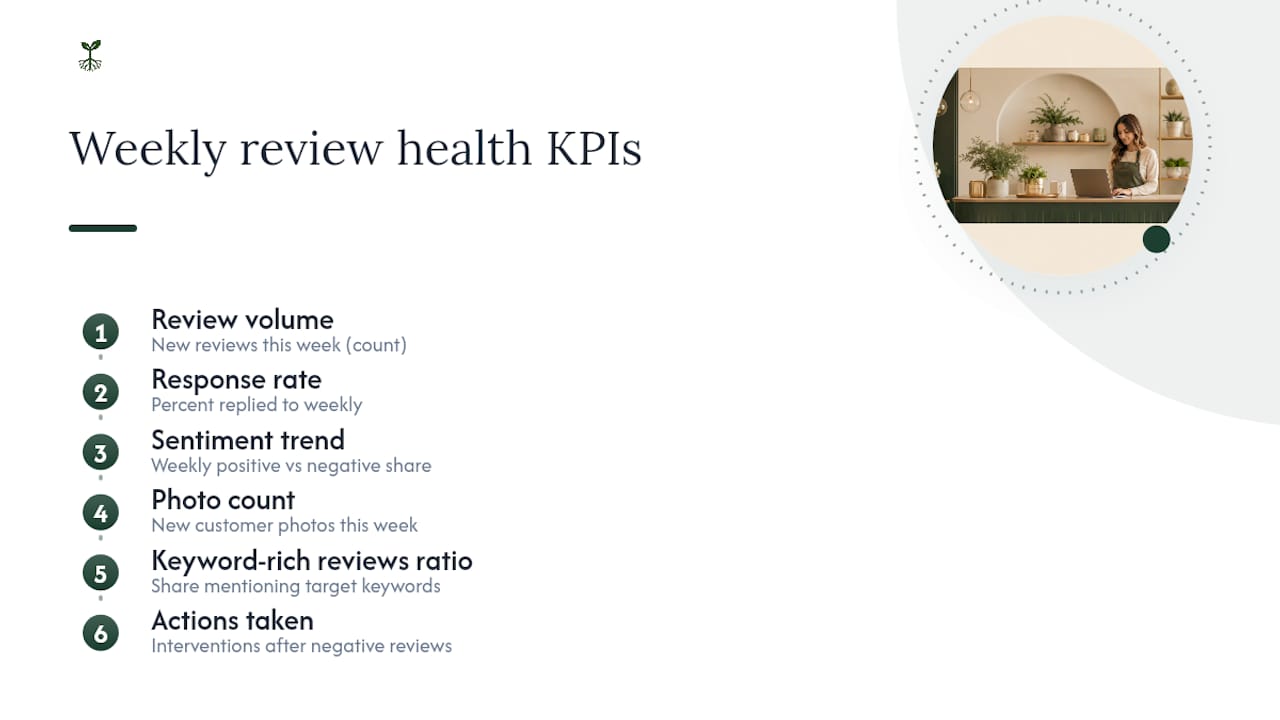
Core KPIs
How to interpret changes
A sudden drop in review volume usually means one of three things: your review request workflow broke, a batch of reviews was removed by spam filters, or customer volume itself dropped. Check all three before assuming the worst.
A sudden spike in negative reviews in a short window often points to a single operational failure — a bad hire, a supply issue, a billing error. Treat it as a signal to investigate internally, not just a reputation problem to manage externally.
Dashboard setup: Track these six KPIs in a simple spreadsheet with a weekly entry. Add a column for "action taken" so you can connect changes in KPIs to specific interventions. Run a deeper audit quarterly: look at sentiment trends in review text, photo count, and whether your keyword-rich reviews are growing relative to generic ones.
Industry analysis confirms that review velocity and response rate are among the most actionable levers available to small businesses in local search, precisely because most competitors are not managing them systematically.
Tools and APIs for managing reviews at scale
For a single-location business with one owner, the Google Business Profile dashboard handles everything. The moment you have multiple locations, a team managing responses, or a CRM you want to connect, the official APIs and third-party tools become worth the setup time.
Official options
| Tool | Best for | Key capability |
|---|---|---|
| GBP Dashboard | Single-location, manual workflow | Reply, flag, and monitor reviews in one place |
| Reviews Management Tool | Reporting and appeal tracking | Submit and track policy-violation reports |
| Business Profile APIs | Multi-location, automated workflows | Programmatic listing, retrieval, reply, and deletion |
The Business Profile APIs let developers pull review data into a CRM, trigger automated notifications when a new review posts, and push replies programmatically — useful for franchises, multi-location healthcare practices, or any business where manual monitoring at scale is not realistic.
Third-party tool categories
- Monitoring and alerting: Tools that send real-time notifications when a new review posts, so nothing sits unanswered for days.
- Bulk reply templates: Platforms that let you build a library of response templates and apply them with one click, then personalize before sending.
- Aggregation dashboards: Centralized views that pull reviews from Google, Yelp, Facebook, and other platforms into a single feed.
- NPS and survey integration: Tools that connect post-service surveys to review request workflows, so satisfied customers are prompted automatically.
Access and privacy controls
Limit Business Profile access to the people who genuinely need it. Use manager-level access for staff who reply to reviews, and reserve owner-level access for the business owner or a trusted administrator. Audit access quarterly. An ex-employee with lingering owner access is a real risk — one that online reputation management best practices flag as one of the most common and preventable vulnerabilities for small businesses.
Operational targets and what realistic results look like
The targets practitioners use are not arbitrary. They come from watching what actually moves rankings and trust scores for small service businesses.
Recommended operational targets:
- Respond to negative reviews within 24–48 hours of posting.
- Maintain an 80%+ overall response rate across all reviews.
- Aim for 5 or more new legitimate reviews per week in competitive local categories.
- Keep average rating at or above 4.0 to remain eligible for "top-rated" and "best of" filters.
Ranking improvements from a review velocity increase follow a predictable curve: limited movement in weeks 1–4, first visible gains in weeks 5–8, and fuller recency-weighted impact by weeks 9–12. Setting this expectation upfront prevents owners from abandoning a working strategy too early.
Checklist for operationalizing this:
- Assign one person as the review owner (even if that person is you).
- Set a weekly 15-minute monitoring block on the calendar.
- Build a response template library with at least three variants for positive, neutral, and negative reviews.
- Define an escalation path for reviews that may warrant a report or a legal review.
- Run a quarterly audit of KPIs, sentiment trends, and access permissions.
For AI-assisted review outreach and workflow automation, the setup investment is typically a few hours — and the ongoing time cost drops to near zero once the triggers are in place.
Why a managed process beats ad-hoc review handling
Most small business owners handle reviews the same way they handle their inbox: reactively, when they remember, and usually after something has already gone wrong. That approach has a real cost.
Ad-hoc responses create an inconsistent voice. One week you write a warm, detailed reply; three weeks later a negative review sits unanswered because you were slammed with client work. Future customers reading your profile see that gap and draw their own conclusions. Worse, the reviews you most need to respond to — the ones with specific complaints or factual errors — are exactly the ones that feel hardest to address in the moment, so they get skipped.
A managed, repeatable approach solves this at the process level rather than the willpower level. When templates exist, when a monitoring cadence is set, and when one person owns the task, response rates stay high without requiring heroic effort. Reviews also become an operational feedback loop rather than just a reputation concern. A pattern of complaints about wait times is a staffing signal. A cluster of reviews mentioning a specific staff member by name is a training or recognition opportunity.
The case for outsourcing is clearest when three conditions are true: you are regularly missing the 24–48 hour response window, you have reviews across multiple platforms with no central view, or you need reporting that connects review activity to business outcomes. At that point, the time cost of DIY exceeds the cost of a managed service.
What Rooted Up does for your GBP review management
Solo professionals and small business owners who want this system running without building it themselves have a direct path: Rooted Up's monthly subscription plans include Google Business Profile management, review response automation, monitoring, and monthly reporting as part of a single, predictable package.

The concrete difference from doing it yourself: Rooted Up handles the monitoring cadence, maintains a response template library tailored to your business voice, flags policy-violating reviews for reporting, and delivers a monthly KPI summary so you can see exactly how review health is trending. No agency retainer, no long-term contract lock-in, and no requirement to learn the dashboard yourself.
For solo professionals who bill by the hour, the math is simple: the time you spend managing reviews each week is time not spent on client work. Rooted Up's reputation automation services are built specifically for that trade-off. To see which plan fits your situation, visit the services page and book a free audit call.
Sources
- Manage customer reviews - Google Business Profile Help
- Work with review data | Google Business Profile APIs
- Why Google reviews will power up your local SEO in 2025
- Do Google Reviews Affect Ranking? - 2026 SEO Evidence
This article provides general informational guidance on Google Business Profile review management. Google's policies and platform features change regularly — confirm current rules at the official Google Help Center or consult a qualified professional before making decisions based on specific policy interpretations.