
Google Business Messages is gone. Google officially discontinued it on July 31, 2024, and new conversations were blocked starting July 15, 2024. If your business still has a chat widget pointing to GBM, it is broken right now. The immediate actions: remove or replace those widgets, export any conversation history you need, and update your Google Business Profile with working contact methods.
Two facts worth anchoring on: Google gave brands until July 15, 2024, to remove brand-managed entry points, and the APIs and partner console access were fully revoked after July 31, 2024. The channel Google is actively building instead is RCS for Business, though it works very differently from what GBM offered.
- Remove broken widgets now. Any button or embed tied to GBM returns an error.
- Export conversation history using Google Takeout before that data becomes inaccessible.
- Add working contact paths to your Business Profile: phone number, website link, or Reserve with Google.
- Evaluate RCS only if you have outbound messaging use cases. It does not replace inbound Search/Maps chat.
Key Takeaways
Google Business Messages shut down on July 31, 2024, and any business still relying on GBM entry points needs to replace them with owned contact channels immediately.
| Point | Details |
|---|---|
| GBM is fully retired | New conversations were blocked July 15, 2024; APIs and partner console access ended July 31, 2024. |
| RCS is not a direct replacement | RCS for Business is outbound-first and carrier-delivered, not an inbound Search/Maps chat channel. |
| Export history now | Use Google Takeout to download past conversations before that data becomes permanently inaccessible. |
| Build owned channels first | Website chat, email, and SMS survive platform shutdowns; add RCS only when outbound use cases justify it. |
| Rooted Up manages the transition | Rooted Up's monthly plans cover profile updates, contact path management, and AI workflow integrations. |
Table of Contents
- What happened to Google Business Messages?
- What is RCS for Business, and how does it differ from Business Messages?
- Where do customer conversations appear now?
- How do you integrate RCS for Business?
- Migration checklist for businesses that used Google Business Messages
- When to use RCS, SMS, WhatsApp, or website chat
- Why you should not rely on a single messaging channel
- What does implementation actually cost and how long does it take?
- Three things to do this week
- Why diversified, owned channels are the right call
- Rooted Up handles the migration and the ongoing strategy
- Sources
What happened to Google Business Messages?
Google announced the wind-down in May 2024. Coverage from 9to5Google confirmed that new conversations were disabled on July 15, 2024, and the feature was fully retired on July 31, 2024. That two-week window between those dates was the only grace period brands got.
What disappeared with it was substantial. Google Business Messages had offered two-way, user-initiated chat directly inside Search and Maps results. Customers could tap a "Chat" button on a business listing and start a conversation with a live agent or a bot, all without leaving Google's surfaces. The developer documentation shows how deep the feature set ran: rich cards, suggested replies, read and delivery receipts, Place ID association for multi-location businesses, webhook-based agent routing, and locale-aware conversation settings.
All of that is now off. Google also removed call-history reporting from Business Profiles at the same time. Search Engine Roundtable reported that Google recommended using Google Takeout to download past chat conversations before the shutdown date, and that businesses should update their profiles to emphasize phone, website, or Reserve with Google as primary contact methods.
For businesses that had built brand-managed widgets, the consequences were immediate. Any embed or button that routed customers into GBM stopped working. Customers clicking those buttons hit dead ends, which is a worse outcome than having no chat button at all.
Pro Tip: Search your website's codebase and any third-party chat plugins for references to "businessmessages.google.com" or GBM API endpoints. Replace them with a working contact method before a customer finds the broken link first.
What is RCS for Business, and how does it differ from Business Messages?
RCS (Rich Communication Services) for Business is the channel Google is actively developing, but calling it a replacement for Google Business Messages misses the point. The two products solve different problems.
Google Business Messages was inbound and discoverable. A customer searching for your business on Google could initiate a chat right from the search result. RCS for Business is primarily outbound. Your business sends a branded, rich message to a customer's phone number, and the customer responds. The customer cannot find you on Google and start an RCS conversation the way they could with GBM.
Forrester's analysis on Forbes made this distinction clearly: businesses that expected RCS to bring inbound Search/Maps chat traffic were often disappointed. The underlying architecture is different. RCS runs over carrier networks, managed by carriers, not by Google's search surfaces.
What RCS for Business actually offers
- Branded profiles: Your business name, logo, and a verified checkmark appear in the conversation header.
- Verification checkmark: Signals to the customer that the sender is a legitimate, verified business.
- Rich cards and carousels: Image-forward message formats that work well for product showcases, appointment confirmations, and promotions.
- Suggested replies and action buttons: Customers can tap a pre-set response or trigger an action (open a URL, dial a number) without typing.
- Media support: Images, video, and file attachments within the message thread.
- Unsubscribe controls: Customers can opt out, and Google enforces this at the platform level.
One privacy point that surprises many teams: verified RCS business messages are not end-to-end encrypted. Google and the carrier can access message content. That is a meaningful difference from WhatsApp's encryption model and worth disclosing to customers in regulated industries.
| Feature | Google Business Messages (retired) | RCS for Business |
|---|---|---|
| Primary direction | Inbound (customer-initiated) | Outbound (business-initiated) |
| Discovery surface | Google Search, Maps | Customer's phone number (carrier-delivered) |
| Conversation appears in | Google's chat interface | Google Messages, Samsung Messages |
| Rich content | Rich cards, suggested replies | Rich cards, carousels, action buttons |
| Verification | Agent verification via Google | Business verification checkmark |
| Encryption | Not end-to-end encrypted | Not end-to-end encrypted |
| Integration model | Webhook/API via GBM partner console | REST API, CPaaS partners, or direct provisioning |
| iOS support | Yes (via Google's web surface) | Limited (carrier-dependent; Android-primary) |
RCS is visible in Google Messages and Samsung Messages on Android. iOS support remains limited and carrier-dependent, which matters if your customer base skews toward iPhone users.
Where do customer conversations appear now?
Before July 2024, a customer could find your business on Google Search or Maps and tap "Chat" to open a conversation inside Google's interface. That entry point is gone.
Today, the surfaces where customers can reach you through Google are:
- Phone number on your Business Profile (click-to-call from Search and Maps)
- Website link (routes to your site's own chat or contact form)
- Reserve with Google (for appointment-based businesses)
- Directions and Q&A (passive discovery, not real-time messaging)
For RCS specifically, conversations appear inside the Google Messages app on Android and Samsung Messages on compatible Samsung devices. The customer needs to have an RCS-capable device and carrier. There is no entry point from Search or Maps into an RCS thread.
- Android users with RCS-enabled carriers will see branded, verified messages in their default messaging app.
- iPhone users generally cannot receive RCS messages from businesses in the same way; SMS fallback is the practical reality for now.
- Brand-managed widgets that previously launched GBM conversations must be removed or replaced. Leaving them in place means customers click a button that goes nowhere.
Pro Tip: Replace any dead GBM chat button on your website with a live chat widget (Tidio, Intercom, or a simple contact form) and update the button's UTM parameters so you can track whether customers are actually using the new path.
How do you integrate RCS for Business?
The integration path for RCS for Business is more involved than GBM was, partly because RCS is still under active development. Google's RCS release notes document ongoing changes to verification requirements, logo specifications, TTL (time-to-live) behavior for messages, and new analytics fields. Plan for iteration.
At a high level, the implementation steps look like this:
- Register your business with Google's RCS Business Messaging program or through a CPaaS partner (Twilio, Sinch, Infobip, and similar platforms offer managed RCS provisioning).
- Complete verification. Google reviews your brand identity, logo, and contact details before issuing the verification checkmark. This step alone can take weeks.
- Configure branding. Upload your logo, set your display name, and define the color scheme that appears in the conversation header.
- Set up webhooks and API flow. Outbound messages go through a REST API; inbound replies and delivery events come back via webhooks. The Business Messages REST resource documentation shows the message structure, including richCard and suggestion chip fields, which carry over conceptually to RCS.
- Test across devices. Verify rendering on multiple Android versions and carriers before going live.
- Monitor analytics. Track delivery rates, read rates, and response rates from the start. RCS analytics fields are still evolving per Google's release notes.
CPaaS partner vs. direct provisioning
For most small and mid-sized businesses, going through a CPaaS partner is the faster path. Direct provisioning requires a Google partnership agreement and engineering resources to manage the API layer. A CPaaS provider handles carrier relationships, fallback to SMS when RCS is unavailable, and often provides a dashboard for message management.
The trade-off: partner fees add to your per-message cost, and you are adding another vendor dependency. For resource-limited teams, that trade-off usually favors the partner route.
Pro Tip: Before committing to a CPaaS provider, confirm they support SMS fallback automatically. If a customer's device or carrier does not support RCS, your message should still arrive as an SMS rather than failing silently.
Migration checklist for businesses that used Google Business Messages
The deadline has passed, but the cleanup work is ongoing for many businesses. Here is a prioritized sequence:
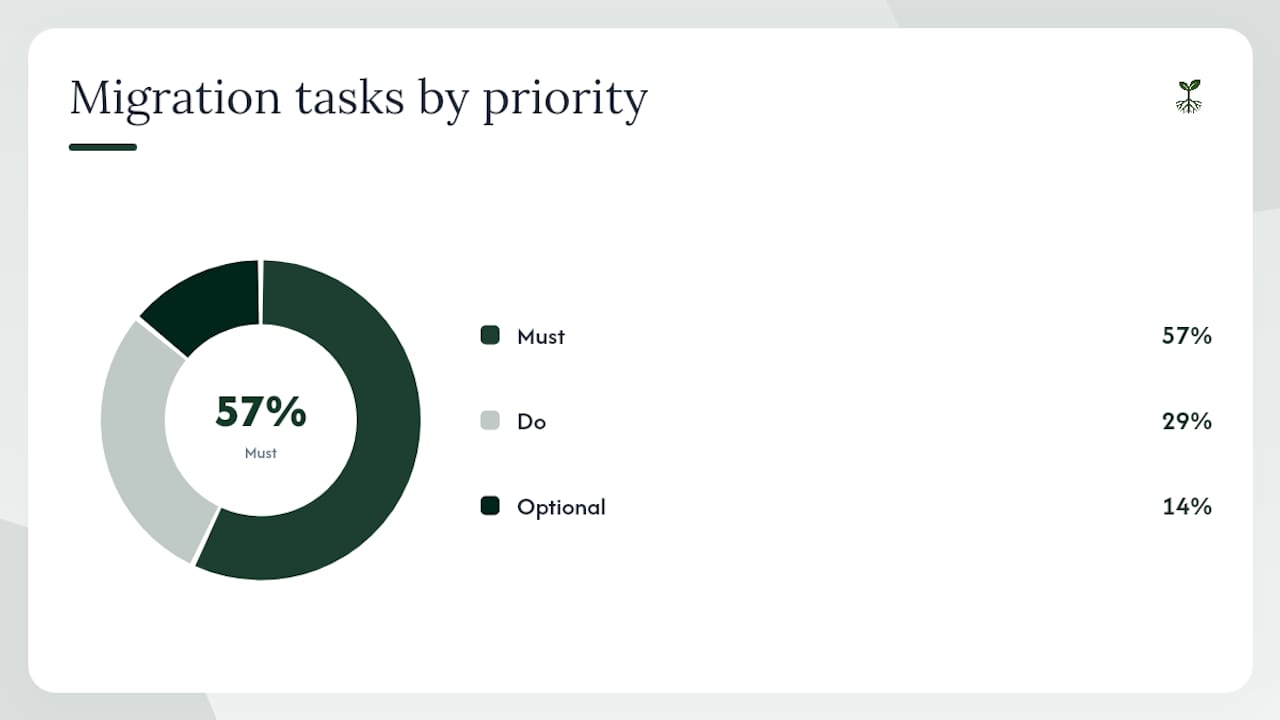
- [Must] Export conversation history. Use Google Takeout to download past chat data. This is your only copy now that the platform is shut down.
- [Must] Audit and remove GBM widgets. Search your website, landing pages, and any third-party tools for GBM entry points. Replace or remove them.
- [Must] Update your Google Business Profile. Add or verify your phone number, website URL, and Reserve with Google link. These are now the primary contact paths from Search and Maps.
- [Must] Notify customers who used chat. If you had active chat relationships, send a short message through email or SMS explaining the change and providing the new contact method.
- [Do] Map old conversation flows to new channels. If GBM handled appointment bookings, route those to Reserve with Google or your booking software. If it handled support, route to email or a live chat tool.
- [Do] Update any marketing materials that referenced the chat button: email footers, social bios, printed materials.
- [Optional] Evaluate RCS if you have outbound use cases like appointment reminders, order updates, or promotional campaigns with a primarily Android customer base.
For customer notifications, keep it short. A sample message:
"Our Google chat button is no longer active. To reach us, call [number], visit [website], or book directly at [booking link]. We're still here."
Publish this on your Google Business Profile as a post, send it to your email list, and pin it to your social profiles.
When to use RCS, SMS, WhatsApp, or website chat
No single channel covers every use case. The right choice depends on what you are sending, who your customers are, and what devices they use.
- RCS for Business: Best for outbound, branded notifications to Android users. Order confirmations, appointment reminders, and promotional rich cards work well. Not suitable as an inbound support channel or for iOS-heavy audiences.
- SMS/shortcode: The most universal fallback. Every phone receives SMS. Use it for time-sensitive alerts, two-factor authentication, and any message that must reach 100% of your list regardless of device.
- WhatsApp Business API: Strong for markets where WhatsApp penetration is high and for two-way customer support conversations. End-to-end encrypted, which matters for healthcare and financial services clients.
- Website live chat: The best channel for inbound, real-time support. Customers are already on your site and have high intent. Tools like Tidio or Intercom integrate with CRMs and support auto-reply workflows.
- Email: Underrated for non-urgent follow-ups, onboarding sequences, and anything that benefits from a longer format. Pairs well with SMS for a two-touch approach.
On UX: suggested replies and quick-action buttons in RCS reduce friction dramatically. A customer who can tap "Confirm appointment" instead of typing a response is far more likely to engage. Keep suggested reply labels under five words and limit options to three per message.
Privacy note: because verified RCS business messages are not end-to-end encrypted, include a clear opt-in disclosure before sending. Customers in regulated industries (healthcare, finance, legal) should be informed that message content is accessible to carriers and Google. Always honor unsubscribe requests immediately.
Why you should not rely on a single messaging channel
Forrester's post-shutdown analysis made a point that applies well beyond GBM: low consumer adoption and a single-vendor dependency left businesses with no fallback when Google pulled the plug. The lesson is not that Google is unreliable. It is that any channel you do not own can be taken away.
A defensible messaging stack for a U.S. small business or solo professional looks like this:
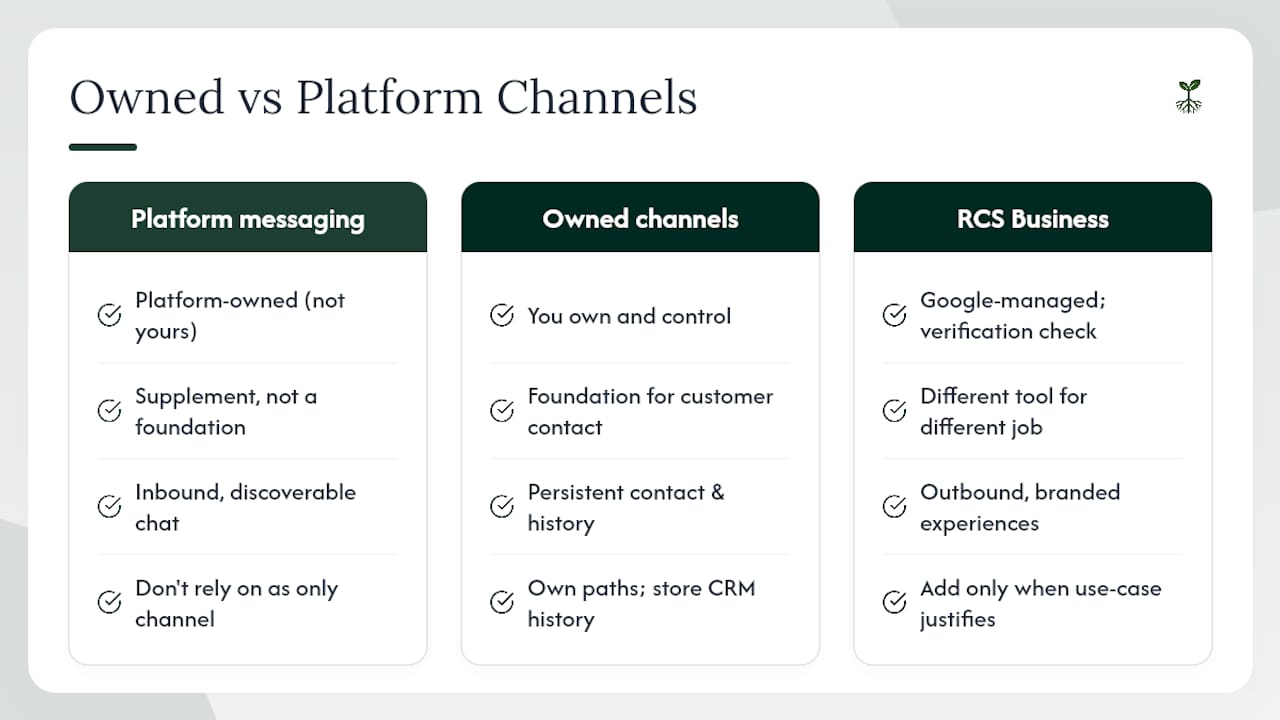
- Primary (owned): Website live chat tied to your CRM, plus email list.
- Secondary (high-reach): SMS/shortcode for time-sensitive outbound messages.
- Rich/branded: RCS for Business, for Android-heavy audiences with outbound use cases.
- Fallback: Phone number and a booking link on your Google Business Profile.
The sequencing matters. Build the owned channels first, because they survive platform changes. Add SMS next, because it reaches everyone. Layer RCS on top only when you have the outbound use cases and the Android audience to justify the integration cost.
When routing inbound leads, connect every channel to a single CRM. Conversation context that lives only inside a third-party platform is context you will lose the next time a platform shuts down. AI-driven routing and automation can help smaller teams manage multi-channel inboxes without adding headcount.
What does implementation actually cost and how long does it take?
Timelines and costs vary by team size and the channels you are adding.
- Small teams (1–5 people), website chat + SMS: 2–4 weeks. Costs include a live chat tool subscription ($20–$100/month depending on the platform), an SMS provider account, and a phone number or shortcode ($1–$25/month for a long code; shortcodes run higher). Developer time is minimal if you use a hosted solution.
- Adding RCS for Business: Add 4–8 weeks for verification and branding approval, plus CPaaS partner fees (typically per-message pricing). Budget for at least one developer sprint to set up webhooks and test delivery.
- Enterprise-style rollouts (multi-location, CRM integration, AI bot): 2–4 months. Costs include CPaaS fees, CRM integration development, bot training, and ongoing analytics monitoring.
To evaluate ROI quickly, track three leading indicators from week one: response rate (are customers engaging?), CSAT or sentiment (are they satisfied with the interaction?), and conversion lift (did the conversation lead to a booking, purchase, or inquiry?). These signals tell you whether a channel is working before you have enough volume for statistical confidence.
Google's RCS release notes are worth bookmarking. Verification requirements, analytics fields, and TTL behavior have all changed since launch, and they will keep changing.
Three things to do this week
- Export and archive. If you have not already downloaded your GBM conversation history via Google Takeout, do it now. That data will not be recoverable later.
- Add owned contact paths. Update your Google Business Profile with a verified phone number and website link. If you take appointments, connect Reserve with Google. These are the contact methods customers will use from Search and Maps going forward.
- Start an RCS evaluation only if the use case fits. If you send appointment reminders, order updates, or branded promotions to a primarily Android audience, RCS is worth a pilot. If your primary need is inbound customer support, invest in website chat and SMS first.
Why diversified, owned channels are the right call
The GBM shutdown was not a surprise to anyone watching Google's product history. Ars Technica noted that Google has a pattern of building communication products and then retiring them when adoption does not meet internal thresholds. GBM struggled with discoverability and consumer adoption from the start. Businesses that had built their customer communication strategy around it had no fallback.
The right lesson here is not to avoid Google products. Google Business Profile remains one of the most valuable free tools a local business has. The lesson is to treat any platform-owned messaging surface as a supplement, not a foundation. Your email list, your phone number, your website's chat widget: those are yours. A platform cannot sunset them.
RCS for Business is genuinely promising for outbound, branded experiences. The verification checkmark builds trust, the rich card format outperforms plain SMS for engagement, and Google is actively investing in it. But it is a different tool for a different job. Expecting it to replicate the inbound, discoverable chat that GBM offered is the mistake Forrester flagged, and it is still the most common misunderstanding in the market.
For solo professionals and small business owners, the practical priority is simple: own your contact paths, keep conversation history in a CRM you control, and add rich channels like RCS only when the use case and audience justify the integration work.
Rooted Up handles the migration and the ongoing strategy

If the GBM shutdown left a gap in how customers reach you, Rooted Up fills it with a managed approach that does not require you to become a messaging expert. Rooted Up's monthly plans cover Google Business Profile management (including contact method updates and profile hygiene), reputation and review automation, SEO, and AI workflow integrations that can route inbound inquiries from any channel into a single, trackable system.
For solo professionals and small business owners, the value is straightforward: you get a maintained, optimized profile with working contact paths, plus the AI automation to handle follow-up without adding staff. No broken widgets, no missed leads, no scrambling when a platform changes its rules.
See what's included in Rooted Up's plans and request a profile audit to find out exactly what needs updating on your Business Profile right now.
Sources
- Update on Google Business Messages | Google for Developers
- Google Business Messages in Maps and Search shutting down
- Google Business Messages (GBM) Shut Down: What Does This Mean For Its Customers?
- Google Business Profile Call History & Chat Going Away July 31, 2024