
The fastest way to reduce no-shows is to turn on a multi-channel, two-way automated reminder sequence with calendar sync and a reschedule link before your next appointment goes out. You don't need a complicated system. You need the right three things running in the right order.
Start here, in the next 24 hours:
- Turn on a 24-hour SMS reminder with a two-way reply option (Y to confirm, N to cancel)
- Add an instant booking confirmation via email with the appointment details and a reschedule link
- Connect your calendar (Google Calendar or Outlook) so every new booking triggers the sequence automatically
Those three moves alone will recover a meaningful share of the appointments you're currently losing to silence.
Key Takeaways
A multi-channel, two-way automated reminder sequence with calendar sync is the single most cost-effective change a small business can make to recover lost appointment revenue.
| Point | Details |
|---|---|
| Lead with two-way SMS | A single-letter reply creates a micro-commitment that cuts no-shows more than any one-way message. |
| Use a three-touch sequence | Instant confirmation, 48-hour email, and 24-hour SMS reduce no-shows by 30–60% in documented field-service implementations. |
| Integrate your calendar first | Every booking source must connect to your reminder tool, or triggers will miss appointments. |
| Run the ROI math early | At $150 per appointment, recovering even 1–2 weekly no-shows covers a mid-tier tool's monthly cost. |
| Rooted Up handles setup | Rooted Up configures templates, integrations, and analytics for solo professionals and goes live in roughly one week. |
Table of Contents
- Why automated appointment reminders matter for your bottom line
- The features every reminder setup actually needs
- What to integrate so your reminders never miss a trigger
- How to set up your reminder workflow in six steps
- Typical pricing and a simple ROI calculation
- Privacy, TCPA, and when HIPAA applies
- How to write reminders that actually get responses
- How Rooted Up implements reminders for solo professionals
- The case for keeping some appointments human
- Rooted Up gets your reminder system live in a week
- Sources
Why automated appointment reminders matter for your bottom line
No-shows aren't just annoying. They're a direct revenue drain, and for a single-location business, even one or two missed appointments per day adds up fast.
Industry data shows multi-channel automated reminders reduce no-shows by 30–60%, while SMS-only reminders cut them by roughly 38% in many settings.
Run the math on your own numbers. If your average appointment is worth about that level and you lose a few per week to no-shows, even a moderate reduction recovers meaningful revenue. Most reminder tools cost a fraction of that monthly.
Beyond revenue, there's the staff time question. Manually calling clients to confirm appointments can consume an hour or more per day for a busy solo practice. Appointment reminder automation commonly delivers 30–40% no-show reductions and pays back its cost within the first billing month for many small businesses. That's time your front desk or you personally never have to spend chasing confirmations again.
One caveat worth knowing: a University of Chicago Medicine evaluation of Televox reminders found that overall missed-appointment rates didn't shift significantly across all outpatients, though Medicaid patients showed a statistically significant improvement. The takeaway isn't that reminders don't work. It's that results vary by client cohort, and a well-configured, multi-touch sequence generally outperforms a single-channel blast.
The features every reminder setup actually needs
Not all reminder tools are built the same, and most small business owners configure them with the wrong priorities. Here's what actually moves the needle:
- SMS first. Text messages get read. Email gets filtered. Lead with SMS for time-sensitive confirmations.
- Two-way messaging. A client who replies "Y" has made a micro-commitment. That single-letter reply correlates with substantially lower no-show rates compared to one-way reminders. It's the highest-impact feature in the entire sequence.
- Calendar sync. Google Calendar, Outlook, and major booking platforms should trigger reminders automatically. Manual entry creates gaps.
- Multi-touch sequence. One reminder isn't enough. The standard sequence is: instant confirmation, 48-hour email, 24-hour two-way SMS, and a same-day short alert.
- Channel preferences per client. Some clients prefer email. Let them choose, and honor it.
- Reporting and analytics. If you can't see your confirmation rate and no-show rate by channel, you can't improve either one.
Pro Tip: Keep SMS reminders under 160 characters. Include the client's name, appointment time, and a single reply instruction ("Reply Y to confirm or N to cancel"). Anything longer gets truncated or ignored.
What to integrate so your reminders never miss a trigger
The most common failure point in reminder systems isn't the message. It's the connection between your booking source and your reminder tool. If a new appointment doesn't automatically trigger the sequence, the whole system breaks down.
Prioritize these integrations:
- Google Calendar — the most common entry point for solo professionals; add-ons like GReminders on the Google Workspace Marketplace connect calendar events directly to SMS reminders with minimal setup
- Outlook / Exchange — standard for healthcare, legal, and financial practices
- Booking widgets and pages — tools like Calendly, Acuity, or your website's native booking form should push new appointments directly into your reminder workflow
- Practice management software — industry-specific platforms (dental, chiropractic, therapy, legal) often have native integrations or webhook support
- CRM or contact list — even a basic sync ensures client names, phone numbers, and preferences are pulled correctly without manual re-entry
The difference between a native integration and an API/webhook connection matters at scale. Native integrations are plug-and-play and require no developer work. API or webhook connections give you more control over timing and logic, but they need someone to configure and maintain them. For most small businesses with under 50 appointments per week, a native integration is the right call. For higher-volume operations or complex workflows, a webhook that fires on booking status changes gives you more precision.
Pro Tip: Before choosing a reminder tool, list every platform where appointments get booked. If your tool doesn't natively connect to all of them, you'll end up with gaps. One disconnected source means missed triggers.
How to set up your reminder workflow in six steps
This is the sequence that gets you from zero to a live, tested reminder system. Most businesses can complete it in two to three days.
- Sync your calendar or booking platform. Connect your primary appointment source to your reminder tool. Verify that a test booking appears in the reminder queue within minutes.
- Write your message templates. Create three: an instant booking confirmation (email), a 48-hour reminder (email or SMS), and a 24-hour two-way SMS. Keep each one short, specific, and personal.
- Set your timing rules. Configure the sequence to fire automatically based on appointment time, not send time. The recommended default is instant confirmation, 48-hour email, and 24-hour SMS with a two-way reply window.
- Define your two-way reply logic. Set "Y" to mark the appointment confirmed. Set "N" to trigger an immediate rebooking offer. Unconfirmed appointments after the 24-hour window should escalate to a same-day short reminder or a staff alert.
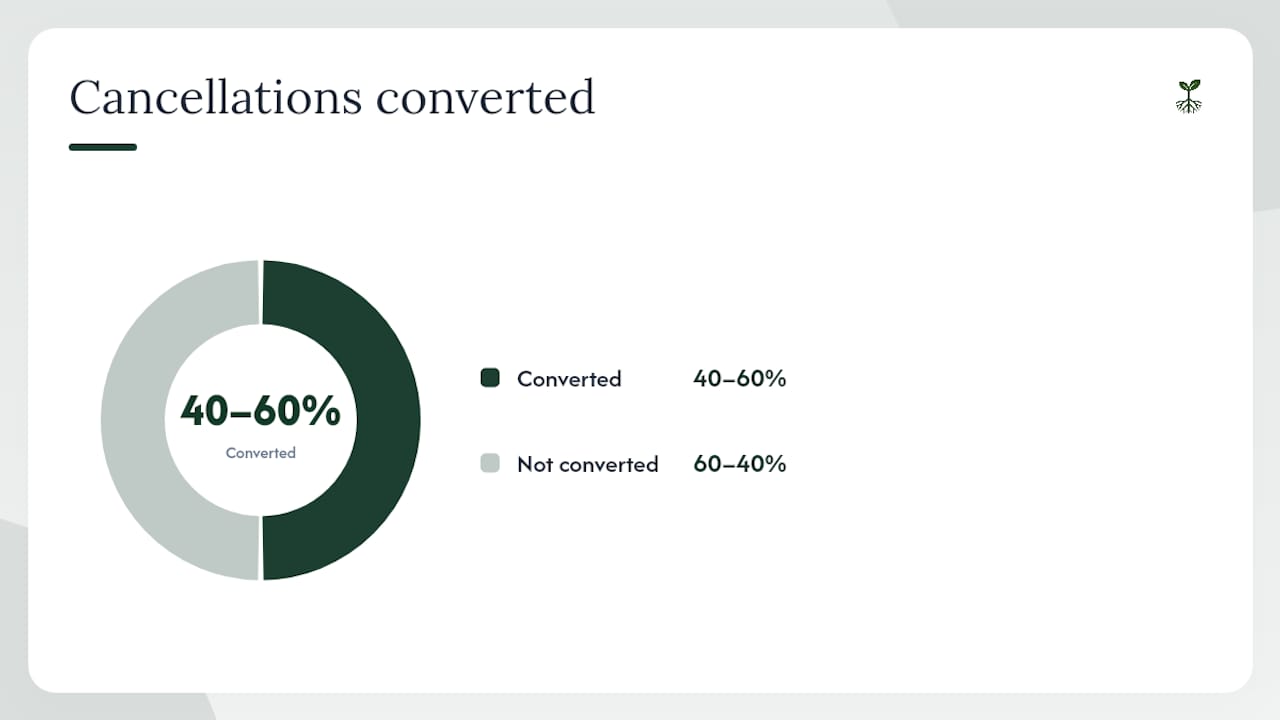
- Build your reschedule flow. When a client cancels, the system should immediately offer an alternative time or a booking link. Implementation data suggests 40–60% of cancellations can convert to rebooked appointments when a rebooking offer fires instantly.
- Test everything before going live. Book a test appointment using your own phone number. Confirm you receive the confirmation email, the 48-hour reminder, and the 24-hour SMS. Reply "N" and verify the rebooking flow triggers correctly.
In the first week after launch, track key metrics like message deliverability rate, confirmation rate, and cancellations converted to rebooks. Those three metrics tell you whether the system is working or needs adjustment.
Typical pricing and a simple ROI calculation
Reminder tools for small businesses generally fall into three tiers.
Entry-level plans (basic SMS + email, one-way reminders, limited integrations) typically run $20–$50 per month. Mid-tier plans that include two-way messaging, calendar integrations, and basic reporting run $50–$150 per month. Enterprise or AI-enhanced tiers with voice reminders, HIPAA compliance, advanced analytics, and CRM sync can reach $200–$400 per month or more, depending on message volume.
For a simple ROI check, use this framework:
- Average appointment value: $150
- Weekly no-shows before reminders: 4
- Expected reduction (conservative 30%): 1.2 appointments recovered per week
- Monthly recovered revenue: ~$720
- Monthly tool cost (mid-tier): $100
- Net monthly gain: ~$620
That's a positive return in month one, which matches what small-business implementation reports consistently show. For a deeper look at what automation costs across different service tiers, the marketing automation cost breakdown from Rooted Up covers the full range.
The cost drivers to watch: message volume (SMS charges per message or per conversation), two-way reply handling, voice call channels, and HIPAA-compliant infrastructure. Each one can push your monthly cost up a tier.
The main cost variables:
- Per-message SMS pricing vs. flat monthly plans
- Two-way reply handling fees
- Voice/phone channel add-ons
- HIPAA-compliant data storage and BAA requirements
- Number of locations or staff seats
Privacy, TCPA, and when HIPAA applies
Sending automated text messages to clients in the U.S. isn't just a technical task. It's a regulated one. Getting this wrong can expose your business to fines and complaints.
TCPA compliance checklist:
- Obtain written or documented digital consent before sending any marketing or reminder SMS
- Include your business name in every message
- Provide a clear opt-out instruction in every message ("Reply STOP to unsubscribe")
- Honor opt-outs immediately and log them
- Limit message frequency to what the client consented to
- Keep records of consent, including the date, method, and scope
When HIPAA applies: if you're a healthcare provider, therapist, dentist, or any covered entity under HIPAA, your reminder tool must sign a Business Associate Agreement (BAA) with you before handling any protected health information (PHI). That includes appointment times, provider names, and any health-related details in the message. Not every reminder tool offers a BAA. Ask before you sign up.
Pro Tip: Store your consent records in a CRM or contact log, not just in the reminder tool. If you ever switch platforms, you need proof of consent that lives independently of any single vendor.
Appointment reminders that contain only the date, time, and business name, with no health details, generally fall outside HIPAA's scope. But the moment a message references a condition, treatment, or provider specialty, HIPAA applies. When in doubt, keep messages generic and consult a healthcare compliance attorney.
How to write reminders that actually get responses
Timing and copy are where most businesses leave confirmation rate on the table. The message that goes out at the wrong time, or says too much, gets ignored.
Recommended timing sequence:
- Instant confirmation (at booking): email with full appointment details, provider name, address, and a reschedule link
- 48-hour reminder (email or SMS): brief, friendly, with a two-way reply option
- 24-hour two-way SMS: the highest-impact touch; short, direct, single reply instruction
- Same-day short alert (2–3 hours before): optional, but useful for high no-show cohorts or new clients
A 72-hour touchpoint makes sense for appointments that require prep (fasting, paperwork, travel), but skip it for routine bookings. Adding a fourth message to a simple haircut appointment is friction, not service.
Copy principles that work:
- Lead with the client's name
- State the date and time in plain language ("Tomorrow at 2 PM")
- One instruction only ("Reply Y to confirm")
- Stay under 160 characters for SMS
- No jargon, no filler
Pro Tip: Test two versions of your 24-hour SMS: one that asks "Reply Y to confirm" and one that asks "Does this time still work? Reply YES or NO." Run each for two weeks and compare confirmation rates. Small copy changes often produce 5–10 percentage point swings in response rates.
For appointment reminder emails, the subject line does most of the work. "Your appointment is tomorrow at 2 PM" outperforms "Appointment Reminder" every time because it answers the client's first question before they open the message.
How Rooted Up implements reminders for solo professionals
Rooted Up's onboarding for automated reminder workflows is built around getting a live system running fast, without putting the setup burden on the client.
Typical onboarding timeline:
- Day 1 (Discovery): audit existing booking sources, identify calendar platforms, and map the client's current no-show rate
- Days 2–3 (Templates and timing): write message templates, set timing rules, and configure two-way reply logic
- Days 3–4 (Integrations): connect calendar, booking platform, and CRM; verify triggers fire correctly
- Day 5 (Pilot): run a small batch of live reminders with monitoring; check deliverability and confirmation responses
- Day 6–7 (Go-live): full deployment with an analytics dashboard configured for weekly reporting
Most clients are fully live within one week. The first measurable results, specifically a drop in same-day no-shows and an increase in confirmed appointments, typically appear within the first two to three weeks.
What Rooted Up includes in its reminder service: template copywriting, integration setup, two-way reply logic configuration, an analytics dashboard, and ongoing monitoring. Clients don't manage the system day-to-day. That's the point.
For a sense of what Rooted Up's client results look like across other automation services, the Google search ranking case studies show the kind of measurable lift that consistent, well-configured automation produces.
The case for keeping some appointments human
Automation handles scale. It does not handle nuance.
For the vast majority of appointments, a well-configured multi-touch sequence is the right answer. It's consistent, it runs at 2 AM, and it doesn't forget. But there's a category of client where a human call outperforms any automated message: the persistent no-show, the client with complex prep requirements, and the new patient who hasn't yet built trust with your practice.
For those clients, a brief staff call, not a fourth automated text, is what actually moves the needle. The NEJM Catalyst perspective on automation versus manual outreach makes this point clearly: automation is highly cost-effective for scale, but targeted manual outreach still outperforms it for specific high-risk cohorts.
Rooted Up's operating principle is automation-first, human-when-needed.
Rooted Up gets your reminder system live in a week
Solo professionals and small business owners who want a working reminder system without spending weeks configuring it have a direct path: Rooted Up sets it up for you.

The service covers everything from template copy and timing logic to calendar integration and two-way reply configuration. You get an analytics dashboard from day one, and Rooted Up monitors performance on an ongoing basis so you're not checking it manually.
For new clients, Rooted Up offers a free 30-minute workflow audit to identify where no-shows are happening and what a reminder sequence would recover. From there, setup typically takes one week. Visit Rooted Up's services page to see the monthly plans, or reach out directly for a scoped quote based on your appointment volume and platforms.
Sources
The research and implementation guides cited throughout this article:
- Implementation of Televox appointment reminder systems and missed appointment rates (University of Chicago Medicine evaluation)
- No-Show Statistics & Data 2026 — Appointment Reminder
- Automated Appointment Reminders for Small Business: Cut No-Shows and Save Hours Every Week | Dark Harbor
- Cut No-Shows: Auto Appointment Reminders Guide | US Tech Automations