
An AI workflow audit is a diagnostic review of your AI-enabled marketing and administrative processes. It finds where you're losing time, flags data risks, and delivers a prioritized 30–90 day roadmap of automations worth building. For a solo professional, that means less time on repetitive admin and more capacity for the client work that actually pays.
The core deliverables from a solid audit:
- Workflow inventory: every tool, trigger, and handoff you currently use
- Governance and privacy checks: what data your AI tools touch and whether that's safe
- Quick wins list: a few automations you can build quickly
- Roadmap: a phased plan with prioritized steps and expected outcomes
Your next step, right now: spend 15 minutes listing every task you repeated more than twice last week. That list is the foundation of your audit.
Table of Contents
- What does an AI workflow audit actually check?
- Your 15-minute DIY inventory checklist
- Sample 30–90 day implementation roadmap
- DIY, contractor, or managed service: which route fits you?
- What results can a solo professional realistically expect?
- Confidentiality and ethical considerations
- What does an AI workflow audit cost?
- Key Takeaways
- The part most solo professionals skip
- Rooted Up handles the audit so you don't have to
What does an AI workflow audit actually check?
A practical audit covers four domains. The table below maps each one to the systems it touches and the outcome metric it produces.
| Domain | Systems Reviewed | Outcome Metric |
|---|---|---|
| Tool inventory and data flows | CRM, email, calendar, invoicing, content repo | Hours spent per task per week |
| Process mapping | Triggers, handoffs, human approval checkpoints | Bottleneck count, handoff delay |
| Governance and brand protection | AI vendor policies, data classification, voice docs | Risk flags, brand-drift incidents |
| Outcome measurement | Analytics, conversion tracking, response time logs | Conversion lift, response time, edit rate |
Process mapping is where most solo professionals find the most waste. A task that looks like "send a follow-up email" often hides four manual steps: checking the CRM, drafting the message, formatting it, and logging the send. Auditing those steps as a sequence, not a single action, is what reveals which part is worth automating.
Your 15-minute DIY inventory checklist
The fastest way to start is a quick inventory now, followed by a seven-day log if you want higher confidence. Ranking your top non-revenue tasks before you build anything is the single most important rule: automate the wrong workflow first and you've wasted a week.
- Flag your top two candidates. For most solo professionals, lead intake and invoice processing consistently produce the largest early time savings.
Pro Tip: The two workflows that most often yield the fastest wins for solo pros are new-client intake forms and follow-up email sequences. Both are high-frequency, low-judgment, and already template-driven, which means an AI tool can handle 80% of the work with minimal setup.
Sample 30–90 day implementation roadmap
The setup phase costs time before it saves time. Most solo professionals see compounding hours-saved gains appear around month two, not week one.
| Phase | Timeline | Owner | Est. Hours | Deliverable |
|---|---|---|---|---|
| Discovery and inventory | — | You (or auditor) | 3–5 hrs | Workflow inventory sheet, scored task list |
| Quick wins build | Weeks 2–6 | You (or contractor) | 6–10 hrs | 2–3 live automations, governance checklist |
| Iterative tuning | Weeks 6–12 | You (or managed service) | 2–4 hrs/month | Refined prompts, voice doc, quality KPIs |
| Monitoring and rollout | Months 3–6 | Managed service or self | 1–2 hrs/month | Monthly report, new workflow candidates |
Cost cues: a DIY audit costs primarily your time (roughly 10–15 hours total in the first two months). A one-time contractor engagement typically runs a few hundred to a few thousand dollars depending on scope. A managed subscription service spreads that cost monthly and includes ongoing tuning, which is where the compounding value shows up.
DIY, contractor, or managed service: which route fits you?
The right answer depends on four variables: your technical comfort, available time, risk tolerance, and how client-facing your AI outputs are.
| Profile | Recommended Route | Key Condition |
|---|---|---|
| Tech-comfortable, 5+ hrs/week available | DIY | Low client-facing risk, internal workflows only |
| Limited time, moderate budget | One-time contractor | Clear scope, defined deliverables upfront |
| Client-facing outputs, ongoing needs | Managed subscription | Needs governance, voice consistency, monthly tuning |
| High-risk data (healthcare, legal, finance) | Managed subscription + legal review | Compliance requirements exceed DIY capacity |
When evaluating a contractor or managed service, ask these questions: What does your audit report include? Can you show a sample deliverable? How do you handle a workflow that fails after go-live? What's your data handling policy for client information?
Red flags: any provider who skips governance entirely, can't show a sample roadmap, or promises full automation of client-facing communications with no human review gate.
A credible audit report includes a scored workflow inventory, a phased roadmap with time estimates, at least one governance checklist, and defined test cases for each automation.
What results can a solo professional realistically expect?
The numbers that show up most consistently: solo operators who run steady iterations for two months recover 12–18 hours per week on average. That's not week-one math. The first month is setup and learning. Month two is where the compounding starts.
A service-based freelancer who automates intake, follow-up emails, and invoice reminders typically recovers 12–18 hours per week after the initial setup phase, then adds more as they tune. A solo healthcare provider who adds AI-assisted appointment confirmations and review requests often sees a measurable lift in Google reviews within 60 days, which directly affects local search visibility.
The measurement approach matters. Track hours saved per workflow weekly for the first 90 days. Log every client-facing error. Measure response time before and after each automation goes live. Those three metrics tell you whether an automation is working or needs adjustment.
Confidentiality and ethical considerations
Two issues come up in every audit: what you share with AI tools and what those tools do with it.
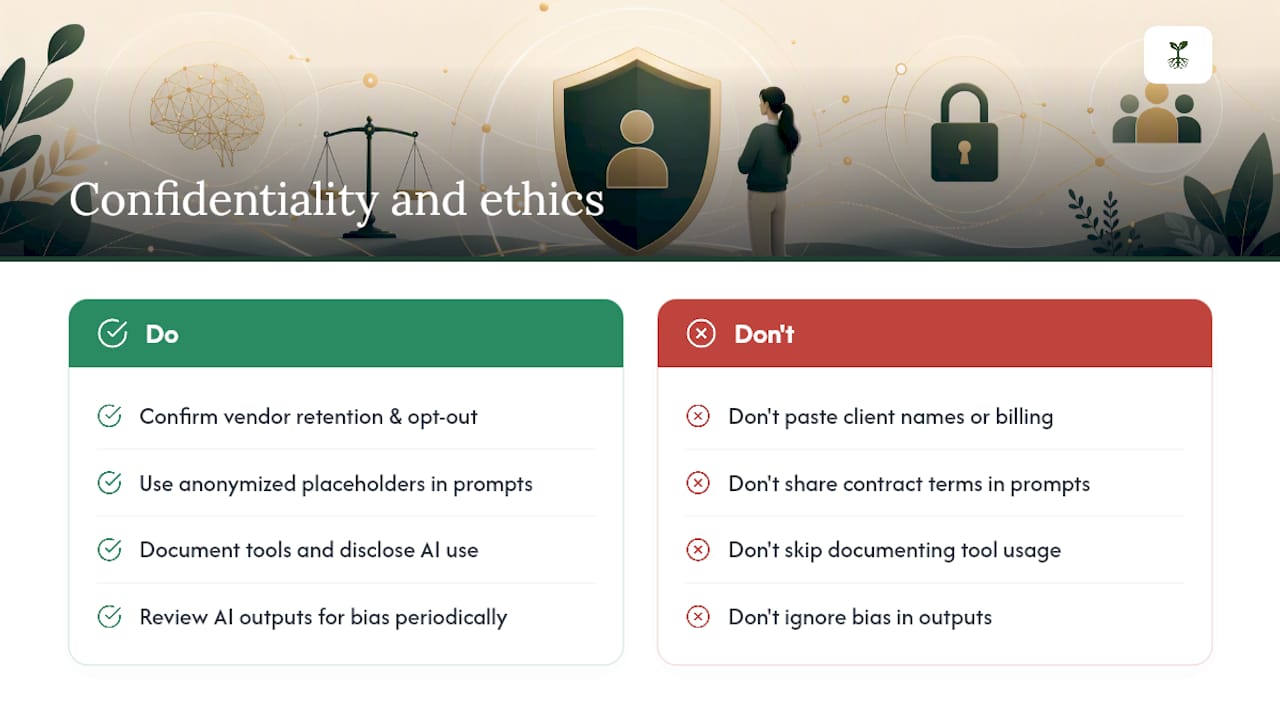
On confidentiality, the practical rule is simple: never paste a client's full name, contract terms, or billing details into a general-purpose AI tool unless you've confirmed the vendor's data retention policy and opted out of model training. Use anonymized placeholders in prompts when the underlying task is generic.
On ethics, the bigger risk for solo professionals is opacity. If a client asks how their content was produced or how their data was used, you need a clear answer. Document which tools touch which workflows and keep that record current. For client-facing AI outputs, disclose AI involvement where your industry or client relationship requires it.
Bias is a real concern in content and communication workflows. Review AI-generated client communications periodically for tone assumptions, demographic language, and any framing that could alienate a segment of your audience.
What does an AI workflow audit cost?
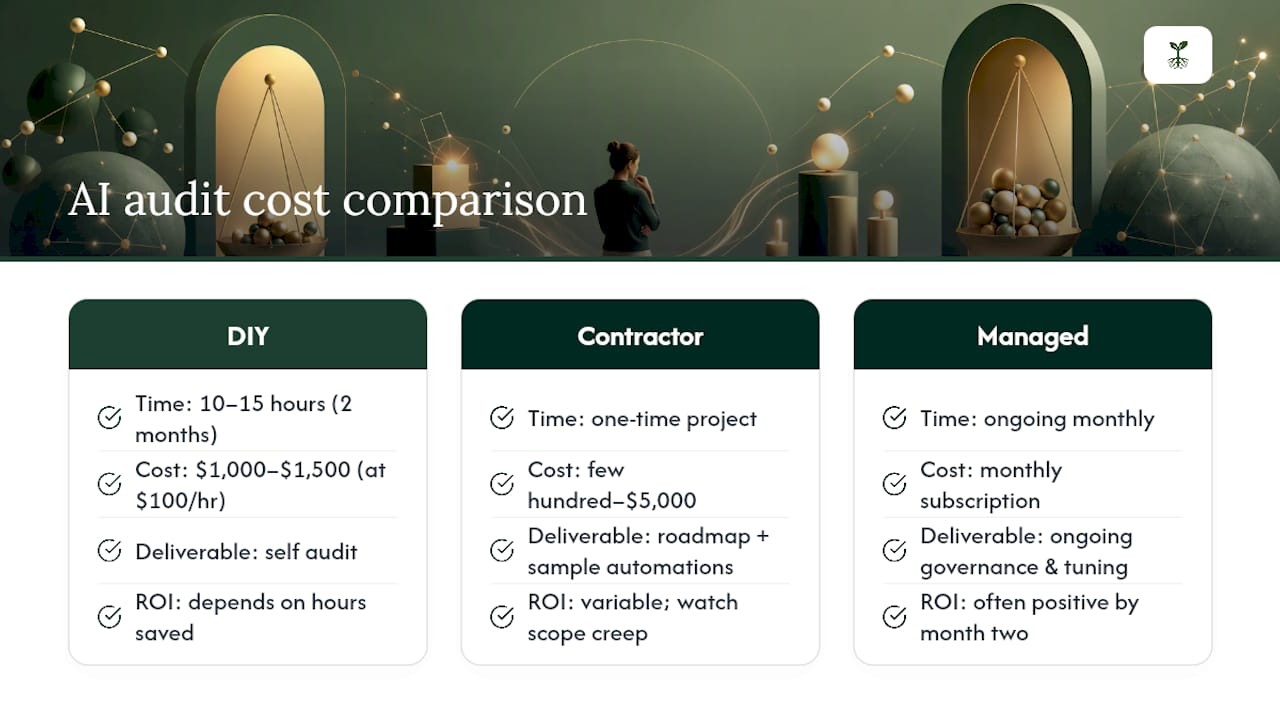
DIY costs your time: roughly 10–15 hours across the first two months, plus any tool subscriptions you add. If your hourly rate is $100, that's a $1,000–$1,500 investment in opportunity cost.
A one-time contractor audit typically ranges from a few hundred dollars for a lightweight review to $2,000–$5,000 for a full scoped engagement with a roadmap and sample automations. Scope creep is the main risk: get deliverables in writing before you start.
A managed subscription service, like what Rooted Up offers, spreads cost across monthly plans and includes ongoing governance, tuning, and new workflow identification. For solo professionals with consistent client-facing output needs, the monthly model usually produces better ROI than a one-time project because the value compounds as workflows are refined.
The ROI calculation is straightforward: multiply hours saved per week by your hourly rate, then subtract the monthly cost of the service. If the math is positive by month two, the audit paid for itself.
Key Takeaways
A well-run AI workflow audit pays for itself by month two when you start with governance, score workflows by repetitiveness and judgment level, and keep one human checkpoint on every client-facing output.
| Point | Details |
|---|---|
| Start with a 15-minute inventory | List every repeated task from last week; score by repetitiveness and judgment required. |
| Governance comes first | Classify data sensitivity and verify vendor retention policies before connecting any tool to client data. |
| Expect gains in month two | Initial setup costs time; compounding hours-saved results typically appear after 60 days of steady iteration. |
| Match the route to your profile | DIY fits internal, low-risk workflows; managed subscriptions fit client-facing, ongoing output needs. |
| Rooted Up for managed audits | Rooted Up delivers scoped AI workflow audits and monthly managed plans for solo professionals needing governance, voice consistency, and ongoing tuning. |
The part most solo professionals skip
Most AI workflow guides lead with the automation. Build the Zap, connect the CRM, watch the hours disappear. The governance piece gets a footnote, if it appears at all.
That's backwards. The solo professionals who get the most out of AI aren't the ones who automate the most. They're the ones who audited first, classified their data, and built human checkpoints into the workflows that actually touch clients. The automations they built are smaller in number and far more reliable.
The 15-minute inventory isn't a warm-up exercise. It's the whole point. You can't score a workflow for AI suitability until you know what the workflow actually costs you. And you can't govern what you haven't mapped.
The other thing worth saying: the 30–90 day roadmap isn't a project plan. It's a learning loop. The first automation you build will teach you more about your own processes than any checklist. Build it, measure it, adjust it. That's the actual methodology.
Rooted Up handles the audit so you don't have to
Solo professionals who want the efficiency gains without the setup time have a direct path: Rooted Up's AI workflow audit and managed subscription plans are built specifically for service-based professionals who need governance-first, client-safe automations without hiring a full-time ops person.

When you work with Rooted Up, you get a scoped workflow inventory, a prioritized roadmap with time and cost estimates, a governance checklist tailored to your business, and ongoing monthly tuning as your workflows evolve. The audit is structured around a 30–90 day implementation timeline, and the managed plan keeps it running after that.
Ready to see which workflows are costing you the most time? View Rooted Up's services and packages to book a consultation or learn more about the monthly AI operations plans built for solo professionals.