
Regie.ai is the strongest overall pick for teams that want one platform to handle prospecting, sequencing, and outbound coaching in a single workflow. If you need something narrower, Apollo.io wins on prospecting scale and data volume, and HubSpot Sales Hub AI wins if your CRM is already HubSpot and you want the assistant built in rather than bolted on. Every other tool on this list earns its place for a specific bottleneck, not because it does everything.
Skip the model comparisons. Run a 3-rep pilot for 30 days and measure one thing: hours returned per rep per week. HubSpot's research found 64% of sales professionals using AI to automate manual tasks saved 1 to 5 hours weekly, and sellers who partnered with AI effectively were 3.7 times more likely to hit quota. SyncGTM puts the ceiling higher, at 2 to 4 hours per rep per day, once account research and CRM entry are automated. If your team lacks the bandwidth to run that pilot internally, a managed AI operations partner like Rooted Up can set it up for you.
- Best overall: Regie.ai, for full-workflow coverage from prospecting to sequencing.
- Best for prospecting scale: Apollo.io, for data volume and outbound automation.
- Best CRM-native pick: HubSpot Sales Hub AI, for teams already living in HubSpot.
Key Takeaways
The right AI sales assistant matches your team's specific bottleneck, and hours returned per rep per week is the only metric that reliably proves it's working.
| Point | Details |
|---|---|
| Pick by bottleneck | Match the tool category (prospecting, coaching, CRM copilot) to your actual problem, not the most popular name. |
| Pilot small first | Test with 3 to 5 reps for 90 days and measure hours saved before rolling out wider. |
| Demand CRM write-back | Confirm the tool writes clean data into your CRM, not just reads from it. |
| Check accuracy on your data | Test transcription and research accuracy on your own calls and accounts, not vendor demos. |
| Consider managed setup | Rooted Up can run pilot design, integration, and monitoring for teams without spare bandwidth to own the process. |
Table of Contents
- How Do the Top AI Sales Assistants Compare?
- What Are the Best AI Sales Assistants for Different Use Cases?
- How Do You Choose the Right AI Sales Assistant?
- How We Evaluated These Tools
- What Should You Expect From a 90-Day Pilot?
- Frequently Asked Questions
- Sources
How Do the Top AI Sales Assistants Compare?
Before you book a single demo, it helps to see how these tools stack up on the dimensions that actually determine whether a rollout succeeds: what each one is built for, how deep the CRM integration goes, and whether the pricing model punishes you for scaling up.
| Tool | Best for | Notable features | CRM integrations | Starting price / free trial | Platforms |
|---|---|---|---|---|---|
| Regie.ai | Full-workflow outbound | AI sequencing, content generation, agentic outreach | Salesforce, HubSpot | Custom quote, demo available | Web |
| Avoma | Meeting intelligence | Call transcription, coaching scorecards, meeting summaries | Salesforce, HubSpot, Pipedrive | Free tier, paid plans from entry level | Web, iOS, Android |
| Lavender | Email coaching | Real-time email scoring, tone and personalization suggestions | Salesforce, HubSpot, Outreach | Free tier, paid plans available | Web, Chrome extension |
| Zapier | Workflow glue between tools | No-code automation, AI-powered "Zaps," app connectors | Nearly all major CRMs via integrations | Free tier, paid plans by task volume | Web, iOS, Android |
| Postaga | Outreach for content and partnerships | Automated prospecting for link building and collaboration outreach | Limited native CRM sync | Paid plans, free trial available | Web |
| Clay | Data enrichment and signal-based outreach | Waterfall enrichment, AI research agents, custom workflows | Salesforce, HubSpot via integration | Usage-based credits, free trial | Web |
| Dialpad | AI-powered calling and coaching | Real-time call transcription, live coaching, sentiment analysis | Salesforce, HubSpot, Zendesk | Paid plans, free trial available | Web, iOS, Android, desktop |
| HubSpot Sales Hub AI | CRM-native assistant | Prospecting agent, email generation, deal insights | Native (HubSpot) | Free tier, paid tiers scale by seat | Web, iOS, Android |
| Apollo.io | Prospecting at scale | Contact database, sequencing, AI writing assistant | Salesforce, HubSpot | Free tier, paid plans by seat and credits | Web, Chrome extension |
| Outreach.io | Enterprise sequencing | Sales execution platform, AI-guided selling, forecasting | Salesforce, HubSpot | Custom quote, demo available | Web |
| Drift | Conversational inbound qualification | Chatbot-based lead qualification, meeting booking | Salesforce, HubSpot | Custom quote, demo available | Web |
| Agent Frank | Autonomous outbound agent | AI-run outbound campaigns with minimal rep input | Salesforce, HubSpot via integration | Custom quote | Web |
| Nooks | AI dialer and call prep | Parallel dialing, AI-generated call briefs, live coaching | Salesforce, HubSpot | Custom quote, demo available | Web |
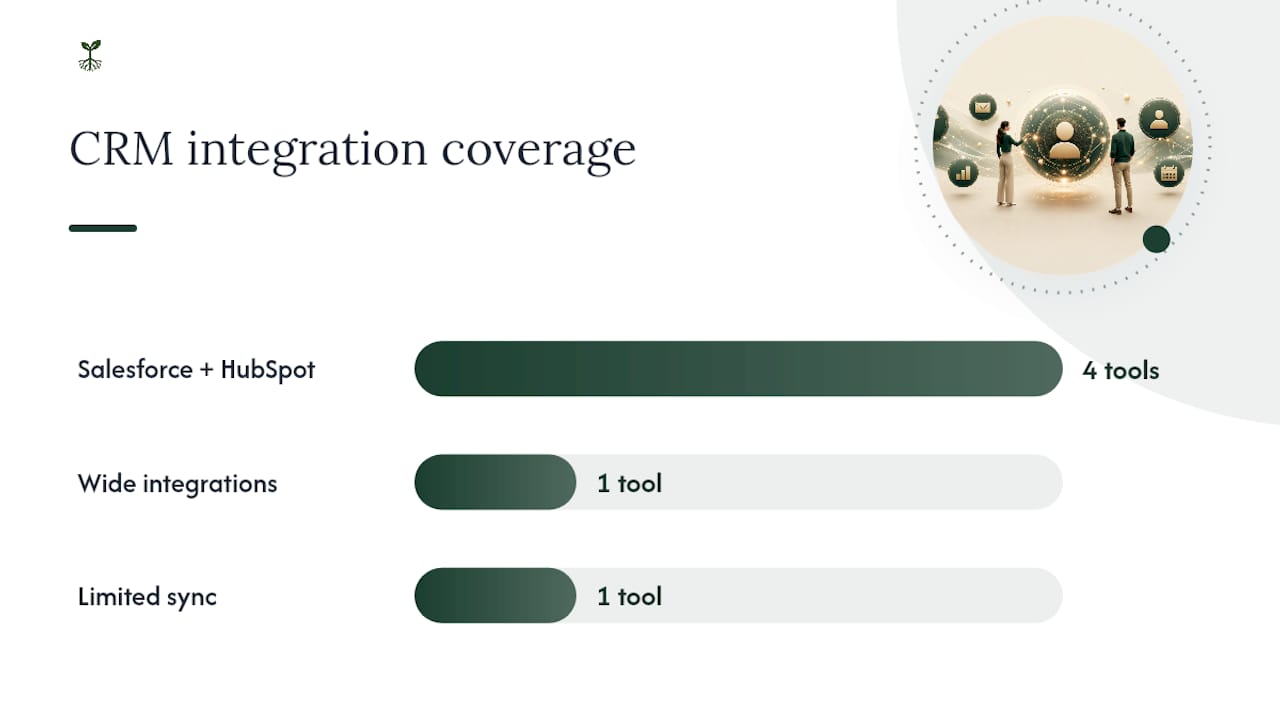
Pricing shapes fall into three buckets. Per-seat pricing (HubSpot Sales Hub AI, Apollo.io, Outreach.io) scales predictably as you add reps, which makes budgeting easy but can get expensive at 20+ seats. Usage-based pricing (Clay, Zapier) charges by task volume or credits, which rewards lean teams but can spike unpredictably if a campaign goes wide. Custom-quote pricing (Regie.ai, Outreach.io, Drift, Agent Frank, Nooks) usually means the vendor wants to scope your call volume or seat count before naming a number, which is standard for tools built around enterprise deployments.
A handful of these vendors don't publish pricing at all, and that's not automatically a red flag. It usually means the tool is priced around usage patterns, like call volume for a dialer or seats plus features for a platform, that vary too much for a flat rate card to make sense. Treat opaque pricing as a prompt to ask for a detailed quote broken into components, not as evidence the tool is overpriced.
What Are the Best AI Sales Assistants for Different Use Cases?
The tools here fall into a few categories, and matching the category to your actual bottleneck matters more than picking whichever name comes up most in search results. Zapier's own roundup of AI sales assistant software makes the same point: some tools are full-workflow assistants, others are narrow point solutions, and the market rewards knowing which one you need before you start demoing.
Regie.ai: the full-workflow pick
Regie.ai builds and executes outbound sequences, drafts personalized email content, and layers in agentic outreach that can adapt messaging based on prospect signals. Its standout feature is that it doesn't just suggest what to send. It writes and schedules the sequence, then adjusts based on engagement data.
Best for: Teams that want one platform running prospecting and sequencing end to end, rather than stitching together three separate tools.
Pricing shape: Custom quote based on seats and volume, with a demo available before you commit.
- Pros: Genuine end-to-end coverage; reduces the number of tools a rep has to touch daily; agentic features adapt to prospect behavior instead of running static sequences.
- Cons: Custom pricing means no quick self-serve signup; full-workflow tools take longer to configure than point solutions.
Pro Tip: Before rolling Regie.ai out to a full team, run it on one segment of your pipeline first. Full-workflow tools tend to touch every stage of the funnel, so a misconfigured sequence can quietly damage a lot of relationships at once.
Avoma: meeting intelligence that actually gets used
Avoma transcribes calls, generates meeting summaries, and scores rep performance against a coaching rubric. What separates it from a basic transcription tool is the coaching layer: it flags talk-to-listen ratios, missed discovery questions, and moments where a rep talked over an objection instead of addressing it.

Best for: Sales managers who need scalable call coaching without listening to every recording themselves.
Pricing shape: Free tier available, with paid plans that scale by seat count.
- Pros: Genuinely useful coaching scorecards, not just transcripts; free tier lets you test before committing budget; integrates cleanly with Salesforce and HubSpot.
- Cons: Coaching insights are only as good as call volume, so solo reps or low-call-volume teams see less value; some managers find the scorecard categories need customization to match their own sales methodology.
"Successful teams treat AI as a multiplier that removes friction, improves execution quality, and democratizes coaching by surfacing personalized recommendations from win history and competitor patterns," according to Xactly's analysis of AI sales assistant software.
Lavender: an email coach that lives in your inbox
Lavender scores outbound emails in real time as you write them, flagging length, tone, personalization gaps, and predicted reply likelihood. It's a Chrome extension more than a platform, which is exactly why it fits teams that already have a CRM and sequencing tool and just need better emails going out the door.
Best for: Reps who write a high volume of one-off emails and want instant feedback rather than a post-send report.
Pricing shape: Free tier for individual use, with paid plans for team-wide rollout.
- Pros: Immediate, in-the-moment feedback instead of a delayed report; low setup friction since it layers on top of existing email tools; free tier makes it easy to test with a handful of reps first.
- Cons: Doesn't replace a sequencing or CRM tool, so it's an add-on rather than a full solution; scoring can feel overly rigid for reps with an established personal voice.
Pro Tip: Watch for reps who start writing to the score instead of the prospect. A tool like Lavender should tighten your emails, not turn every rep's voice into the same generic template.
Zapier: the connective tissue between everything else
Zapier doesn't originate sales activity. It automates what happens between your other tools, using AI-powered "Zaps" to route leads, update records, and trigger follow-ups without manual intervention. Zapier's own guide to AI sales assistants frames this well: the value isn't in any single feature, it's in eliminating the gaps between tools that otherwise require a rep to manually copy data from one system to another.
Best for: Teams running several point solutions (a dialer, a CRM, an email tool) that need those systems talking to each other automatically.
Pricing shape: Free tier for light use, paid plans scale with task volume.
- Pros: Near-universal CRM and app compatibility; low cost of entry; fixes the "swivel chair" problem of manually re-entering data across tools.
- Cons: Requires someone to actually build and maintain the automations; not a sales assistant in the traditional sense, more of an infrastructure layer.
Postaga: outreach built for partnerships, not cold sales
Postaga automates prospecting specifically for link building, partnership outreach, and content collaboration campaigns. It's a narrower tool than most on this list, and that's the point: it's not trying to be a full sales platform.
Best for: Marketing and business development teams running partnership or content outreach rather than direct sales sequences.
Pricing shape: Paid plans with a free trial available.
- Pros: Purpose-built for a specific outreach type most general sales tools handle poorly; free trial lets you test fit before paying.
- Cons: Limited native CRM sync means data often has to be manually reconciled; not a fit for teams running standard sales sequences.
Clay: signal-based enrichment for reps who hate cold lists
Clay pulls data from dozens of sources to enrich prospect records, then uses AI research agents to surface buying signals, like a company hiring for a role your product supports, before a rep ever picks up the phone. It's less about automating outreach and more about making sure the outreach that does happen is aimed at the right accounts.
Best for: Teams with a defined ideal customer profile who want to prioritize accounts based on real-time signals rather than static lists.
Pricing shape: Usage-based credits with a free trial.
- Pros: Enrichment quality is a genuine differentiator; the waterfall approach (trying multiple data sources until one succeeds) reduces dead-end records; flexible enough for custom research workflows.
- Cons: Usage-based pricing means costs scale with how aggressively you enrich; requires some setup investment to configure workflows well.
Pro Tip: Check enrichment accuracy on a sample of 50 accounts before committing to a plan. Clay's waterfall model is only as good as the underlying data sources it queries, and coverage varies by industry.
Dialpad: calling with a coach built in
Dialpad handles the calling infrastructure itself, then layers real-time transcription, live coaching prompts, and sentiment analysis on top. A rep on a call sees suggested talking points pop up based on what the prospect just said, which is a different kind of assistance than a post-call summary.
Best for: Teams that make a high volume of calls and want coaching to happen live, not after the fact.
Pricing shape: Paid plans with a free trial.
- Pros: Live coaching during the call itself is rare among competitors; broad platform support including desktop and mobile; solid CRM write-back to Salesforce and HubSpot.
- Cons: Transcription accuracy on calls with heavy accents or poor audio quality can dip below usable thresholds; live prompts can distract newer reps who aren't used to reading a screen mid-call.
HubSpot Sales Hub AI: the CRM-native option
HubSpot Sales Hub AI builds its assistant directly into the CRM rather than as a bolt-on. Its prospecting agent surfaces leads, drafts emails, and summarizes deal activity, all without a rep leaving the HubSpot interface.
Best for: Teams already running HubSpot as their CRM who want AI features without adding another tool to the stack.
Pricing shape: Free tier available, paid tiers scale by seat.
- Pros: Zero integration friction since it's native to the CRM you already use; free tier makes testing low-risk; deal insights pull directly from CRM history without manual data entry.
- Cons: Value is capped if you're not already a HubSpot customer; some AI features are gated behind higher-tier plans.
Apollo.io: prospecting at volume
Apollo.io combines a large contact database with sequencing and an AI writing assistant, making it a go-to for teams that need to generate pipeline from scratch rather than working an existing list. The AI layer helps draft outreach copy and suggests send timing based on engagement patterns.
Best for: Teams that need to build prospect lists at scale, not just manage an existing book of accounts.
Pricing shape: Free tier, paid plans scale by seat and enrichment credits.
- Pros: Database size and quality are a real advantage for outbound-heavy teams; combines prospecting and sequencing in one tool; free tier is generous enough for genuine testing.
- Cons: Data accuracy on smaller or newer companies can lag behind larger enterprise records; credit-based pricing on enrichment can add up fast for high-volume users.
Outreach.io: sequencing for larger sales orgs
Outreach.io is built for sales execution at scale, combining sequencing, AI-guided selling recommendations, and forecasting in one platform. It's a heavier lift to set up than most tools here, which is exactly why it's aimed at larger teams with dedicated sales operations support.
Best for: Larger sales organizations that need forecasting and pipeline visibility alongside sequencing, not just outbound automation.
Pricing shape: Custom quote, demo required.
- Pros: Forecasting and AI-guided selling add a layer most sequencing tools lack; scales well for large, complex sales orgs; deep Salesforce integration.
- Cons: Custom pricing and setup complexity make it a poor fit for small teams; overkill for a solo rep or a 3-person pilot.
Drift: conversational qualification for inbound leads
Drift uses a chatbot to qualify inbound website visitors and book meetings automatically, without a rep needing to be available in real time. It's the one tool on this list built entirely around inbound rather than outbound motion.
Best for: Teams with meaningful inbound traffic who want to qualify and route leads before a rep ever gets involved.
Pricing shape: Custom quote, demo available.
- Pros: Automates a step (initial qualification) that otherwise eats significant rep time; works around the clock without staffing a live chat team.
- Cons: Only useful if you have inbound volume worth automating; conversational flows need regular tuning to avoid feeling robotic to visitors.
Agent Frank: autonomous outbound with minimal rep input
Agent Frank runs outbound campaigns with an unusually light touch from reps, handling research, sequencing, and follow-up with limited human intervention. It sits at the more autonomous end of the spectrum compared to tools like Regie.ai, which still expect a rep to review and approve most steps.
Best for: Teams comfortable letting an AI agent run substantial parts of an outbound motion with light oversight.
Pricing shape: Custom quote.
- Pros: Genuinely reduces rep hands-on time for outbound execution; suited to teams with more pipeline needs than reps to work it.
- Cons: Less rep involvement means less opportunity to catch tone or targeting mistakes before they reach a prospect; requires strong human-in-the-loop guardrails to avoid autonomous errors compounding.
Pro Tip: Any tool that runs largely on autopilot needs a human checkpoint somewhere in the loop. Review a sample of Agent Frank's outbound messages weekly, not just at launch, since drift in messaging quality can go unnoticed for weeks otherwise.
Nooks: parallel dialing with AI call prep
Nooks combines a parallel dialer (calling multiple prospects at once to boost connect rates) with AI-generated call briefs and live coaching. According to Nooks' own breakdown of AI-powered sales assistants, the goal is reducing the dead time between calls and the prep work reps used to do manually before each one.

Best for: Outbound-heavy teams that want to increase call volume and connect rates without adding headcount.
Pricing shape: Custom quote, demo available.
- Pros: Parallel dialing directly increases connect rate per hour worked; AI-generated briefs cut prep time before each call; live coaching mirrors what higher-cost dialers offer.
- Cons: Custom pricing makes budget planning harder upfront; best suited to high-volume outbound motions, less useful for account-based or low-volume selling.
How Do You Choose the Right AI Sales Assistant?
Pick by bottleneck, not by feature list. If reps are drowning in CRM data entry, you need a CRM copilot like HubSpot Sales Hub AI. If calls are inconsistent and coaching doesn't scale, you need something like Avoma or Dialpad. If pipeline generation is the problem, Apollo.io or Clay solve a different issue entirely than a call-coaching tool ever could. Trellus recommends testing on real accounts and real calls before buying, specifically because feature demos rarely expose how a tool handles your actual data.
Here's a decision checklist worth running through before you sign anything:
- Name the bottleneck first. Is it prospecting volume, call quality, CRM hygiene, or follow-up speed? Pick a tool category, not a specific vendor, at this stage.
- Check CRM write-back, not just integration. A tool that reads your CRM but doesn't write clean data back into it creates more manual work, not less.
- Test transcription and research accuracy on your own data. Run 15 to 20 real calls or accounts through the tool before buying, not the vendor's demo data.
- Confirm human-in-the-loop controls exist. Can a rep review and edit an AI-drafted email before it sends? Can a manager pause an autonomous sequence mid-run?
- Ask about data retention and model training policy. Does the vendor use your call data or CRM data to train models used by other customers?
- Estimate time-to-value honestly. A point solution like Lavender should show value in days. A full-workflow platform like Regie.ai or Outreach.io realistically takes weeks.
When you get vendors on a call, a few questions separate serious platforms from ones that oversell:
- Ask for transcription or data accuracy benchmarks on a sample similar to your own call volume and industry.
- Ask what happens to your data if you cancel. Some platforms make export difficult on purpose.
- Ask whether pricing changes if call or email volume spikes mid-contract.
- Watch for vague answers about SOC2 compliance or data residency. A vendor that can't name a compliance framework directly is a red flag, not just an oversight.
A pilot for a small team typically follows this rhythm:
| Week | Milestone | What to measure |
|---|---|---|
| 1 | Setup and CRM integration | Integration completeness, data sync accuracy |
| 2 | Rep onboarding and first live use | Adoption rate, initial friction points |
| 3–4 | Full workflow use on real accounts | Hours saved per rep, CRM completeness |
| 6–8 | Mid-pilot review | Follow-up latency, meeting conversion uplift |
| 12 | Go/no-go decision | ROI against baseline, rep satisfaction |
How We Evaluated These Tools
Rankings here weighted five metrics: hours saved per rep per week, CRM data completeness after AI-assisted entry, accuracy of research and call transcription, integration depth (read access versus true write-back), and time-to-value from setup to first measurable result. Hours saved carried the heaviest weight, since it's the metric SyncGTM and HubSpot's data both point to as the clearest signal a tool is working, rather than just adding activity.
- CRM write-back tests checked whether AI-logged data matched manual entry quality across 20 to 30 sample interactions.
- Transcription accuracy checks followed the industry benchmark of roughly 90% or higher on standard audio quality, per guidance echoed across Dashly's evaluation framework.
- Time-to-value was assessed against the pilot timelines vendors themselves publish, not marketing claims.
The core stat that drove weighting: HubSpot found sellers who partner with AI effectively are 3.7 times more likely to hit quota, which is the outcome every other metric here is meant to predict.
What Should You Expect From a 90-Day Pilot?
Set a baseline before you start. Track weekly hours spent on manual research, email drafting, and CRM entry for two weeks before rollout, then compare against the same tasks post-launch.
- Weeks 1 to 2: Select 3 to 5 reps, integrate the tool, and record baseline hours on manual tasks.
- Weeks 3 to 6: Track hours returned to selling, CRM completeness rate, and follow-up latency weekly.
- Weeks 7 to 10: Measure demo-to-meeting conversion uplift and rep adoption rate; address friction points.
- Weeks 11 to 13: Compare results against baseline and decide whether to expand beyond the pilot group.
Gangly's cohort data found a typical account executive's selling-adjacent admin dropped from roughly 36 hours a week to about 8 after adopting a connected assistant, a sample-based result that's dramatic even if your own team lands somewhere more modest. Pair that expectation with HubSpot's finding that 64% of AI users save 1 to 5 hours weekly, and you get a realistic range rather than a single inflated promise.
The Mistake Teams Keep Making
The biggest error in AI sales rollouts isn't picking the wrong tool. It's assuming the tool itself is the lever. Reps who don't change their workflow around the assistant, and managers who don't coach reps on how to use it, get a fraction of the value a tool like Xactly's own framing describes: AI as a multiplier, not a replacement.
Pro Tip: Spend as much time training reps on when to override the AI as you do training them on how to use it. The tools that fail in practice usually aren't broken. Reps just never learned to trust or challenge them properly.
Managed AI Operations as an Alternative to DIY Rollout
Running a proper AI sales assistant pilot takes more than picking software. It means designing the test, integrating the CRM correctly, setting baseline metrics, and reviewing results weekly, work that a lot of sales teams don't have spare hands for. Rooted Up handles that entire process for solo professionals and small service businesses: mapping the right workflow bottleneck, setting up the integration, running the pilot, and monitoring results so you get a clean read on hours saved without burning your own team's bandwidth on trial and error.
Managed operations make sense when your team is small enough that nobody has bandwidth to own a pilot on top of quota, or when you'd rather validate the numbers with outside support before expanding a rollout. If you're weighing this against building it yourself, Rooted Up's AI workflow automation guidance for small businesses covers the setup work in more detail, and the AI operations and integration services page outlines what a monthly plan or a one-time setup engagement actually includes.
Ready to see real numbers instead of guessing? Reach out to Rooted Up to scope a 3-rep pilot or a standalone AI workflow audit, and get a clear estimate of hours-saved potential before you commit to a platform.
Frequently Asked Questions
What is the best AI sales assistant for a small sales team?
For a small team, HubSpot Sales Hub AI or Lavender tend to offer the fastest time-to-value since both have low setup friction and free tiers to test with. Full-workflow tools like Regie.ai or Outreach.io usually make more sense once you've outgrown a handful of reps.
How much time do AI sales assistants actually save?
HubSpot's data shows 64% of users save 1 to 5 hours weekly, while SyncGTM reports up to 2 to 4 hours per rep per day in more aggressive workflow automation. Actual savings depend heavily on which tasks you automate.
Do AI sales assistants integrate with Salesforce and HubSpot?
Most tools on this list, including Regie.ai, Avoma, Dialpad, Apollo.io, and Outreach.io, integrate natively with both Salesforce and HubSpot. A few, like Postaga, have more limited native CRM sync and may require manual reconciliation.
How long does it take to see results from an AI sales assistant?
A focused pilot on a single workflow typically shows measurable results within one quarter, according to guidance from Gangly. Point solutions like Lavender can show value in days, while full-workflow platforms take several weeks to fully configure.
Is it better to build an AI sales workflow in-house or use a managed service?
That depends on your team's bandwidth. Teams with a dedicated sales operations resource can often run their own pilot using the checklist above. Smaller teams without that capacity, or those who want an outside read on the numbers before committing, are usually better served by a managed AI operations engagement like the one Rooted Up offers.
Sources
For teams building their own pilot, start with the sources that focus on measurable outcomes rather than feature marketing. HubSpot's B2B sales AI research is the strongest source for adoption-level statistics, including the 3.7x quota-attainment figure. SyncGTM's breakdown gives a clear, task-level view of where hours actually get saved, which is useful for setting pilot expectations.
For category-level thinking rather than raw numbers, Zapier's roundup of AI sales assistant tools is a useful map of how the market segments into full-workflow tools versus point solutions. Trellus's guide to choosing an AI sales assistant is worth reading before any vendor call, since it frames the buying process around bottlenecks rather than features.
- AI in B2B sales: How it’s used in 2026 and the biggest benefits New data — HubSpot
- What Is an AI Sales Assistant and Should Your Team Use One? | SyncGTM
- AI Sales Assistant: What It Is and How It Works — Gangly Blog
- AI Sales Assistant: What It Does and How to Choose One — Trellus