
AI data entry automation works well when you narrow the scope to one repetitive, well-defined document type and test it against real samples before wiring it into production. Skip a defined process or a confidence-threshold plan and you'll get fast garbage instead of fast accuracy. Start today: pick a single high-volume form, pull 50 to 100 real examples, and treat governance as part of the build, not an afterthought.
TL;DR:
- AI data entry automation works best when focused on a single high-volume, structured document type tested with at least 50 to 100 real samples before full deployment.
- Reliable results require setting specific confidence thresholds, implementing schema validation, cross-field rules, and having a human review interface for low-confidence fields.
- Continuous monitoring and weekly sampling, along with regular retraining or reconfiguration, are essential to maintain high accuracy after initial rollout.
- Proper governance involves mapping fields, documenting data provenance, verifying vendor terms, and ensuring compliance with privacy regulations, especially for protected health information.
- Full automation readiness depends on narrowing scope, testing thoroughly, and maintaining oversight, as agentic AI tools currently handle routine tasks but are not fully autonomous.
Table of Contents
- What Is AI Data Entry Automation and Where Does It Work Best?
- How Does AI Change Extraction Compared to Manual Entry?
- What Should You Look for in a Data Entry Automation System?
- What Results Should You Expect From Automating Data Entry?
- How Do You Roll Out Automated Data Entry Without Breaking Things?
- What Governance and Compliance Rules Apply to AI Data Entry?
- How Do You Keep Automated Entries Accurate After Launch?
- What Do Real Pilot Results Actually Look Like?
- How Rooted Up Supports Teams Adopting This Kind of Automation
- What People Get Wrong About Agentic Automation
- How Rooted Up Can Help You Automate Data Entry the Right Way
- Sources
- FAQ
What Is AI Data Entry Automation and Where Does It Work Best?
AI data entry automation uses machine learning models, mainly optical character recognition (OCR) and natural language processing (NLP), to pull information out of documents and load it into your systems without a person typing each field. That's a meaningful jump from traditional robotic process automation (RPA), which follows fixed rules and breaks the moment a layout shifts. AI-based tools read context, so they can still extract a total amount even when the invoice template changes.
The distinction that matters for planning: structured inputs (a form with fixed fields) are far easier to automate than unstructured ones (a handwritten note or a scanned contract with inconsistent formatting). Most teams get quick wins on the structured side first.
Common places this pays off right now:
- Vendor invoices and receipts flowing into an accounting system
- Customer intake forms feeding a CRM
- Insurance claims requiring extraction of policy numbers, dates, and dollar amounts
- Repetitive CRM field updates pulled from emails or PDFs
Volume and repeatability decide whether it's worth building. A process you touch five times a month rarely clears the return-on-investment bar; one you touch 500 times almost always does.
How Does AI Change Extraction Compared to Manual Entry?
Three technology layers do the real work. OCR and layout-aware parsing convert scanned PDFs and photographed forms into machine-readable text while preserving table and field structure. NLP and large language models (LLMs) then classify that text, extract specific values, and normalize them, turning "March 3rd" and "03/03/26" into the same date format your database expects.
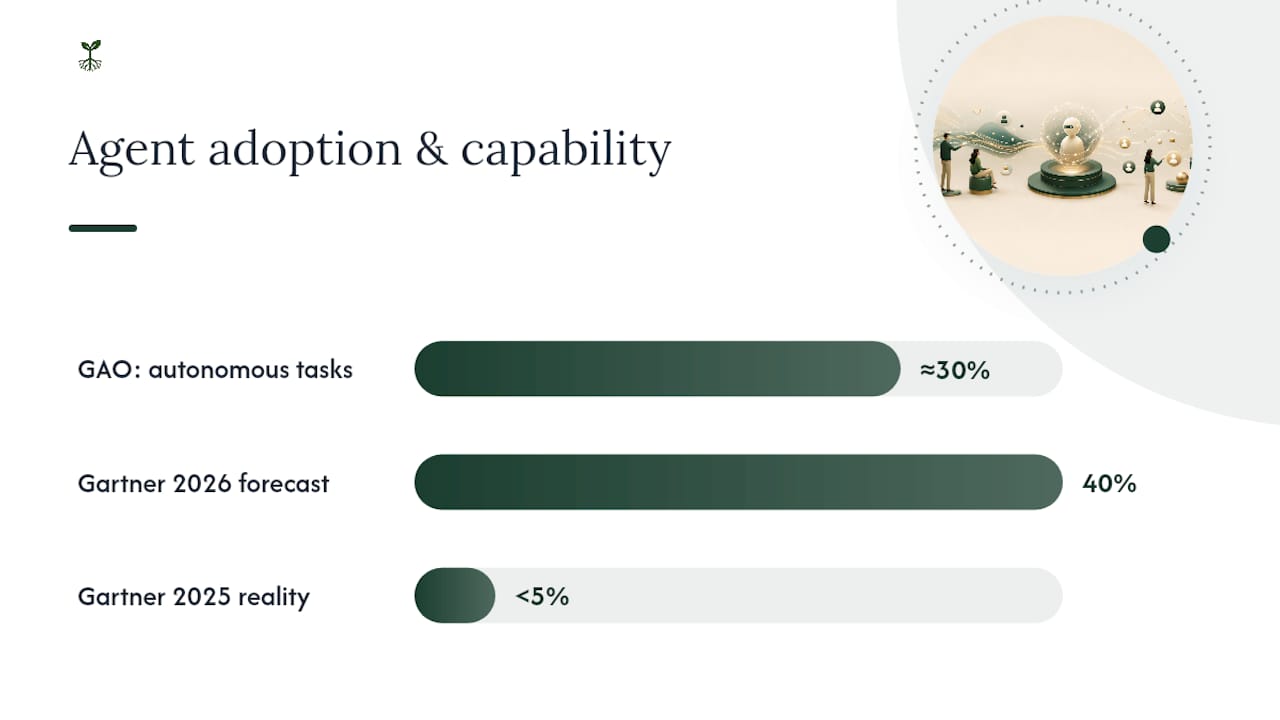
Agentic features, tools that can decide what to do next and take multiple steps, are the newest layer and the least mature. The GAO's 2025 Science & Tech Spotlight found the best-performing agent tested completed roughly 30% of software-development tasks autonomously. That's a useful reality check: agents can handle routine actions like data entry, but they're not ready to run unsupervised end to end. Start narrow and keep a human in the loop.
Integration choices carry real tradeoffs:
- APIs are the first choice for stable systems with documented endpoints
- RPA fills the gap for legacy interfaces that have no API at all
- Computer-use agents (tools that click and type inside a screen, mimicking a person) offer flexibility for messy, older software but demand the highest level of oversight
Gartner's own projection backs the caution: the firm expects task-specific AI agents to appear in 40% of enterprise applications by the end of 2026, up from under 5% in 2025. Rapid adoption is coming. Full autonomy isn't here yet.
What Should You Look for in a Data Entry Automation System?
Extraction is the easy part to demo and the hard part to trust. Key information extraction (KIE), pulling structured values out of tables and forms with inconsistent layouts, is where most tools stumble, especially on multipage documents or handwritten fields.
A system worth building or buying needs four capabilities, regardless of vendor:
- Confidence scoring at the field level, not just one score for the whole document
- Schema validation that rejects a date in a currency field before it ever reaches your database
- Cross-field rules that catch a subtotal that doesn't match its line items
- Duplicate detection that stops the same invoice from posting twice
Operationally, you also need a human-review interface that surfaces low-confidence fields for a quick check, an audit trail that logs every automated decision, and traceability back to the original source document for every record. Extraction accuracy and record accuracy are not the same thing. A model can read "$1,200.00" correctly and still drop it into the wrong column.
Pro Tip: Test your field-level confidence thresholds separately for each field type. An invoice number might need 98% confidence to auto-post, while a free-text notes field can tolerate 80%, since a wrong invoice number breaks accounting and a slightly off note field doesn't.
What Results Should You Expect From Automating Data Entry?
Teams typically see three measurable gains: minutes saved per record, higher throughput on the same headcount, and fewer downstream errors caused by manual re-keying.
The catch is a distinction most vendors gloss over: extraction accuracy measures whether the model read a value correctly, while record accuracy measures whether that value landed in the right field, in the right format, in your actual system. Character-level OCR accuracy can look excellent on a report while your accounting team still finds mapping errors every week, because a correctly read number placed in the wrong column is still a wrong record.
Realistic expectations, not hype: Field extraction accuracy on clean, structured documents can run high within weeks of setup. Record accuracy, the number that actually matters, takes longer and needs continuous validation, per the GAO's accountability framework.
Two things blunt the payoff. Very low volume processes rarely justify the setup cost. Highly variable, inconsistent document formats (think handwritten forms from dozens of different clinics) push more work back to human reviewers, eating into the time savings you were counting on.
How Do You Roll Out Automated Data Entry Without Breaking Things?
Treat this as a phased rollout with hard gates between phases, not a single deployment — follow a clear marketing automation checklist to stay on track.
- Define scope and target metrics. Pick one process, one document type, and specific KPIs (error rate under X%, time saved per record) before writing a line of integration code.
- Collect representative documents. Pull real samples, including messy edge cases, and label the fields you expect the system to extract. Skipping the ugly examples is the most common pilot mistake.
- Run dry tests against those samples. Compare extracted output to the correct answer field by field, not document by document.
- Set field-specific confidence thresholds. Decide which fields auto-post and which route to a human reviewer, and write the escalation rule down.
- Choose your integration path. Favor a direct API where your target system supports one; fall back to RPA only for legacy interfaces with no API.
- Test the full write-back path, not just extraction. Confirm records land correctly in the destination system, and define a rollback plan before you go live.
- Set pilot duration and expansion criteria. A two to four week pilot on a few hundred documents is usually enough to know whether to scale.
The NIST AI Risk Management Framework organizes this exact sequence into four functions: govern, map, measure, manage. It's a useful checklist to run your pilot against, before anyone calls it "done."
Pro Tip: Don't expand scope until your pilot clears its error-rate target for two consecutive weeks. One good week can be luck; two in a row is a pattern. For a deeper walkthrough of scoping and validation, Rooted Up's AI workflow automation guide covers the audit steps in more detail.
What Governance and Compliance Rules Apply to AI Data Entry?
Four sources of guidance cover almost every question a team will face here, and none of them require a legal department to follow.
Start with the NIST AI RMF: map which fields the system touches, document your risk tolerance for errors in each one, and assign a named person responsible for human oversight. The GAO's accountability framework adds the next layer, documenting where your training and testing data came from, testing for bias in extraction results, and monitoring live data for drift over time.
Before sending any document to a third-party AI service, confirm the vendor's actual contract terms. The FTC's 2024 guidance warns that vendors must honor privacy commitments and disclose whether your data gets used to train their models, so read the retention and training-use clauses before you sign, not after.
- Confirm data retention periods and deletion rights in writing
- Ask whether your documents train the vendor's models by default
- Check subprocessor and breach-notification terms
If any document contains protected health information (ePHI), HHS guidance makes clear that a cloud vendor processing that data is a business associate under HIPAA and needs a signed business associate agreement (BAA) before it touches a single patient record.
| Governance area | What to check | Source |
|---|---|---|
| Risk mapping | Intended fields, risk tolerance, named owner | NIST AI RMF |
| Data provenance | Training/testing data origin, bias and drift testing | GAO accountability framework |
| Vendor terms | Retention, training-use, breach notification | FTC guidance |
| Health data | BAA in place for any ePHI processing | HHS guidance |
How Do You Keep Automated Entries Accurate After Launch?
Monitoring doesn't stop once the pilot clears its threshold. Field-specific confidence scores matter more than a single document-level score, since an invoice can look 95% "confident" overall while its one critical field, the total due, sits well below that.
- Run weekly sampling on a random slice of automated records, not just the flagged exceptions
- Watch for drift, when accuracy quietly drops as new document formats appear
- Keep schema checks, cross-field validation, and duplicate detection running continuously, not just at launch
- Set a retraining or reconfiguration cadence, often quarterly, tied to what the sampling finds
Build a short incident playbook: who gets alerted, who reviews the flagged batch, and how you roll back a bad update. That structure mirrors what GAO recommends for ongoing validation, and it's the difference between catching a problem in a day versus finding it in a quarterly audit.
What Do Real Pilot Results Actually Look Like?
A common pattern shows up across pilots: a weekly data-entry task that once took hours drops to minutes once the extraction pipeline is running, because the software handles the repetitive fields correctly on the first pass.
The rough edges show up in predictable places. Easy fields, names, dates, standard categories, hit high accuracy almost immediately. Totals, ID numbers, and anything requiring cross-document math need more human review early on, often for months before confidence climbs.
Track three numbers from week one:
- Manual minutes saved per record, compared to your pre-automation baseline
- Error rate on posted records, checked against the source document
- Exceptions flagged per 1,000 records, which should trend down as the model improves
Skip these metrics and you're flying blind on whether the pilot actually worked.
How Rooted Up Supports Teams Adopting This Kind of Automation
Some providers build AI workflow audits and custom automations specifically for solo professionals and small teams who don't have an in-house data science group. That work includes scoping a pilot process, setting field-level confidence rules, and wiring the integration, the same steps outlined above. If your team lacks the bandwidth to run the checklist above internally, an outside audit is often faster than building the discipline from scratch.
What People Get Wrong About Agentic Automation
Most pitches oversell autonomy and undersell the boring part: thresholds, review queues, incident playbooks. The upside is real, but only for teams willing to measure results and retrain staff to work alongside the system, not around it.
— Jason
How Rooted Up Can Help You Automate Data Entry the Right Way
If you've read this far, you already know the hard part isn't finding an AI tool. It's scoping the pilot, setting thresholds, and building the review process around it, exactly the work most solo professionals and small teams don't have hours to spare for. Some firms handle that work directly, running AI workflow audits and building custom automations as part of monthly service plans.

The Foundation, Growth, and Partner plans bundle AI operations work alongside marketing management, so you're not paying separately for a workflow audit and a review process on top of everything else. For a narrower need, AI Operations for your own practice starts from $300 per month and covers ongoing automation support without the full marketing bundle. Teams that want a bounded, one-time engagement can start with the Foundations Sprint, a $1,500 to $3,000 project that scopes and builds your first automated process end to end.
On a first call, expect three things: a review of one candidate process, a draft confidence-threshold and escalation plan, and a realistic timeline for a working pilot. Visit Rootedup to book that first conversation and see which plan fits your current volume.
Sources
- Artificial Intelligence Risk Management Framework (AI RMF) | NIST
- Science & Tech Spotlight: AI Agents | U.S. GAO
- AI companies: uphold your privacy and confidentiality commitments | FTC
- Guidance on Direct Data Entry (DDE) and Use of Automated Tools for Entering Data | HHS
FAQ
What Is the 30% Rule for AI Agents?
It refers to a GAO finding that the best-performing AI agent tested completed roughly 30% of software-development tasks autonomously without human help. It's a useful benchmark showing agents handle routine steps well but still need human oversight for full workflows.
Which AI Tool Is Best for Data Entry?
There's no single best tool. The right choice depends on your document type, integration needs, and whether you need a stable API connection or RPA for legacy software. Evaluate any option against field-level confidence scoring, schema validation, and audit trails rather than picking based on marketing claims alone.
Is AI Eliminating Data Entry Jobs?
AI automates repetitive, high-volume entry tasks, but it shifts human effort toward review, exception handling, and quality control rather than eliminating the role outright. Someone still has to catch the low-confidence fields, validate edge cases, and manage the system, that's the human-in-the-loop model most implementations rely on.
Can ChatGPT Do Data Entry?
General-purpose chat tools can extract text from documents and help draft structured data, but they lack built-in schema validation, audit trails, and field-level confidence scoring needed for reliable production use. Purpose-built extraction pipelines, or a managed automation build, handle those governance requirements more reliably.
What Does AI Workflow Automation Cost for a Small Team?
Costs vary by scope, but Rooted Up's AI Operations service starts from $300 per month for ongoing support, while a one-time Foundations Sprint to scope and build a first automated process runs $1,500 to $3,000. Current pricing and plan details are available on Rootedup.