
What an AI-enhanced customer journey actually means for you
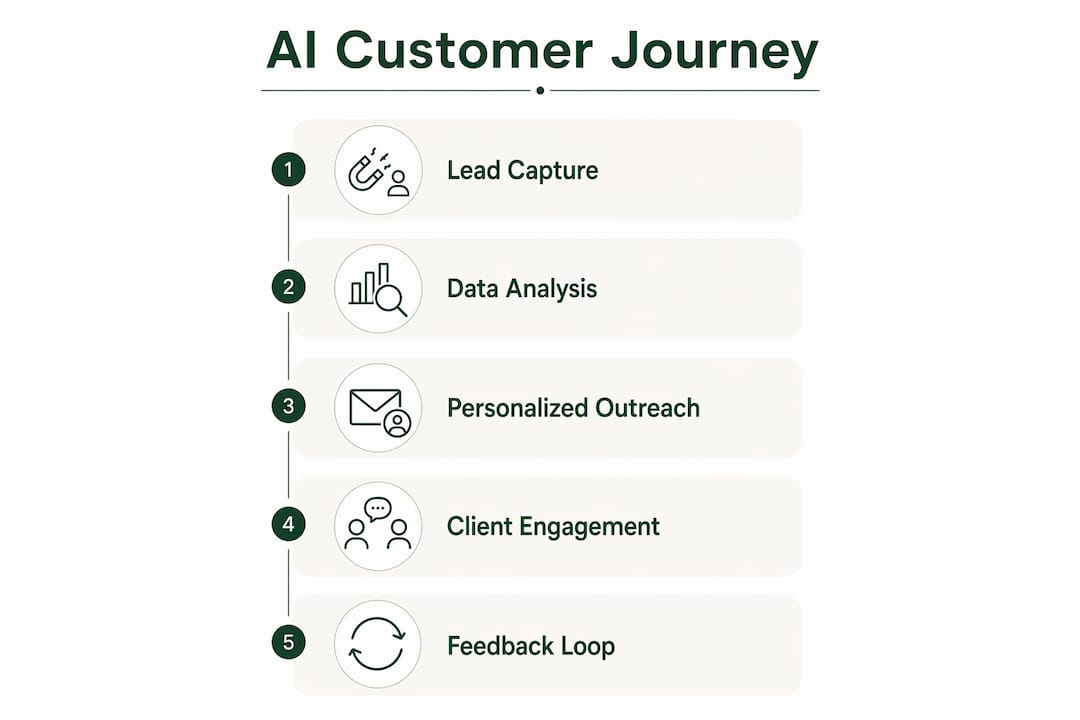
The AI customer journey is the full sequence of interactions a client has with your business, tracked, analyzed, and personalized in real time using artificial intelligence. For solo professionals, that means AI handles the repetitive work of follow-up, segmentation, and scheduling while you stay focused on the work clients actually pay for.
The difference from a traditional approach is structural. A static journey map is a diagram you build once and revisit quarterly. An AI-powered map updates continuously based on real client behavior, routing leads to the right message at the right moment without you manually adjusting anything.
Key benefits for solo professionals include:
- Faster lead response — AI can send a personalized first reply within minutes of a lead arriving, before it cools
- Reduced admin load — connected AI workflows reclaim significant hours per week from non-billable tasks
- Higher close rates — disciplined, AI-driven follow-up directly lifts close rates by 15–30%
- Stronger retention — automated post-project touchpoints capture testimonials and referrals most solo professionals never ask for
The U.S. Small Business Administration recommends starting small with free or low-cost AI tools, testing them for efficiency gains before scaling. That advice fits solo professionals perfectly. You do not need an enterprise budget to see real results.
Table of Contents
- 1. How AI transforms customer journey mapping for solo professionals
- 2. Key AI tools and features that actually move the needle
- 3. Steps to implement an AI-enhanced customer journey without burning out
- 4. How to measure ROI from your AI-powered client workflow
- 5. AI-driven personalization techniques that actually engage clients
- 6. How to connect AI tools with your existing platforms
- 7. Common challenges solo professionals face with AI adoption
- 8. Privacy and ethical considerations when using AI for client data
- 9. What AI-enhanced client workflows look like in practice
- Rooted Up helps solo professionals build this without starting from scratch
- Key Takeaways
1. How AI transforms customer journey mapping for solo professionals
Traditional journey maps are built on assumptions. AI replaces assumptions with live data.
AI customer journey mapping turns a static diagram into a living system that reroutes and adapts like a GPS app responding to traffic. When a lead opens your proposal twice in one day, AI flags it. When a past client's engagement drops, AI triggers a check-in. You respond to signals, not guesses.
- Behavior pattern detection identifies which touchpoints actually convert, not which ones you assumed would
- Intent grouping clusters leads by readiness so your messaging matches where they are, not where you hope they are
- Automated follow-up timing fires at the moment a prospect is most likely to respond
- Personalized messaging adapts tone and content based on what a contact has already seen or clicked
Stat: AI workflows for solo consultants save significant time per week and improve close rates substantially through faster, more disciplined follow-up.
One thing worth keeping clear: AI augments your judgment at critical moments, it does not replace it. Discovery calls, proposal decisions, and difficult client conversations stay human. Everything around those moments can be automated.
2. Key AI tools and features that actually move the needle
Solo professionals do not need a complex tech stack. The highest-impact AI capabilities are available through tools you likely already use or can access for under $100 per month.
- Lead intake automation — tools like Typeform combined with CRM-native AI capture, score, and route leads without manual data entry
- Proposal drafting support — AI pulls notes from a discovery call transcript and populates a PandaDoc template, cutting turnaround from three days to 24 hours
- Predictive follow-up timing — AI identifies when a prospect is most active and sends nudges at day 3 and day 7 if a proposal goes unsigned
- Client segmentation — behavioral analysis groups contacts by engagement level so you prioritize the right conversations
- AI chatbots with governance — platforms like Superwise offer built-in guardrails so automated client-facing responses stay on-brand and compliant
- Workflow synchronization — connecting Typeform, HubSpot, PandaDoc, Stripe, and Notion through a single orchestration layer means no tab-switching and no dropped tasks
CRM-native AI tools offer the smoothest data flow because they work inside systems you already use. The SBA's guidance holds here too: start with free tiers, test for real efficiency gains, then upgrade.
Pro Tip: Before buying any new AI tool, map the one workflow that costs you the most time each week. Build around that single pain point first. A focused, connected workflow beats a sprawling stack you never fully configure.

3. Steps to implement an AI-enhanced customer journey without burning out
The most common mistake is trying to automate everything at once. The better path is sequential, starting where the pain is sharpest.
- Map your six core stages first — lead intake, discovery, proposal, kickoff, delivery, and wrap-up. Every solo professional's client lifecycle follows this shape regardless of niche.
- Start with lead intake — this is where most deals die. A lead that waits 24–48 hours for a response has already cooled. AI can send a personalized reply within minutes.
- Add invoicing second — late invoices and manual payment chasers are the second-biggest time drain. Automating this stage pays for itself fast.
- Automate kickoff third — a triggered welcome kit, project setup, and deposit invoice the moment a contract is signed eliminates the "what happens next?" gap that damages first impressions.
- Define your ideal client profile before scaling outbound AI — AI scales what already works. Deploying outbound automation without a clear ICP amplifies noise, not results.
- Keep discovery and proposals human — the call itself, the judgment call on fit, the pricing conversation. These are what clients pay for.
- Measure one stage at a time — adjust AI settings based on real response data before moving to the next stage.
Effective AI personalization requires matching messaging to a client's actual readiness, not a generic funnel stage. Getting that right takes a few weeks of real data, not a perfect setup on day one.
Pro Tip: After each AI-assisted touchpoint, send one personal message yourself. A quick voice note or a two-line email from you specifically keeps the relationship warm and protects your referral pipeline. Speed from AI, trust from you.
4. How to measure ROI from your AI-powered client workflow
Measurement does not require a data team. It requires knowing which numbers to watch.
- Lead response time — are you hitting under five minutes on first reply?
- Close rate — track proposals sent versus contracts signed, month over month
- Hours saved on admin — compare time logged on non-billable tasks before and after AI deployment
- Client retention rate — are past clients returning or referring?
- Referral rate — are your wrap-up sequences actually generating testimonials and introductions?
Stat: A well-configured AI sales agent can generate multiple qualified meetings per month with realistic ROI within the first few closed deals for small B2B businesses.
Track these inside your CRM. Most CRM platforms surface this data without custom reporting. The goal is a monthly review, not a quarterly one. AI systems drift when left unchecked, so a monthly pass through your key metrics catches misaligned automations before they cost you a client.
Qualitative feedback matters too. Ask clients directly how the onboarding felt, whether communication was clear, and whether they felt well-informed throughout. That input often surfaces friction points your CRM data misses entirely.
5. AI-driven personalization techniques that actually engage clients
Personalization at scale used to require a marketing team. AI makes it a solo operation.
Micro-segmentation goes beyond "new lead" versus "past client." AI groups contacts by content they have engaged with, services they have inquired about, and timing patterns in their behavior. A lead who downloaded your pricing guide gets a different follow-up than one who watched a case study video.
Predictive next-best-action uses historical data to suggest what a contact is likely to need next. If past clients at the proposal stage responded well to a short video walkthrough, AI surfaces that pattern and triggers the same for new prospects.
Dynamic email content adjusts subject lines, opening sentences, and calls to action based on a contact's segment and engagement history. The message feels written for them because, in a functional sense, it was.
Behavioral triggers fire based on specific actions: a prospect revisiting your services page, a client whose project status has not updated in five days, a past client approaching the anniversary of their last engagement. These are the moments where a timely, personalized message converts.
6. How to connect AI tools with your existing platforms
Integration does not require a developer. Most AI tools connect through OAuth or native integrations that take minutes to configure.
The practical approach is to build around your CRM as the central data layer. Every tool that touches a client record, from your intake form to your invoicing platform, should write back to the same CRM. That single source of truth is what allows AI to personalize accurately.
For solo professionals, a working stack looks like this: Typeform or a contact form captures the lead, HubSpot or a similar CRM stores and scores it, PandaDoc handles proposals, Stripe manages payments, and Notion or Airtable tracks delivery. An orchestration layer connects them so the AI agent moves data between tools without you switching tabs.
AI marketing tools that integrate natively within your existing CRM offer the smoothest path because they work with data you already have. Adding a standalone tool that requires manual data export defeats the purpose.
7. Common challenges solo professionals face with AI adoption
Over-automation is the most frequent mistake. When every touchpoint is automated, clients feel it. The fix is keeping high-stakes moments, discovery calls, difficult conversations, and final proposals, firmly in human hands.
Wrong intent assumptions happen when AI is trained on too little data or misconfigured segments. A lead flagged as "high priority" based on one page visit may not be ready to buy. Regular review of your lead scoring criteria prevents this from compounding.
Tool sprawl slows everything down. Three partially configured tools produce worse results than one well-connected workflow. Start with the minimum viable stack and add only when a specific gap appears.
No defined ICP is the deepest problem. AI scales what you feed it. If your ideal client profile is vague, your automated outreach will be too. Nail the ICP first, then deploy.
8. Privacy and ethical considerations when using AI for client data
Solo professionals in Tennessee operate under U.S. federal guidelines and, depending on client location, may have additional state-level obligations. The SBA's guidance on ethical AI use is the right starting point.
Collect only the data you need. If your intake form asks for information you never use in your workflow, remove it. Clients notice when data collection feels excessive relative to the service.
Be transparent about automation. Clients do not need to know every tool in your stack, but they should know when they are interacting with an automated system versus a person. A chatbot that presents itself as a human is an ethical and reputational risk.
Store client data in platforms with clear data processing agreements. HubSpot, Stripe, and PandaDoc all publish these. Review them before connecting a new tool to your client data.
Customer engagement strategies built on AI work best when clients trust the system. That trust is built through transparency, not just efficiency.
9. What AI-enhanced client workflows look like in practice
A solo marketing consultant in Tennessee using AI across their client lifecycle might look like this: a lead fills out a Typeform intake form at 9 PM on a Tuesday. Within two minutes, they receive a personalized reply referencing their industry and the service they inquired about. By Wednesday morning, the consultant has a pre-call brief with the lead's LinkedIn summary, company snapshot, and recent news. The discovery call happens Thursday. By Friday, a PandaDoc proposal is sent. A follow-up nudge fires automatically on Monday if it is unsigned.
That sequence, which previously took three to five days and multiple manual steps, now runs in under 48 hours with the consultant's direct involvement limited to the discovery call and proposal review.
The wrap-up stage compounds this. After final payment, an automated sequence requests a testimonial, asks for a referral, and adds the client to a 30/60/90-day nurture sequence. Most solo professionals skip this entirely because they are already in the next project. AI does not skip it.
Rooted Up helps solo professionals build this without starting from scratch
Solo professionals in Tennessee who want the efficiency of an AI-enhanced client workflow without spending weeks configuring tools have a direct path: Rooted Up's monthly subscription plans are built specifically for this.

Rooted Up handles Google Business Profile management, review automation, SEO blog posts, newsletters, and custom AI workflow builds, all in one plan. No agency retainer, no six-month contract, no requirement to become a marketing technologist yourself. The AI workflow audit alone identifies where your current client lifecycle is leaking time and revenue, then Rooted Up builds the automations to fix it.
If your close rate is lower than it should be, your follow-up is slower than five minutes, or your past clients are not generating referrals, those are solvable problems. See what Rooted Up offers and find the plan that fits where you are right now.
Key Takeaways
AI-enhanced customer journeys give solo professionals a measurable edge in client acquisition and retention when deployed in the right order, starting with lead intake and invoicing.
| Point | Details |
|---|---|
| Start with lead intake | Automating first response under five minutes is the single highest-impact change for close rates. |
| Close rates improve measurably | AI-driven follow-up lifts close rates by 15–30% through speed and consistency. |
| AI meetings output | A configured AI sales agent can generate 8–15 qualified meetings per month for small B2B businesses. |
| Keep discovery human | Discovery calls and proposal judgment stay with you; AI handles everything around those moments. |
| Rooted Up builds it for you | Rooted Up's monthly plans include AI workflow audits and custom automations for solo professionals in Tennessee. |